Table of Contents >> Show >> Hide
- What’s actually changed (and why it feels different)
- Dish-first searching: when “soup dumplings near me” means soup dumplings
- Multisearch: point your camera at the craving
- Menus without the misery: highlights, “popular dishes,” and quick context
- AI Overviews: fast answers, stronger source signals
- Reservations without tab-juggling: AI Mode gets more helpful for dining
- Real-time deals: “What’s Happening” on restaurant profiles
- Filters and intent signals: delivery, refinement chips, and faster narrowing
- Recipes: richer results when publishers use structured data
- How to use these updates like a hungry pro
- What this means for restaurants and food publishers
- of “been there, searched that”: scenarios you can steal
- Scenario 1: The dish you can’t stop thinking about
- Scenario 2: A dietary constraint that used to derail the plan
- Scenario 3: “Open now” at 9:47 p.m.
- Scenario 4: Travel mode, limited language skills
- Scenario 5: The first-date vibe check
- Scenario 6: The special that changes everything
- Scenario 7: Cooking at home, but with standards
- Conclusion
Food search used to be a three-act tragedy: you crave something oddly specific, you open 17 tabs to confirm it exists, and you end up eating cereal because decision fatigue won. Google’s recent Search and Maps updates are basically an interventionmore dish-level results, smarter menu and review summaries, quicker filtering, and even AI-assisted help with reservations.
What’s actually changed (and why it feels different)
Google is pushing Search from “information” toward “decision-ready.” For food, the pattern looks like this:
- Dish-first discovery (find the exact thing you want, not just “a restaurant”).
- Less scrolling (menu highlights, popular dishes, condensed review takeaways).
- More actions (order, reserve, call, navigateright from Search/Maps).
- More AI (faster summaries, plus a bigger need to verify key details).
In other words, Google wants to shorten the journey from “I want tacos” to “I am holding tacos.” That sounds smalluntil you remember how many taco dreams have died on the battlefield of indecision.
Dish-first searching: when “soup dumplings near me” means soup dumplings
One of the biggest upgrades is Search treating the dish as the main character. Type “soup dumplings near me” (or “birria tacos near me”), and Search can surface dish-forward results with photos and detailsthen point you to places that serve them. This isn’t just convenience; it’s accuracy. “This restaurant is nearby” is not the same as “this restaurant has the thing you want.”
Dish-first search also plays nicely with how people actually order. Add modifiers like spicy, vegetarian, or gluten-free. Add conditions like open now or outdoor seating. Suddenly your query reads like a real sentence instead of a desperate keyword pile.
Try these searches
- “birria tacos near me”, “vegan ramen near me”, “gluten-free pizza near me”
- Add constraints: “open now,” “patio,” “happy hour,” “takeout”
- Add preference words: “spicy,” “kid-friendly,” “quiet”
Multisearch: point your camera at the craving
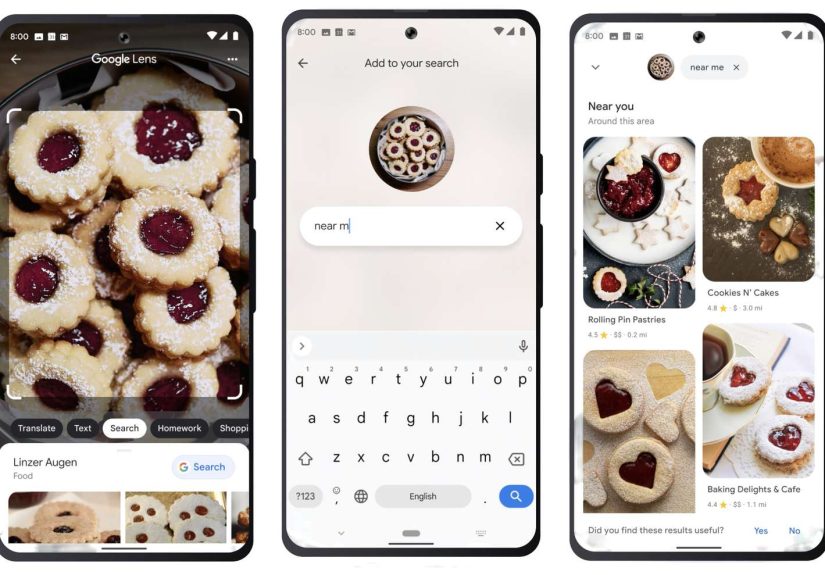
Sometimes you don’t know the dish’s nameyou just know you want it. Google’s multisearch (a combo of visual search and text) is built for that moment. You can snap a photo of a dish (or screenshot it from a video), add a short query like “near me” or “recipe,” and let Search connect the dots.
It’s especially handy for:
- Travel food (menus in another language, unfamiliar ingredients, mystery pastries that look like happiness).
- Social media cravings (that one sandwich you saw for 2.4 seconds before the algorithm moved on).
- Lookalike dishes where a name search gives you the wrong thing (is it flan, crème caramel, or “custard’s complicated cousin”?).
Menus without the misery: highlights, “popular dishes,” and quick context
Google Maps has been turning restaurant listings into a mini decision dashboard: menus, photos, and popular dishes surfaced from what people mention and photograph. The newer twist is compressionfeatures like menu highlights and AI-generated review summaries that call out what diners consistently praise (or complain about) regarding food, service, and atmosphere.
Google has also been experimenting with AI-generated menu summaries in Search and Maps listingsshort overviews that group and describe what a restaurant serves so you don’t have to scroll forever. When it works, it feels like someone skimmed the menu for you and surfaced the “greatest hits.” When it doesn’t, it’s a reminder that AI is still a tool, not your court-appointed food guardian.
This matters because restaurant websites aren’t always mobile-friendly, updated, or fast. When Search and Maps can summarize the essentials (and show the right actions), you spend less time hunting and more time eating.
AI Overviews: fast answers, stronger source signals
AI Overviews can appear for some queries, giving an AI-generated snapshot of what Search thinks you’re asking. For food searches, that can mean quicker comparisons (“best sushi near me”), short explanations (“what is birria?”), or a condensed list of options. It’s useful when you want a starting point and don’t feel like doing research like you’re defending a thesis in “Advanced Noodles.”
Because AI summaries can be wrong, Google has been working on making sources more visibleadding clearer link icons and, on desktop, expanding how you view sources so it’s easier to click through and confirm details. That’s a big deal for food decisions where details matter (hours, dietary needs, price expectations).
Use AI like a shortcut, not a substitute
- Trust summaries for direction (what to consider, what places seem relevant).
- Verify specifics (allergens, reservation rules, “open now,” menu changes) by checking the listing’s menu section, photos, and newest reviews.
- Prefer freshness when it matters: sort reviews by newest if a place recently changed ownership, menu, or hours.
Reservations without tab-juggling: AI Mode gets more helpful for dining
Google has been expanding its conversational AI Mode in Search, including “agentic” capabilities that can help find restaurant reservations across booking partners when you specify time, party size, location, and cuisine. In practice, you can ask something like: “Find a 7 p.m. reservation for four near downtown, Italian or Spanish, with outdoor seating.” Then you get options and booking links instead of a scavenger hunt across five platforms.
Expect this to feel especially useful in cities where availability changes quickly. It’s also a hint at where local search is going: less “search, click, back, click, back” and more “state your goal, get workable options.”
Real-time deals: “What’s Happening” on restaurant profiles
Sometimes the deciding factor isn’t the menuit’s the moment. Google has rolled out a “What’s Happening” section for restaurant and bar profiles that lets businesses highlight time-sensitive promos and events (daily specials, live music, seasonal deals) right in Search. For diners, it’s fewer “Is happy hour still real?” guesses and more accurate “this week” info.
If you’re a consumer, you benefit automatically. If you’re a business owner, this is your reminder that a Google Business Profile isn’t just a listingit’s a live storefront window.
Filters and intent signals: delivery, refinement chips, and faster narrowing
Search is getting better at recognizing intent like food delivery and showing filtering tools (often as badges or refinement chips). Google’s Search documentation notes expansions of these structured experiencesrolling out market by marketso people can narrow results faster when they want to order, book, or compare options.
Even without memorizing interface names, you’ll notice the behavior: Search tries harder to keep you in “decision mode.” When you search “pizza delivery,” it nudges you toward delivery-ready options. When you search “best brunch,” it nudges you toward lists, photos, reviews, and maps you can act on immediately.
Recipes: richer results when publishers use structured data
Recipe discovery benefits from the same “decision-ready” shift. With Recipe structured data, Google can better understand cook time, ratings, and nutrition details so recipes can show up in enhanced formats across Search and Images. For home cooks, that’s faster scanning (“20 minutes or an all-day saga?”). For creators, it’s clearer visibility when the markup is done right.
If you’re searching for a recipe, look for clear time signals (prep + cook), ratings, and ingredient clarity. If you’re publishing recipes, remember that structured data isn’t “SEO glitter”it’s machine-readable clarity. The better Search understands your recipe, the more confidently it can surface it when someone types “easy weeknight dinner” while staring into the fridge like it personally betrayed them.
How to use these updates like a hungry pro
Dish + constraint is the new power combo
Lead with what you want, then add one constraint: “chicken tikka masala open now,” “matcha latte near me,” “tacos patio,” “ramen late night.” This mirrors how Google is organizing food search: specific first, context second.
Use vibe words (then sanity-check)
Try: “quiet,” “romantic,” “group-friendly,” “kid-friendly,” “date night.” Then confirm with photos and recent reviews. (Dim lighting is either romantic or a sign you’ll be paying by flashlight.)
Quick checklist before you commit
- Hours (especially around holidays).
- Menu reality (is the menu current, and do photos match?).
- Recent sentiment (new reviews often reveal recent changes).
- Friction (reservations required? parking chaos? long waits?).
What this means for restaurants and food publishers
As Search compresses the journey, visibility depends on being understood as much as being ranked. Diners see your listing before your website, and AI summaries draw from what’s available. That makes data quality and freshness non-negotiable.
For restaurants
- Keep your Google Business Profile accurate: hours, attributes, photos, menu links.
- Use real-time updates (like “What’s Happening”) when available.
- Make menus readable and currentclean text beats a blurry photo every time.
- Encourage fresh reviews (politely!). Summaries pull from what people actually say.
For recipe creators
- Implement Recipe structured data correctly and keep recipe details consistent on-page.
- Write for scanning: clear ingredients, numbered steps, honest timing, and helpful notes.
- Assume some readers will first meet you in a snippetmake that snippet trustworthy.
of “been there, searched that”: scenarios you can steal
Here are seven everyday food-search situations that show what these updates look like in real life. (You’ll notice a theme: the best searches sound like how humans talk when they’re hungry.)
Mini-experience before you start: when you’re planning with other people, these updates save the most time. Instead of texting screenshots back and forth, you can agree on the dish (“tacos”), agree on one constraint (“patio”), and let Search do the narrowing. The conversation shifts from “Where should we go?” to “Which of these three looks best?”which is a much more solvable problem.
Scenario 1: The dish you can’t stop thinking about
You saw a video of birria ramen. Now your brain won’t accept alternatives. You search “birria ramen near me” and jump straight into dish-forward resultsphotos, places, and quick details. Then you sanity-check with recent reviews to make sure it’s not a “special from last year” situation.
Scenario 2: A dietary constraint that used to derail the plan
You’re meeting a gluten-free friend. Search “gluten-free pizza near me,” then spot-check: menu highlights, recent reviews mentioning GF options, and any attributes in the listing. You still confirm cross-contamination policies, but you’re starting from a shortlist instead of a shrugand that’s already a better friendship move.
Scenario 3: “Open now” at 9:47 p.m.
Late-night hunger is chaotic. Search “Korean fried chicken open now” and let Search/Maps filter by hours and distance. Then you check the listing for the line that matters most: “Order online.” If it’s packed, you peek at the “busy” cues or newest reviews to see whether the wait is worth it.
Scenario 4: Travel mode, limited language skills
In a new neighborhood, dish photos, popular dishes, and translated reviews become your safety net. Instead of ordering blind, you pick what people consistently rave about. You also avoid the classic travel mistake of accidentally ordering “spicy” when you meant “slightly warm.”
Scenario 5: The first-date vibe check
You search “cozy wine bar small plates” and quickly learn whether a place is candlelit-and-chill or neon-and-loud. Photos and summaries help you avoid the classic first-date activity: yelling “WHAT?” across the table while pretending you can totally hear each other.
Scenario 6: The special that changes everything
You were going to get burgersthen a listing shows “This week: oyster happy hour” or “Tonight: live jazz.” Real-time promos turn “default dinner” into “new plan” without relying on a blog post from three summers ago or a friend’s outdated recommendation that starts with, “It used to be amazing…”.
Scenario 7: Cooking at home, but with standards
You search “20-minute chicken thigh dinner” and scan cook times, ratings, and nutrition snippets. Recipe-rich results speed up the shortlist. Then you open the recipe you trust and confirm it doesn’t require five specialty ingredients and “one clean cast-iron pan (blessed by ancestors).”
The common thread: Search is moving from “information” to “confidence.” Less wandering, more clarity, fewer meals decided by exhaustion.
Conclusion
From dish-first results to smarter menus, real-time specials, and AI-assisted reservations, Google’s latest Search updates are designed to help you choose fasterwithout doing a full investigative report on dinner. Use the shortcuts, verify the details that matter, and you’ll spend more time eating and less time scrolling.