Table of Contents >> Show >> Hide
- Step 1: Decide what “finding someone” means (so you don’t doom-scroll by accident)
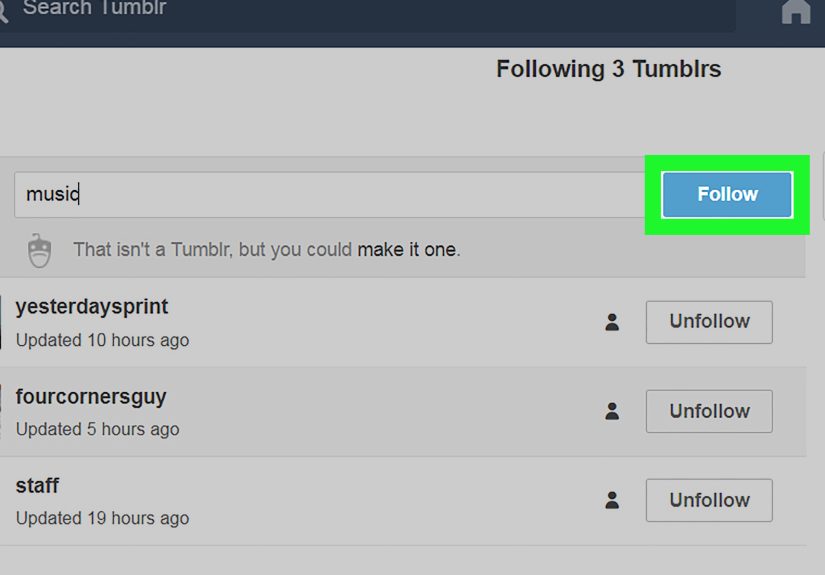
- Step 2: Use Tumblr’s search bar like a direct dial (username, URL, or email)
- Step 3: Filter results to “Tumblrs/Blogs” so you’re not chasing random posts
- Step 4: Treat tag pages as “mini-neighborhoods” (and follow the neighborhood)
- Step 5: Use “tag stack” searches to narrow down to your exact niche
- Step 6: Become a search wizard with Tumblr’s advanced operators
- Step 7: Use in-blog search to confirm you found the right person (not a lookalike)
- Step 8: Let “Explore” and trending topics do the heavy lifting
- Step 9: Join Tumblr Communities to meet people who are into the same oddly specific thing
- Step 10: Follow the reblog trail (notes are basically a guest list)
- Step 11: Use @mentions and Ask culture to locate people through mutuals
- Step 12: Use Google as your backup search engine (site: tumblr.com)
- Common issues (and quick fixes) when you can’t find someone
- Safety and etiquette: find people without being That Person
- Final takeaway
- Extra: of real-world Tumblr “finding people” experience
Tumblr is the internet’s cozy chaos corner: part art gallery, part fandom convention, part “I came for one GIF and now it’s 2 a.m.” The only tricky part? Finding your peopleartists, writers, meme lords, niche historians, or that one blogger who posts the exact kind of raccoon content you didn’t know your soul required.
The good news: Tumblr has more ways to discover people than you have tabs open right now. The slightly chaotic news: the best method depends on what you know (a username? a topic? a single screenshot from 2016?). Follow these 12 steps and you’ll go from “Where is everyone?” to “Oops, I followed 40 new blogs.”
Step 1: Decide what “finding someone” means (so you don’t doom-scroll by accident)
Before you type anything into search, ask yourself: what do you actually have to work with?
- Exact username (best-case scenario)
- Blog title or a recognizable phrase from their bio
- A topic (fandom, aesthetic, hobby, identity, community interest)
- A post you remember (quote, image, tag, or era)
- Mutual connections (you follow someone who follows them)
This matters because Tumblr search can show posts, tags, and blogsand you’ll get faster results when you aim at the right target.
Step 2: Use Tumblr’s search bar like a direct dial (username, URL, or email)
If you know the person’s Tumblr handle (like coolname or @coolname) or their blog URL (coolname.tumblr.com), start in the main search. Type it in exactly, and look for the option that lets you go straight to that blog.
Example: You remember your friend’s blog is “starrylofi.” Type starrylofi. If it appears in suggestions, click it. If not, look for a “go to” style option.
Pro tip: if you only have their email and they used it publicly or tied it to discoverability, searching that email can sometimes surface the blog. If it doesn’t, don’t force itprivacy settings vary.
Step 3: Filter results to “Tumblrs/Blogs” so you’re not chasing random posts
Tumblr search often defaults to showing a mix of resultsposts, tags, related searches, and blogs. If your goal is to find people, switch your view/filter to the section that highlights Tumblrs (blogs/profiles).
Quick win: Search a topic (“film photography”) and then jump to the blogs list. That’s usually where the consistent creators live, not just the one-off rebloggers.
Step 4: Treat tag pages as “mini-neighborhoods” (and follow the neighborhood)
On Tumblr, tags aren’t just hashtagsthey’re basically the city map. Search a tag (or type it with a #) and you’ll land on a tag page filled with posts around that topic. On web, you may also see top blogs for that tag and related tags to explore.
Example: If you want watercolor artists, try #watercolor, then click into blogs whose work shows up repeatedly. If you want a specific vibe, get more specific: #watercolor landscape or #plein air.
Then do the smartest lazy thing possible: follow the tag. Tumblr will keep surfacing new posts from that tag so you keep discovering fresh creators without re-searching every day.
Step 5: Use “tag stack” searches to narrow down to your exact niche
Big tags can be crowded. The trick is combining tags to get closer to your micro-community. Tumblr supports searching for multiple tags at once, and that can dramatically improve signal-to-noise.
- Broad + specific:
#art #character design - Fandom + format:
#star wars #fanfic - Aesthetic + medium:
#goth #photography
When you find a post you love, don’t just like it and vanish like a polite ghost. Click the blog. See if they post consistently. Follow if yes. Tumblr friendships are basically built on “I saw you in the tags five times and now we’re mutuals.”
Step 6: Become a search wizard with Tumblr’s advanced operators
If you’re trying to locate a person via a postespecially one with a specific phrase, time period, or originating blogadvanced operators can help. Tumblr introduced more powerful search operators that let you narrow results by things like who posted it and when.
Useful operators to find people through posts
from:blognameorfrom:@blognameto find posts by a particular blogmatch:textto focus on words in the post contentmatch:tagsto focus on words in tagsyear:YYYYanddate:YYYY-MM-DDto narrow by time
Example: You remember an amazing Halloween post from Tumblr staff in 2019. Try: halloween from:staff year:2019. Once you find the post, click the blog behind it (or the reblogger you actually want).
Heads-up: some search operators work best on newer posts, and older content may behave differentlyso if you’re hunting something ancient, be prepared to mix in Step 12 (Google).
Step 7: Use in-blog search to confirm you found the right person (not a lookalike)
Tumblr has plenty of similar usernames and themes. Once you think you found the right blog, verify by searching inside the blog. On many blogs (especially when you open them from your dashboard), you can use a magnifying glass search to find posts within that blog.
Example: You think “starrylofi” is your friend, but you’re not sure. Search inside their blog for “Boston” or “ceramics” or whatever detail you remember. If the results match, congratsyou found your human.
Step 8: Let “Explore” and trending topics do the heavy lifting
Sometimes you don’t want to find someone specific; you want to find your people. That’s where discovery feeds help. Tumblr highlights trending topics and discovery surfaces that can introduce you to active creators and communities.
How to use this strategically: pick one trending topic that overlaps with your interests, click into it, and then follow three blogs: (1) the original creator of a post you love, (2) the funniest commenter/reblogger, and (3) a curator who reblogs consistently.
Step 9: Join Tumblr Communities to meet people who are into the same oddly specific thing
Tumblr Communities (think interest-based groups) can be a powerful way to find people because they’re organized around topics and conversation. Depending on the community’s settings, you may be able to join instantly, request access, or need an invite link.
Example: You’re into marine biology art. Join a related community, browse recent posts, then click through to members’ blogs. People who post in communities are usually active and open to interactionaka, easier to befriend than a blog that hasn’t posted since the Obama administration.
Bonus: communities often come with their own norms and moderation, so the vibe can be more consistent than the wild-west feeling of some giant tags.
Step 10: Follow the reblog trail (notes are basically a guest list)
Tumblr’s secret superpower is the reblog network. When you open a post’s notes, you can often see who liked and reblogged it. That’s not just vanity metricsit’s a list of people who share that exact interest.
How to use notes without being weird: click a handful of rebloggers, look for consistent posting, then follow. If someone adds commentary you like, follow them immediately. Tumblr culture is built on “your tags made me laugh, we’re friends now.”
Example: You find a post in #cozy games. In the notes, you spot three blogs that reblogged similar posts. Follow them, and suddenly your dashboard is 40% more delightful.
Step 11: Use @mentions and Ask culture to locate people through mutuals
Tumblr supports @mentions: type @ plus a username when composing a post to reference a user. This is useful when you’re trying to connect dotslike asking your mutuals for recommendations or confirming someone’s new username.
Try this (politely): “Hey mutualsdoes anyone know where @oldusername moved to?” Or send an ask to a mutual who’s likely to know: “Do you follow any blogs that post X? I’m building my dashboard.”
Keep it friendly, not forensic. You’re looking for community, not running a background check.
Step 12: Use Google as your backup search engine (site: tumblr.com)
Tumblr search is good, but Google is relentless. If you’re trying to find a person based on a quote, a specific post, or a username that might have changed, use Google’s advanced search tricks.
Copy-and-paste search recipes
- Find a specific blog handle:
site:tumblr.com "oldusername" - Find a post by a memorable quote:
site:tumblr.com "exact quote here" - Find blogs about a niche topic:
site:tumblr.com "your niche" "tumblr.com/tagged" - Exclude noise:
site:tumblr.com watercolor -pinterest
Example: You remember a post that said “alligators are just swamp puppies” (Tumblr would). Search: site:tumblr.com "swamp puppies". Then click through to the blog behind the post.
Common issues (and quick fixes) when you can’t find someone
They changed usernames
This happens a lot. Try searching for their old handle in posts (Step 6), ask mutuals (Step 11), or use Google (Step 12). Sometimes old @mentions or reblogs can lead you to the updated blog.
They deactivated or got suspended
If a blog is gone, it may not appear in search at all. In that case, your best bet is finding reblogs of their content or references from other blogs (again: Step 10 + Step 12).
Search results look “missing,” especially on iOS
Some terms may be restricted or filtered in certain contexts (notably on mobile platforms). If a search term yields weirdly empty results, try a synonym, search via web, or use more specific tag combinations.
You miss the old “Find Your Friends” tool
Tumblr has experimented with contact-based friend finding in the past, but it’s not the core discovery method today. Modern Tumblr discovery is mostly interest-based: tags, communities, and reblog networks.
Safety and etiquette: find people without being That Person
- Respect boundaries: If someone says “no DMs” or “asks off,” believe them.
- Don’t treat tags like a diary scanner: Tags are for discovery, not interrogation.
- Be normal about fandom: A friendly follow and a kind reblog comment goes further than a 14-paragraph message.
- Curate your dashboard: Follow tags you like, filter what you don’t, and let the algorithm work with your tastenot against it.
Final takeaway
Finding people on Tumblr is less like searching a phonebook and more like wandering into the right rooms at a massive convention. Start with direct search if you know a handle. If you don’t, use tag pages and follow tags to keep new creators flowing in. Add advanced operators when you’re hunting a specific post, and use Communities when you want to meet active folks in your niche. When Tumblr search taps out, Google’s site: operator is your superhero cape.
Extra: of real-world Tumblr “finding people” experience
The first time I tried to “find people on Tumblr,” I did what every innocent internet citizen does: I searched one broad tag, followed the first three blogs I saw, and immediately wondered why my dashboard turned into an endless loop of the same recycled content. That’s the Tumblr rite of passagelike getting your first awkward “mutual follow” and realizing you now feel emotionally responsible for a stranger’s frog memes.
What actually worked was treating Tumblr like a set of neighborhoods instead of a single downtown area. Broad tags are Times Square: bright, crowded, and full of people trying to hand you a pamphlet (metaphorically; Tumblr pamphlets are reaction GIFs). Smaller tagsespecially two-tag combosare the side streets where the good cafés live. When I started searching #animation with #process or #sketchbook, I stopped finding viral reposts and started finding working artists. The difference was immediate: more original work, more consistent posting, and more humans who actually responded when someone said, “This is gorgeous.”
The second big breakthrough was learning to follow the reblog trail. Notes are a living map of the people who share your taste. If you click a post and see the same usernames reblogging similar thingsespecially with thoughtful tags or commentaryyou’ve found a cluster. Follow two or three from that cluster and suddenly your dashboard feels curated, like you moved from “random radio stations” to “a playlist made by someone who gets you.”
The funniest part is how often Tumblr discovery is powered by accidental comedy. I’ve followed people because their tags made me laugh, because they added a single devastatingly clever line to a reblog, or because they consistently showed up in the same niche tag like a reliable local. One time I found an entire circle of mutuals through a tag that wasn’t even the “main” tagjust a hyper-specific one that only the true fans used. That’s the Tumblr magic: the more specific you get, the more human the experience becomes.
Communities, when they match your interests, feel like Tumblr on “easy mode.” Instead of hoping the tag feed serves you something good, you’re walking into a room where everyone already speaks your dialect. The quality of connections tends to be better, toopeople posting in communities are often actively looking for interaction, not just broadcasting into the void.
My last lesson: don’t underestimate Google for “lost blog” hunts. Tumblr usernames change, posts get buried, and search features evolve. But if you remember one exact quote, one unique phrase, or even a distinct image description, Google can often surface the breadcrumb you need. Once you find a single reblog or archived page, Tumblr takes over again: click the blog, check the notes, meet the neighborhood, and suddenly you’re home.