Table of Contents >> Show >> Hide
- What Does “Adding Your Website to Google” Really Mean?
- Method 1: Add and Verify Your Site in Google Search Console
- Method 2: Submit an XML Sitemap
- Method 3: Use the URL Inspection Tool to Request Indexing
- Method 4: Make Your Site Easy for Google to Crawl
- Method 5: Add Your Website to Google Business Profile and Build Discovery Signals
- Bonus: Submit Your Website to Bing Too
- Common Reasons Your Website Is Not Showing on Google
- Should You Use Google’s Indexing API?
- Quick Checklist: Add Your Website to Google
- Examples: Which Method Should You Use?
- Experience Notes: What Actually Works in the Real World
- Conclusion
- SEO Tags
Launching a new website without adding it to Google is a little like opening a coffee shop in the desert and hoping someone smells the espresso from three states away. Google can discover many websites naturally, but “eventually” is not exactly the word business owners, bloggers, developers, or online store owners love to hear. The good news? You can help Google find, crawl, understand, and index your website faster with a few simple steps.
This guide explains how to add your website to Google using five quick methods that actually matter. We will cover Google Search Console, XML sitemaps, URL Inspection, crawlability checks, Google Business Profile, and a few practical SEO habits that help both Google and Bing understand your site. No magic button can guarantee rankingssadly, Google does not accept cookies, compliments, or emotional support emails as ranking signalsbut these methods give your site the best chance to be discovered properly.
What Does “Adding Your Website to Google” Really Mean?
Before we start clicking buttons like a caffeinated raccoon, let’s clear up one important idea: adding your website to Google does not mean you are instantly ranking on page one. It means you are making your website available for Google to discover, crawl, and potentially index.
Crawling, Indexing, and Ranking Are Different
Crawling happens when Googlebot visits your website and follows links to discover pages. Indexing happens when Google stores and understands a page well enough to show it in search results. Ranking is where Google decides how high your page appears for a search query.
Think of it like applying for a talent show. Crawling is the producer noticing your audition tape exists. Indexing is getting accepted into the contestant database. Ranking is getting on the stage under the big shiny lights while someone named Gary holds a clipboard. You need all three, but they are not the same step.
Method 1: Add and Verify Your Site in Google Search Console
The fastest and most reliable starting point is Google Search Console. It is a free tool from Google that helps website owners see how Google views their site, submit sitemaps, inspect URLs, monitor indexing problems, and review search performance.
How to Add Your Website to Google Search Console
Go to Google Search Console and add your website as a property. You will usually choose between a Domain property and a URL-prefix property. A Domain property covers all versions of your domain, including HTTP, HTTPS, www, non-www, and subdomains. A URL-prefix property tracks only the exact version you enter.
For most serious website owners, the Domain property is the cleaner long-term choice. You will need to verify ownership, commonly through DNS verification. If you are using WordPress, Shopify, Wix, Squarespace, Webflow, or another platform, you may also have built-in options or plugins that make verification easier.
Why Verification Matters
Verification proves to Google that you own or manage the website. Without it, Google will not give you private site data, because handing out someone else’s search performance would be awkward, creepy, and possibly the beginning of a courtroom drama.
Once verified, Search Console becomes your control center. You can submit your sitemap, check whether pages are indexed, identify technical problems, and see which search queries bring people to your site. For new websites, this is the closest thing to walking up to Google and politely saying, “Hello, I exist. Please do not ignore me.”
Method 2: Submit an XML Sitemap
An XML sitemap is a file that lists important URLs on your website. It helps search engines discover pages more efficiently, especially if your site is new, large, recently redesigned, or not yet well connected through backlinks.
What a Sitemap Looks Like
A common sitemap URL looks like this:
Many content management systems generate sitemaps automatically. WordPress creates them by default in many setups, and SEO plugins like Yoast SEO, Rank Math, or All in One SEO can generate more customizable versions. Shopify, Wix, Squarespace, and Webflow also provide sitemap support.
How to Submit a Sitemap in Google Search Console
After verifying your website, open Google Search Console, choose your property, and go to the Sitemaps report. Enter the sitemap path, such as sitemap.xml, and click submit. If everything works, Search Console will show the sitemap status and eventually report when Google last read it.
Submitting a sitemap does not guarantee that every URL will be indexed. It is more like giving Google a well-organized guest list. Google may still decide who gets into the party based on quality, accessibility, duplication, canonical signals, and overall usefulness. Still, a sitemap is one of the simplest and most important ways to add your website to Google.
Sitemap Best Practices
Only include URLs you actually want indexed. Do not stuff your sitemap with thin pages, duplicate pages, search results pages, private pages, tag archives with no value, or anything that makes your website look like it was assembled during a Wi-Fi outage.
Use clean, canonical URLs. Make sure your sitemap uses HTTPS if your site uses HTTPS. Keep it updated when you publish, delete, or redirect pages. If your website has thousands of URLs, use multiple sitemaps and a sitemap index file. The goal is simple: help search engines find your best pages without making them dig through digital laundry.
Method 3: Use the URL Inspection Tool to Request Indexing
The URL Inspection tool in Google Search Console lets you check a specific page and see how Google understands it. You can test whether the URL is available to Google, whether it is already indexed, whether there are mobile usability problems, and whether Google sees the page as crawlable.
When to Use URL Inspection
Use URL Inspection when you publish an important new page, update a key service page, fix an indexing issue, or change a major piece of content. For example, if you publish a new page called “Emergency Plumbing Services in Dallas,” you can paste that URL into the URL Inspection bar and request indexing.
This is especially useful for pages that matter commercially: product pages, landing pages, local service pages, major blog guides, new category pages, and updated evergreen content. However, do not treat the tool like a slot machine. Requesting indexing repeatedly will not force Google to rank a weak page. It will only make you feel busy, which is not the same as being productive.
How to Request Indexing
Open Search Console, paste the full URL into the inspection bar, and wait for the report. If the page is available to Google, click Request Indexing. Google will test the live URL and place it in a crawl queue if it passes basic checks.
If the tool reports that the page is blocked by robots.txt, marked noindex, redirected unexpectedly, canonicalized to another URL, or returning an error status, fix that issue first. Asking Google to index a broken page is like inviting guests to a housewarming party and forgetting to build the house.
Method 4: Make Your Site Easy for Google to Crawl
Google cannot index what it cannot access. Even if you submit your website through Search Console, technical problems can stop pages from being discovered or understood. Crawlability is the foundation of indexing, and it is where many new websites trip over their own shoelaces.
Check Your Robots.txt File
Your robots.txt file tells search engine crawlers which parts of your site they can or cannot crawl. It usually lives here:
A common mistake is accidentally blocking the whole website with a rule like this:
That rule tells crawlers not to crawl anything. It is basically hanging a “Go Away” sign on your front door and then wondering why nobody came to dinner. If your site is ready to be public, make sure important pages are not blocked.
Add Your Sitemap to Robots.txt
You can also place your sitemap location in robots.txt:
This gives search engines another way to discover your sitemap. It is not a replacement for Search Console, but it is a useful backup signal.
Use Crawlable Internal Links
Google discovers pages by following links. That means your important pages should be linked from menus, category pages, related posts, footer links, product collections, or other relevant pages. Avoid hiding important links behind complicated scripts, forms, filters, or buttons that search engines may not treat as normal links.
A good internal linking structure helps both users and crawlers. If your homepage links to your main categories, your categories link to detailed pages, and your articles link to related resources, Google gets a clearer map of your website. Your visitors also avoid feeling like they wandered into a furniture store with no signs and too many identical lamps.
Watch Out for Noindex Tags and Canonical Problems
A page with a noindex tag tells Google not to include it in search results. That can be useful for thank-you pages, internal search pages, duplicate landing pages, or private content. But if you accidentally place noindex on your homepage, product pages, or service pages, your SEO campaign may start quietly crying in the corner.
Canonical tags also matter. A canonical tag tells Google which version of similar or duplicate pages should be considered the main version. If your canonical tag points to the wrong URL, Google may ignore the page you actually want indexed.
Method 5: Add Your Website to Google Business Profile and Build Discovery Signals
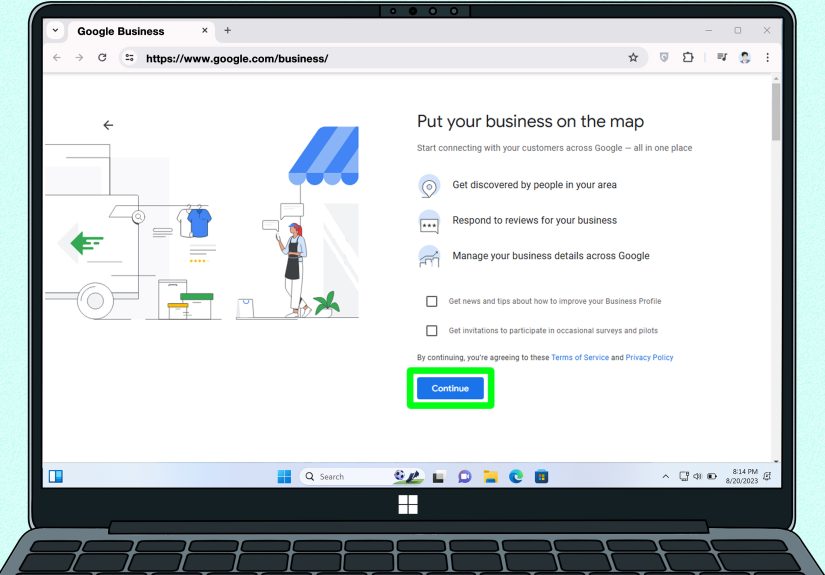
If you run a local business, adding your website to Google Business Profile is one of the quickest ways to connect your website with Google Search and Google Maps. This is especially important for restaurants, dentists, plumbers, salons, repair services, consultants, stores, agencies, clinics, and service-area businesses.
How Google Business Profile Helps
A Google Business Profile can show your business name, address, phone number, hours, photos, reviews, services, products, posts, and website link. When someone searches for your brand or a local service, your profile may appear in Search or Maps. Adding your website link gives customers a direct path from Google to your site.
For example, if you run a bakery in Austin, your profile can help users find your hours, directions, menu, reviews, and website. Your website can then provide deeper content: wedding cake galleries, custom order forms, pricing guides, allergy information, and blog posts about why buttercream deserves its own fan club.
Claim and Verify Your Profile
To use this method, add or claim your Business Profile, verify ownership, and make sure your website URL is accurate. Keep your business name, address, and phone number consistent across your website and major directories. For local SEO, consistency builds trust.
Build Real Links and Mentions
Google can also discover your website through links from other websites. These may include business directories, partner websites, social profiles, industry associations, local chambers of commerce, guest articles, press mentions, podcasts, supplier pages, or community sponsorship pages.
Do not buy spammy backlinks or join sketchy link farms. Google is much better at spotting fake popularity than people think. A strong link should make sense to a human reader. If the link exists only because someone promised “10,000 backlinks by Friday,” run away like the website is on fire.
Bonus: Submit Your Website to Bing Too
This article is focused on how to add your website to Google, but Bing still matters. Bing powers its own search results and contributes to search experiences across Microsoft products. Many SEO basics overlap between Google and Bing: clean site structure, useful content, crawlable links, XML sitemaps, and technically accessible pages.
Use Bing Webmaster Tools to add your site, verify ownership, submit your sitemap, and submit important URLs. If you already use Google Search Console, Bing Webmaster Tools may allow you to import verified sites, which makes setup faster. This is a simple win because the same sitemap can often support both search engines.
Common Reasons Your Website Is Not Showing on Google
If you followed the steps above but your site still does not appear, do not panic. New websites can take time to be crawled and indexed. However, some problems are worth checking right away.
Your Site Is Too New
Brand-new domains may not appear instantly. Google needs to discover the site, crawl pages, process content, and decide whether pages are worth indexing. Submitting your sitemap and requesting indexing can help, but patience is still part of the recipe. Unfortunately, patience is the least exciting SEO tool ever invented.
Your Pages Are Blocked
Check robots.txt, noindex tags, password protection, firewall settings, and server errors. If Googlebot cannot access the page, indexing will not happen.
Your Content Is Thin or Duplicated
Google may choose not to index pages that are low-value, copied, automatically generated, or nearly identical to other pages. Add original information, examples, images, product details, expert insights, FAQs, comparisons, and clear answers to user questions.
Your Internal Linking Is Weak
If a page exists but no important page links to it, Google may treat it as low priority. Link to important pages from your navigation, homepage, category pages, and relevant articles.
Your Site Has Technical Problems
Slow servers, broken redirects, incorrect canonical tags, mobile usability issues, JavaScript rendering problems, and 404 errors can all hurt discovery and indexing. A small technical audit can save weeks of confusion.
Should You Use Google’s Indexing API?
For most websites, no. Google’s Indexing API is not a general-purpose “index my blog post now” tool. It is designed for specific page types such as job postings and livestream-related pages with the correct structured data. For ordinary websites, blogs, product pages, service pages, and landing pages, use Search Console, sitemaps, internal links, and strong content instead.
That may sound disappointing, but it is actually good news. The best indexing methods are free, stable, and available to everyone. You do not need secret software, mysterious SEO rituals, or a browser extension named something like “IndexBlaster Turbo Wizard 9000.”
Quick Checklist: Add Your Website to Google
- Verify your website in Google Search Console.
- Create and submit an XML sitemap.
- Use URL Inspection for important new or updated pages.
- Check robots.txt, noindex tags, canonical tags, redirects, and crawlable links.
- Add your website to Google Business Profile if you run a local business.
- Build real links and mentions from relevant websites.
- Submit your sitemap to Bing Webmaster Tools as well.
- Publish useful, original content that deserves to be indexed.
Examples: Which Method Should You Use?
Example 1: A New Blog
If you just launched a personal finance blog, start with Google Search Console, submit your sitemap, and request indexing for your homepage and best guide. Then build internal links between related posts. A post about budgeting should link to posts about emergency funds, saving money, debt payoff, and retirement basics.
Example 2: A Local Plumbing Business
If you run a plumbing company, verify your website in Search Console, submit your sitemap, and claim your Google Business Profile. Add your website link, services, photos, service areas, hours, and contact information. Create useful pages for emergency plumbing, drain cleaning, water heater repair, and your main service locations.
Example 3: An Online Store
If you own an ecommerce site, make sure your category and product pages are included in your sitemap. Avoid indexing duplicate filter pages unless they have unique value. Use canonical tags carefully, write original product descriptions, and link from categories to important products.
Experience Notes: What Actually Works in the Real World
In real SEO work, adding a website to Google is rarely just one click. The fastest results usually come from combining technical clarity with useful content. The websites that get indexed smoothly tend to have the same traits: clean architecture, accurate sitemaps, internal links that make sense, original pages, and no accidental “please ignore my entire website” settings hiding in the background.
One common experience with new sites is that the homepage gets indexed first, while deeper pages take longer. This is normal. Google often discovers the homepage through direct submission, links, or the sitemap, then gradually explores the rest of the site. To help this process, link your most important pages directly from the homepage or main navigation. If your best page is buried seven clicks deep, Google may treat it like a forgotten sock behind the dryer.
Another practical lesson: sitemap submission works best when the sitemap is clean. Many site owners proudly submit a sitemap with hundreds of low-value URLs, then wonder why Google ignores half of them. A better approach is to include pages that are index-worthy. If a page has no unique information, no search purpose, no internal links, and no reason for a visitor to care, submitting it will not magically transform it into SEO gold.
URL Inspection is useful, but it should be used thoughtfully. When an important page is published or heavily updated, requesting indexing can speed up discovery. But if the page is thin, slow, blocked, duplicated, or poorly linked, the request may not help much. In practice, the best time to request indexing is after you have checked that the page loads properly, has a self-referencing canonical tag, is not blocked, appears in the sitemap, and links naturally from relevant pages.
Local businesses often see strong benefits from Google Business Profile because it connects search visibility with real-world trust signals. A complete profile with accurate business information, photos, services, reviews, and a website link can support both customer confidence and local discovery. For a small business, this can be just as important as traditional website SEO. People searching locally often want fast answers: Are you open? Are you nearby? Do you have good reviews? Can I click to your site and book? Your profile helps answer those questions before visitors even reach your homepage.
Finally, the most overlooked experience is simple: indexing is easier when your website deserves to be indexed. Google is not just looking for URLs; it is looking for pages that help users. A clear article, useful product page, detailed service page, or helpful resource has a much better chance than a generic page stuffed with repeated keywords. Add your website to Google, yesbut also give Google something worth adding.
Conclusion
Adding your website to Google is not complicated, but it does require doing the right things in the right order. Start with Google Search Console, submit your XML sitemap, use URL Inspection for important pages, make sure your site is crawlable, and connect your website to Google Business Profile if you serve local customers. Then strengthen your site with clean internal links, useful content, and trustworthy mentions from relevant places.
The big takeaway is this: Google discovery is not a one-time chore. It is an ongoing relationship between your website and search engines. Keep publishing helpful pages, keep your sitemap accurate, monitor indexing reports, fix technical issues quickly, and make your site easy for both humans and crawlers to understand. Do that consistently, and your website has a much better chance of being found, indexed, and eventually ranked.
Note: This article is based on current official search engine documentation and reputable SEO best practices. Source links are intentionally omitted from the article body as requested.