Table of Contents >> Show >> Hide
- What Free Driver Scout v1.0 Was Designed to Do
- What It Got Right
- Where Free Driver Scout v1.0 Started to Fall Apart
- Performance, Practical Value, and Real-World Use
- Who Should Have Used It Then, and Who Should Avoid It Now?
- Final Verdict
- Extended Experience: What Using Free Driver Scout v1.0 Felt Like in Practice
- SEO Tags
If you were building or reviving a Windows PC in the era when driver updater tools were everywhere, Free Driver Scout v1.0 probably looked like a gift from the software gods. It promised something almost magical: scan your PC, find outdated drivers, download the right replacements, install them automatically, and spare you the scavenger hunt through motherboard pages, GPU portals, and mysterious ZIP files named after chipsets nobody remembers installing. In theory, that is the kind of convenience that makes tired Windows users weep happy tears.
In practice, though, Free Driver Scout v1.0 is a more complicated story. Back in its day, it earned attention for being easy to install, friendly to beginners, and unusually aggressive about automation. It was one of those utilities that tried to do all the boring work for you, including scheduled scans, batch downloads, and automatic installation. That sounds great until you remember the golden rule of driver management: when software has access to the plumbing of your PC, “convenient” and “safe” are not always best friends.
This review takes a modern, reality-based look at the tool. Not a nostalgia trip. Not a hit piece. Just a practical answer to the question many people still type into search engines: Is Free Driver Scout v1.0 any good, and should anyone still use it? Spoiler: it deserves credit for ambition, but time has not been kind to it.
What Free Driver Scout v1.0 Was Designed to Do
At its core, Free Driver Scout was built to solve a very specific Windows headache: device drivers go stale, disappear, break, or get replaced by generic versions that technically work but feel like they are doing the bare minimum. A Wi-Fi adapter starts acting moody, audio turns flaky, graphics performance dips, or a printer behaves like it is offended by your existence. Driver updater tools promised to fix all that with one click.
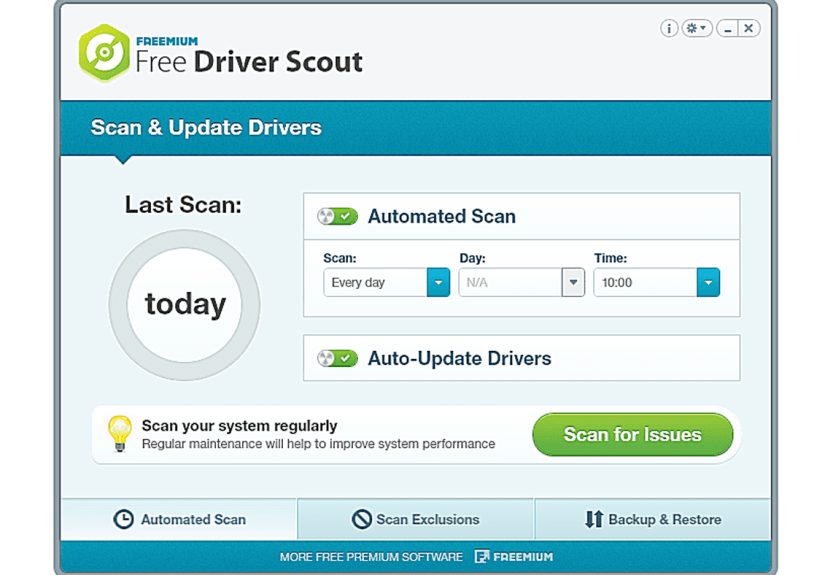
Free Driver Scout v1.0 stood out because it leaned hard into automation. Instead of merely identifying outdated drivers and sending you off to download them yourself, it was known for handling the entire pipeline. It could scan for outdated drivers, queue multiple downloads, and install updates with little or no further input. For casual users, that felt refreshingly simple. For power users, it was either delightfully efficient or mildly terrifying, depending on personality type.
The software also gained attention for features that sounded more generous than what many competing free tools offered at the time. These included scheduled scans, bulk downloads, backup and restore functions, and options to exclude certain hardware from future scans. That exclusion feature mattered because not every driver should be updated just because a newer file exists somewhere on the internet. Sometimes a stable old driver is the hero, not the villain.
What It Got Right
1. It Was Beginner-Friendly
One of the strongest points in any Free Driver Scout v1.0 review is usability. The program was widely described as easy to install and easy to understand. That matters because driver maintenance is not exactly thrilling entertainment. Most people do not wake up excited to compare version numbers for storage controllers. Free Driver Scout tried to make the process feel approachable, and that alone gave it value.
The interface was designed for people who wanted answers, not a certification exam. Scan the machine, review results, update what needs updating, move on with life. That simplicity is a real advantage in a category where some utilities either oversell their magic or bury users under technical clutter.
2. Automation Was the Big Selling Point
This tool’s headline feature was true hands-off updating. That was not just marketing glitter. One of the reasons it became memorable was its ability to handle scanning, downloading, and installation in a fairly automated way. For busy users, or for someone helping friends and relatives with old PCs, that kind of workflow felt efficient.
Instead of turning every driver refresh into a multi-tab browser quest, the software tried to centralize everything. That was genuinely appealing in older Windows environments, especially when hardware support pages were less polished than they are today.
3. Backup and Restore Added a Safety Net
Any driver updater that touches core hardware needs a rollback strategy, and Free Driver Scout earned points for offering backup and restore options. That feature gave it a layer of practicality that some lightweight utilities lacked. When a new driver behaves badly, being able to restore an earlier version is the difference between “minor inconvenience” and “why is my screen flickering like a haunted TV?”
It also appealed to users reinstalling Windows or preparing for hardware changes. In theory, that made the tool useful beyond simple updating.
4. It Had an Ambitious Feature Set for a Free Tool
For a free driver updater, Free Driver Scout was not shy. Scheduled scans, driver exclusions, batch handling, backup controls, and even migration-related features gave it a surprisingly broad toolbox. On paper, it looked like a generous deal. If you were comparing free driver update software years ago, this was the kind of app that made you pause and think, “Wait, this one actually does a lot.”
Where Free Driver Scout v1.0 Started to Fall Apart
1. Driver Detection Was Not Best-in-Class
Here is where the shiny promise starts to wobble. Reviews and software roundups repeatedly pointed out that Free Driver Scout v1.0 did not detect as many outdated drivers as stronger competitors. That is a serious weakness in a tool whose entire reason for existing is to find driver problems before you do.
A driver updater does not get graded on effort. It gets graded on whether it locates the right drivers for the right hardware without breaking anything. If its database coverage or detection logic misses devices, then the fancy automation becomes less impressive. It is like owning a robot vacuum that politely avoids all the dirt.
2. Bundled Offers Hurt Trust
Another issue attached to the software was bundled third-party offers during installation. That may sound like a minor annoyance, but in the world of system utilities, trust is everything. The moment an updater starts nudging extra software, users naturally wonder whether the tool is trying to help their PC or audition for the role of “mildly suspicious roommate.”
Bundling is especially damaging for driver utilities because these programs operate close to the operating system itself. Users need to feel confident that every prompt is relevant and every install action is necessary. Extra offers erode that confidence fast.
3. Safety Concerns Became Hard to Ignore
The biggest problem is not that the tool got old. Plenty of software gets old. The real problem is that Free Driver Scout eventually crossed into territory where many modern users should simply walk away. Over time, support faded, updates stopped, and safety concerns became more visible. Some scans and reports associated the software or its delivery chain with adware-style behavior or security warnings. That does not inspire warm, fuzzy confidence.
Even if you find a download that still appears to work, that is not the same as finding a trustworthy, maintained, current utility. For driver tools, maintenance is not optional. Drivers change. Hardware changes. Windows changes. Security expectations change. An abandoned updater is like an old road map in a city that replaced half its streets.
4. It No Longer Fits Modern Driver Best Practices
This is the most important point in the entire review. The modern Windows ecosystem has changed. Today, the safest path for most users is usually one of three things: Windows Update, the device manufacturer’s support page, or an official vendor utility such as Intel Driver & Support Assistant, NVIDIA’s driver tools, AMD’s auto-detect utility, or an OEM updater from Dell, Lenovo, Acer, or another system maker.
That shift makes old-school third-party driver updaters much less compelling. If Windows can already deliver many certified driver updates, and official vendors offer device-specific tools for graphics, chipset, firmware, and laptop support, then a legacy third-party updater has to be exceptionally trustworthy to stay relevant. Free Driver Scout no longer clears that bar.
Performance, Practical Value, and Real-World Use
Could Free Driver Scout improve a system when it was new and properly supported? Yes, in some cases. A machine with outdated drivers, especially older Windows installations, could benefit from a centralized update tool. Audio issues, network adapter quirks, and generic display drivers were all common reasons people tried software like this. When the software identified the correct updates and installed them smoothly, it saved time.
But the problem with driver utilities has always been the same: success feels invisible, while failure feels unforgettable. When a browser updates itself, nobody throws a parade. When a bad driver update wrecks Wi-Fi or turns sleep mode into a coin toss, suddenly everyone becomes a philosopher of software trust.
That is why Free Driver Scout v1.0 is best understood as a once-interesting tool with a dated operating model. It aimed for convenience before Microsoft and major hardware vendors improved their own update channels. In that older context, it made sense. In today’s context, it feels like a shortcut from a different era.
Who Should Have Used It Then, and Who Should Avoid It Now?
It once made sense for:
Users on older Windows systems who wanted a simple interface, automated scans, and a free way to manage multiple driver updates without bouncing across half a dozen support sites.
It does not make sense now for:
Almost anyone using a modern PC. If your computer runs Windows 10 or Windows 11, you are generally better off using Windows Update for routine driver delivery and relying on Intel, AMD, NVIDIA, Dell, Lenovo, Acer, HP, ASUS, or your motherboard vendor for specific updates. That path is cleaner, safer, and more sustainable.
Final Verdict
Free Driver Scout v1.0 deserves a little historical credit. It understood what frustrated Windows users wanted: less hunting, fewer manual installs, and a faster way to keep drivers current. Its interface was approachable, its automation was ambitious, and its backup features added real value. At a glance, it looked like one of the more appealing free driver updater tools of its time.
But a review written for today has to answer today’s question, not yesterday’s. And today, the verdict is simple: Free Driver Scout v1.0 is more interesting as a relic than as a recommendation. Its detection was never the strongest, its installation experience raised trust concerns, and its lack of current support makes it a poor fit for modern Windows systems.
If you are researching it because you found an old download page or a nostalgic recommendation, treat it as a chapter in the history of Windows maintenance tools, not as your next install. The smarter move is to update drivers through official channels and use third-party utilities only when they are actively maintained, transparent, and widely trusted. Your PC deserves better than a mystery-box driver adventure.
Extended Experience: What Using Free Driver Scout v1.0 Felt Like in Practice
To make this Free Driver Scout v1.0 review more useful, it helps to talk about the experience around the software, not just the features on the label. The appeal of a tool like this was emotional as much as technical. People were not installing it because updating drivers sounded fun. They installed it because Windows problems can feel random and exhausting. When audio disappears, Wi-Fi starts dropping, a graphics driver acts strange, or a printer goes on strike like it joined a union, users want a quick fix. Free Driver Scout marketed itself as that fix.
The first impression was often positive. The program looked manageable, the scan process felt straightforward, and the promise of automatic updates made the software seem smarter than the usual DIY approach. For many users, that first scan created a sense of momentum. Suddenly there was a list of outdated drivers, a path forward, and the satisfying illusion that every weird PC problem had finally been given a name tag.
That part matters because utility software lives or dies on confidence. Free Driver Scout seemed to know what it was doing. It did not force users to become hardware detectives. It said, in effect, “Relax, I brought a clipboard.” For people maintaining older desktops or family laptops, that was appealing. If you were the unofficial tech support person in your household, the idea of automating updates on multiple machines sounded like a gift.
But the second phase of the experience was more mixed. Once the novelty wore off, the usual questions started creeping in. Did the tool find every driver that mattered? Were the recommended updates really the best ones for the exact hardware model? Would the installation bring stability, or would it create a fresh set of mysteries? These are not dramatic questions until you have spent an evening fixing a broken network adapter because a “helpful” update got a little too creative.
That is where Free Driver Scout often felt like a classic shortcut with a catch. When it worked, it felt efficient. When doubts appeared, they appeared fast. Bundled offers, aging support, and later safety concerns gave the whole experience a layer of uncertainty that modern users should not ignore. In other words, the software could save time, but it could also make you suspicious enough to hover over every button like it owed you money.
So the lasting experience of Free Driver Scout v1.0 is not really about whether it was awful or amazing. It is about how clearly it reflects an older Windows era: one where people were desperate for easier maintenance, willing to trust aggressive automation, and often one odd install away from regretting everything. That makes it memorable, but not essential. Useful once? Sure. Wise to use now? Not really.