Table of Contents >> Show >> Hide
- What Is Tenorshare 4uKey?
- How Tenorshare 4uKey Works on Windows (High-Level)
- Is Tenorshare 4uKey Safe and Legit?
- Key Pros and Cons of Tenorshare 4uKey for Windows
- Pricing, Trial, and Licensing
- Tips for Using 4uKey Responsibly and Effectively
- Who Is Tenorshare 4uKey Best For?
- Real-World Experiences with Tenorshare 4uKey (500-Word Deep Dive)
- Conclusion
Locked out of your iPhone again? Maybe your kid “helped” by entering the wrong passcode 10 times in a row, or you picked up a secondhand device that greets you with nothing but a stubborn lock screen. In situations like these, a dedicated unlock tool can feel less like software and more like a rescue mission in progress.
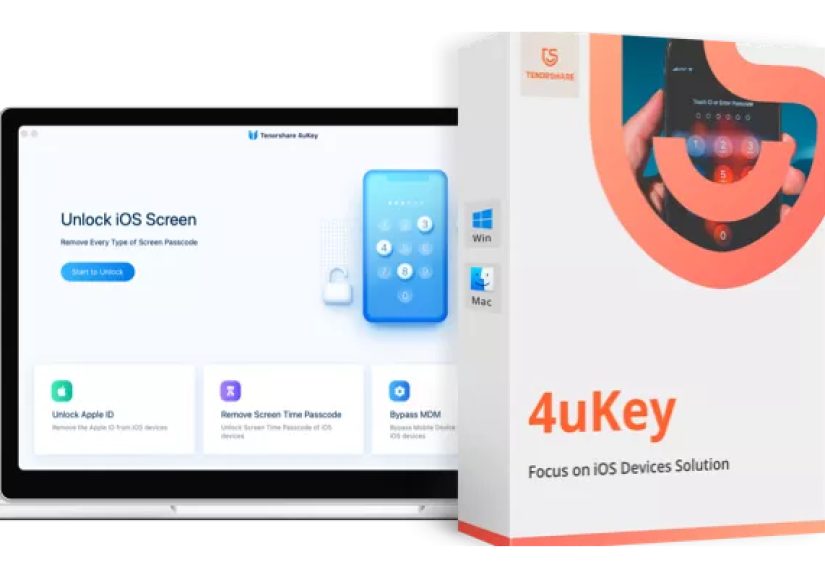
Tenorshare 4uKey is one of the most widely known iPhone and iPad unlock utilities. It’s available for Windows and is featured on download hubs like Gizmodo’s software section as a trial version for Windows 7 through Windows 11. Designed to remove screen passcodes and other lock barriers on iOS devices, it promises a quick, click-through experience rather than a weekend spent wrestling with iTunes.
But what exactly are you getting when you download Tenorshare 4uKey for Windows, how does it work, andvery importantis it safe and ethical to use? Let’s walk through the details before you hit that download button.
What Is Tenorshare 4uKey?
Tenorshare 4uKey is a desktop iPhone unlocker app for Windows (and macOS) that’s built to remove several types of locks from iPhones, iPads, and iPod touch devices. On Windows, you install the program, connect your iOS device via USB, and let the software guide you through unlocking supported lock types.
Core features at a glance
- Remove iOS lock screen passcodes. 4uKey can wipe out a 4-digit or 6-digit passcode, custom numeric or alphanumeric code, and even lock screens tied to Touch ID and Face ID.
- Unlock Apple ID from the device (in specific scenarios). On some devices and iOS versions, 4uKey can help remove an Apple ID tied to the phone so you can sign in with your own accountagain, only for devices you legitimately own or manage.
- Bypass Screen Time passcodes. If Screen Time limits were set and the code has been forgotten, 4uKey can remove those restrictions so you can reconfigure them.
- Handle MDM (Mobile Device Management) locks. For corporate or school devices where you have permission to remove management profiles, 4uKey offers tools to get past MDM lock screens.
- Works on modern Windows PCs. The Windows version is listed as compatible with Windows 7, 8, 8.1, 10, and 11 on download hubs like Gizmodo’s software catalog.
In short, 4uKey is meant to be a “no-tech-degree-required” way to get back into your own device when the usual methodslike remembering your passwordhave completely failed you.
How Tenorshare 4uKey Works on Windows (High-Level)
Under the hood, Tenorshare 4uKey isn’t using magic; it relies on Apple’s own recovery mechanisms combined with custom logic and automation. The core idea is simple: the software helps you put the device into a recovery mode, downloads an appropriate firmware package, and then reinstalls iOS while clearing the lock screen in the process.
A simplified walkthrough
While the exact screens may change between versions, the high-level flow on Windows usually looks like this:
- Install Tenorshare 4uKey and launch it.
- Connect your iPhone or iPad to your Windows PC via USB.
- Let the software detect your device model and prompt you to enter recovery or DFU mode.
- Download the recommended firmware package for your device within the app.
- Run the unlock process, which resets the device and removes the lock screen.
One crucial detail: unlocking with 4uKey usually means wiping the device. The screen passcode is removed as part of a system reset, so unless you have a backup in iCloud or iTunes, your data will not be preserved. Even Tenorshare’s own documentation stresses that data loss is expected in the standard unlock process.
When 4uKey can legitimately help
Some typical, legitimate use cases include:
- You forgot the passcode to your own iPhone and can’t unlock it.
- A child or partner entered the wrong passcode too many times, disabling the device.
- You own a secondhand iPhone with the previous owner’s lock screen still active but have permission to wipe it.
- You set a Screen Time or MDM profile and no longer know the credentials, but you’re the rightful owner/admin of the device.
When you should not use 4uKey
What Tenorshare 4uKey should not be used for is unlocking a device you don’t own or don’t have clear permission to managethat can cross legal and ethical lines, and in some cases may violate local laws or Apple’s terms of service. The tool is marketed as a way to solve your own lockout problems, not as a way to “liberate” stolen or found phones.
Is Tenorshare 4uKey Safe and Legit?
Safety with unlock tools has two sides: technical safety (does it install malware or leak data?) and practical safety (are you dealing with a reputable company that handles licenses and refunds fairly?).
Technical safety
Independent reviews and comparison articles generally agree that 4uKey itself is safe to use when downloaded from the official Tenorshare website or well-known software portals. It does not typically install third-party adware or bundled apps, and it performs its work locally on your PC rather than uploading your device data to remote servers.
Some reviewers note that earlier versions were occasionally flagged as “adware-like” due to aggressive promos, but current builds focus more on the core unlocking function. As always, the rule is simple: only download Tenorshare 4uKey from official or highly reputable download sources.
Reputation and customer feedback
On review platforms such as Trustpilot, Tenorshare gets a mix of strong praise and frustrated complaints. Some users are thrilled the software rescued a locked device in minutes; others complain about billing, subscriptions, or difficulty obtaining refunds when the software didn’t solve their particular problem.
This is fairly typical for specialized utilities: if it works on your device and scenario, it feels like money well spent. If it doesn’t, the license fee can sting. Before buying, make sure you:
- Read the refund policy carefully.
- Check whether your specific device and iOS version are supported.
- Understand that activation locks and iCloud issues may not always be fixable the way marketing suggests.
Key Pros and Cons of Tenorshare 4uKey for Windows
Pros
- Works with a wide range of iPhone and iPad models and iOS versions.
- Simple, guided interface suitable for non-technical users.
- Handles multiple lock types: screen passcodes, Screen Time, Apple ID (in some cases), and MDM locks.
- Available as a Windows app and featured on mainstream download portals, making it easy to find and install.
- Backed by a large software company that specializes in iOS tools and has millions of users globally.
Cons
- Most unlock operations erase data, so it’s not a magic “keep everything and skip the password” solution.
- No guarantee it will work for every activation lock, iCloud, or carrier-related scenario.
- License-based pricing can feel expensive if you only need it once.
- Some customers report difficulty with refunds or subscription cancellations.
Pricing, Trial, and Licensing
When you see “Download Tenorshare 4uKey for Windows” on a site like Gizmodo, what you typically get is a trial version of the software. The trial lets you install the app, scan your device, and preview the interfacebut you’ll need a paid license to complete most unlocking jobs.
Tenorshare often sells 4uKey under several plans (for example, monthly, yearly, or lifetime licenses) with different prices depending on how many devices or computers you want to use it on. Promotions appear frequently, and some resellers or regional partners may offer discounted bundles with other utilities like data recovery tools.
The key takeaway: you can download Tenorshare 4uKey for free, but you should expect to pay for a license before it actually removes a passcode or lock screen.
Tips for Using 4uKey Responsibly and Effectively
- Back up first (if possible). If your device is still recognized by iTunes or Finder and you can initiate a backup, do that before running any unlock tool. Once the device is wiped, your data is gone unless you have a backup.
- Use official download sources. Stick to Tenorshare’s own site or recognized download hubs like Gizmodo’s catalog to avoid cracked or modified installers that may contain malware.
- Check compatibility. Confirm that your iPhone or iPad model and iOS version are listed as supported before you buy a license.
- Stay within legal and ethical boundaries. Use 4uKey only on devices you own or are explicitly authorized to manage. Bypassing security on someone else’s phone without permission is never okay.
- Read the fine print. Take a minute to scan the license terms and refund policy so you know what to expect if the software doesn’t work in your situation.
Who Is Tenorshare 4uKey Best For?
4uKey is best suited for people who are stuck in that awkward space between “I own this device” and “I genuinely cannot get past the lock screen.” If you’re comfortable with the idea that your device may need a complete reset, and you’d rather follow a guided wizard on Windows than dig deep into Apple’s technical manuals, 4uKey can be a practical solution.
However, if your main concern is keeping all your data intact or dealing with complex activation lock issues, you may want to talk to Apple Support or consider alternative tools and services. Sometimes the safest unlock is the one handled directly through official channels.
Real-World Experiences with Tenorshare 4uKey (500-Word Deep Dive)
Reading the feature list is one thing; understanding how Tenorshare 4uKey actually feels to use is another. User experiences around 4uKey tend to fall into several recognizable patternssome glowing, some frustrated, most somewhere in between.
First, there’s the “panic to relief” story that shows up over and over. Someone inherits an older iPad, their child’s iPhone gets disabled, or they simply forget a passcode after months of using biometrics only. They stumble across articles and reviews recommending 4uKey as an easy unlock option. After downloading the Windows version, they’re guided through connecting the device, downloading the firmware, and starting the unlock. Tenorshare’s own tests and many independent reviews report that, when the device and iOS version are supported, the process is pretty straightforward and often succeeds on the first try.
The moment the device restarts without a lock screen can feel almost magicaluntil the user remembers that everything on the phone has been erased. That’s when the backup question hits: if iCloud backups were turned on, restoring is simple and you’re back in business. If not, 4uKey still did its jobremoving the lockbut it can’t recover data that was encrypted behind that passcode. For some users, this is a fair trade; they’d rather have a working device than a fancy paperweight.
A second common experience revolves around Screen Time and MDM locks. Parents who set Screen Time codes and forget them (it happens more than you’d think) may use 4uKey to wipe those restrictions so they can start fresh. Administrators of small businesses or schools sometimes inherit devices with outdated management profiles and use tools like 4uKey to remove them when they have legitimate authorization. In these cases, the software essentially acts as a reset button, letting the owner or admin re-enroll devices in a current system.
On the other side of the spectrum are users who feel burnednot necessarily because 4uKey is malicious, but because expectations and reality didn’t match. Some reviewers on Trustpilot complain about difficulties obtaining refunds if the tool doesn’t work on a specific device or activation lock scenario. Others mention feeling locked into subscriptions they didn’t fully understand at checkout. These experiences highlight the importance of reading the fine print and knowing exactly what problem you’re trying to solve before purchasing.
There are also discussions in forums where technically savvy users criticize unlock tools in general for overselling what they can do, especially around iCloud or carrier locks. Their point is valid: no third-party app can legitimately “break” Apple’s cloud security, and any claim to do so should be viewed with skepticism. 4uKey’s most reliable and verifiable strength is handling local screen passcodes through a reset, not performing miracles where Apple itself has strict protections in place.
If you zoom out, the real-world verdict on Tenorshare 4uKey is nuanced. When used exactly as intendedon a supported, personally owned device where the main goal is to remove a forgotten lock screenit often works well and delivers on its promises. When expectations drift into “it will fix any iPhone problem of any kind” or “I’ll get my money back no matter what,” disappointment becomes much more likely.
The best user experiences share three traits: realistic expectations, a recent backup, and a download from the official site or a trusted hub like Gizmodo’s Windows download collection. If you check those boxes, 4uKey can be a genuinely useful tool in your iOS recovery toolkit.
Conclusion
Downloading Tenorshare 4uKey for Windows from a reputable source like Gizmodo’s software section gives you fast access to a powerful iPhone and iPad unlock utility. It’s not a hacker tool and it doesn’t rewrite the laws of cryptography; instead, it leverages official recovery methods and a friendly interface to reset locked devices and remove many common barriers. Used responsiblyon devices you own or administerit can turn a hopelessly locked iPhone into a fresh, usable device again.
Just remember the trade-offs: unlocking almost always means wiping, and no software can guarantee success with every activation or iCloud lock. If you go in with clear expectations, a good backup, and a careful read of the license terms, Tenorshare 4uKey for Windows can be a smart, pragmatic choice when you need to regain control of your iOS hardware.
sapo:
Tenorshare 4uKey for Windows is a popular iPhone and iPad unlock tool featured on major download hubs like Gizmodo. This in-depth guide explains what 4uKey actually does, how it works on Windows PCs, and when it can legitimately help you remove forgotten passcodes, Screen Time limits, or MDM locks from your own devices. You’ll learn about its main features, real-world pros and cons, pricing and safety considerations, and what to expect during the unlock processincluding the risk of data loss. We also walk through real-world experiences and practical tips so you can decide whether downloading Tenorshare 4uKey for Windows is the right move for your specific lockout situation.