Table of Contents >> Show >> Hide
- The Best Free Navigation Apps at a Glance
- What Makes a Free GPS App Worth Using?
- Best Free GPS Turn-By-Turn Navigation Apps
- 1. Google Maps Best Overall
- 2. Waze Best for Real-Time Driver Alerts
- 3. Apple Maps Best for iPhone Users
- 4. HERE WeGo Best for Offline Navigation and International Travel
- 5. MapQuest Best for Multipoint Routes and Road-Trip Planning
- 6. TomTom Best Clean Alternative for Drivers
- 7. Sygic Best Freemium Option for Offline-Heavy Drivers
- Which Free Navigation App Should You Choose?
- Common Mistakes People Make When Picking a Free GPS App
- Real-World Experience: What These Apps Feel Like to Use Every Day
- Final Verdict
- SEO Tags
If your phone has become your co-pilot, therapist, and emergency “where on earth am I?” button, welcome. A good free GPS turn-by-turn navigation app does more than bark directions at you like a disappointed driving instructor. It helps you dodge traffic, reroute around mystery roadwork, find gas without paying airport-sandwich prices, and keep moving when your signal gets moody.
The tricky part is that free does not always mean the same thing. Some navigation apps are fully free and excellent right out of the gate. Others are free to download but reserve their flashiest features for paying users. And some are amazing for daily commuting but less useful if you are driving through mountain roads, crossing state lines, or traveling abroad with unreliable data.
This guide breaks down the best free GPS turn-by-turn navigation apps based on everyday usability, map quality, offline support, live traffic intelligence, driving experience, and how much “please subscribe now” energy each app throws at you. Spoiler: there is no single winner for everyone. But there is almost certainly one that fits your driving style better than the rest.
The Best Free Navigation Apps at a Glance
| App | Best For | Free Status | Why It Stands Out |
|---|---|---|---|
| Google Maps | Best overall | Fully free | Excellent routing, huge place database, strong traffic data, offline maps |
| Waze | Best for drivers who want live road alerts | Fully free | Community-powered reports for traffic, police, crashes, road hazards, and more |
| Apple Maps | Best for iPhone users | Fully free | Clean interface, strong voice guidance, polished CarPlay experience, offline maps |
| HERE WeGo | Best for offline and international travel | Fully free | Easy offline downloads, simple interface, good city and cross-border usability |
| MapQuest | Best for errands and road-trip extras | Fully free | Multipoint routes, gas-price tools, route customization, traffic-aware directions |
| TomTom | Best driver-focused alternative | Fully free | Clean driving interface, real-time traffic and hazard alerts |
| Sygic | Best freemium offline upgrade path | Free + optional paid upgrades | Offline 3D maps, strong road-trip features, premium path for power users |
What Makes a Free GPS App Worth Using?
Not all map apps fail in dramatic ways. Most fail in small, irritating ways that add up fast. They announce turns too late. They choose “shortcuts” that look suspiciously like goat paths. They lose value when the signal drops from five bars to one sad dot.
So when comparing the best free navigation apps, I looked at five things that actually matter in the real world:
1. Turn-by-turn accuracy
A navigation app should guide you clearly, not make every interchange feel like a game-show lightning round.
2. Live traffic and rerouting
The best apps react fast when a smooth drive turns into a parking lot with brake lights.
3. Offline usefulness
If you drive through rural areas, parking garages, dead zones, or another country, offline maps are not a luxury. They are your dignity.
4. Interface and voice guidance
A cluttered screen is not helpful at 65 miles per hour. Clear visuals and good voice prompts matter more than cute icons.
5. Actual free value
A “free” app that hides the useful stuff behind a paywall is basically a trial wearing a fake mustache. The strongest picks either work well for free or make their upgrade path obvious and fair.
Best Free GPS Turn-By-Turn Navigation Apps
1. Google Maps Best Overall
For most people, Google Maps is still the safest recommendation. It is the navigation equivalent of a reliable friend who knows every back road, every coffee shop, and somehow also whether that taco place is secretly closed on Tuesdays.
Its biggest strength is balance. Google Maps does not dominate just one category; it performs well in nearly all of them. Driving directions are strong, traffic rerouting is usually fast, and the search database is excellent. If you need directions to a business, apartment building, gas station, or random landmark your cousin swears is “right there,” Google Maps is usually the first app to find it cleanly.
It is also a better all-around choice than many competitors because it supports more than just driving. If your trip includes walking, transit, cycling, or a last-minute “forget it, I’ll park and walk” decision, Google Maps handles those transitions better than most.
Best features: huge place database, live traffic, strong route alternatives, offline map downloads, and dependable multi-mode navigation.
Best for: daily commuters, travelers, and anyone who wants one app that does almost everything well.
Weak spot: the interface can feel busy, and some drivers still prefer Waze for road alerts that feel more immediate and driver-focused.
2. Waze Best for Real-Time Driver Alerts
If Google Maps is the polished all-rounder, Waze is the caffeinated friend whispering, “Accident ahead, slow down, there’s debris in the road, and also the left lane is chaos.”
Waze shines because it is built around live, community-driven reporting. Drivers report crashes, construction, hazards, traffic jams, lane closures, and other trouble spots in real time. That makes it especially good for commuters who drive the same congested routes every day and care less about discovering cafés and more about shaving 11 minutes off a miserable highway crawl.
Its route decisions can feel more aggressive than Google Maps, which some people love and others interpret as “Why am I suddenly behind a grocery store?” But when traffic is ugly, Waze often feels the most alive.
Best features: road hazard reporting, fast reroutes, ETA sharing, excellent commute-friendly awareness.
Best for: drivers, rideshare users, and anyone whose blood pressure rises with every unexplained red brake light.
Weak spot: it is less versatile outside driving. If you need robust transit, walking, or cycling support, Waze is not trying to be your hero.
3. Apple Maps Best for iPhone Users
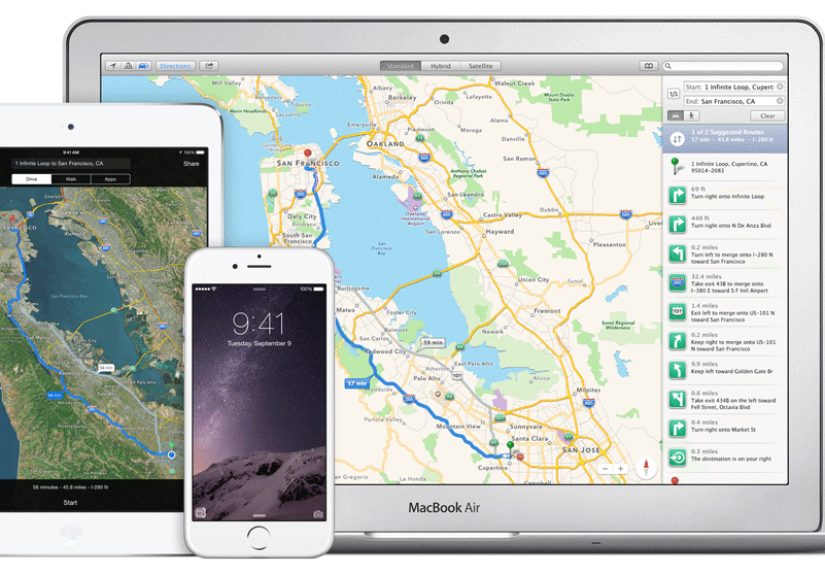
Apple Maps has grown from punchline to legitimate contender, and that redemption arc deserves a polite nod. For iPhone users, especially those who use CarPlay regularly, Apple Maps is now one of the best free turn-by-turn navigation apps you can install without installing anything at all.
The biggest win here is clarity. The interface is cleaner than Google Maps, the spoken directions are often easy to follow, and the whole experience feels less cluttered. For drivers who dislike crowded screens and too many visual distractions, Apple Maps can feel refreshingly calm.
It also benefits from tight ecosystem integration. Search from your iPhone, continue in CarPlay, check directions with Siri, and move on with your life. That smooth handoff matters more than people think.
Best features: clean design, excellent iPhone integration, strong CarPlay experience, improving routing, and offline maps.
Best for: iPhone users who want a simpler, more polished driving experience.
Weak spot: if you jump between platforms or rely heavily on Google’s ecosystem, Google Maps may still feel more universal and flexible.
4. HERE WeGo Best for Offline Navigation and International Travel
HERE WeGo is the app that quietly earns respect the longer you use it. It does not have the cultural dominance of Google Maps or the road-gossip energy of Waze, but it is one of the smartest picks for travelers who value offline navigation.
Its biggest appeal is how naturally offline mapping fits into the experience. With some apps, downloading maps feels like filing taxes in a moving car. HERE WeGo makes offline use feel like a normal part of planning a trip, which is exactly how it should work.
That makes it especially useful for international travel, cross-border driving, rural routes, or anyone trying to avoid mobile data drama. It is also strong enough in cities to be practical for mixed travel days that combine driving, walking, and transit.
Best features: excellent offline options, practical travel planning, simple navigation, and strong usefulness outside your home region.
Best for: travelers, international users, and people who do not trust cellular coverage to behave.
Weak spot: it feels less rich than Google Maps for discovering businesses, reviews, and local place details.
5. MapQuest Best for Multipoint Routes and Road-Trip Planning
MapQuest is still around, which might surprise people who last thought about it around the same time as desktop printers and family desktop PCs. But the app version is more useful than its old reputation suggests.
Where MapQuest stands out is trip planning. If your day involves multiple stops, route choices, gas checks, and a bit of old-school “let me organize this properly” energy, it can be genuinely handy. It is not the sleekest app in the field, but it offers practical extras that make it appealing for errands, delivery-style driving, or road trips with lots of stops.
Best features: voice navigation, alternate routes, gas-price comparison, multipoint routing, and decent traffic tools.
Best for: errands, family road trips, and users who like planning before they move.
Weak spot: it lacks the modern shine and broad ecosystem muscle of the top three apps.
6. TomTom Best Clean Alternative for Drivers
TomTom’s current app is a strong option for drivers who want a navigation experience that feels more focused and less crowded. It leans into what many people want most from a GPS app: clear directions, traffic awareness, hazard alerts, and a road-first design.
That focus makes TomTom worth considering if you feel overwhelmed by the broader “everything app” approach of Google Maps. It is less about restaurant discovery and more about the actual business of moving your car from one point to another without nonsense.
Best features: driver-first layout, live traffic, incident alerts, and a streamlined feel.
Best for: people who care most about driving clarity and less about extra map layers.
Weak spot: it is not as universally familiar, and it has less everyday mindshare than Google Maps, Waze, or Apple Maps.
7. Sygic Best Freemium Option for Offline-Heavy Drivers
Sygic is the app for people who hear “offline 3D maps” and immediately sit up straighter. It has long appealed to users who want a more dedicated GPS feel on their phone, especially for long drives, inconsistent service areas, and feature-rich route guidance.
The free version is useful, but Sygic is also the clearest example on this list of a freemium model. You can absolutely use it without paying, but its premium tiers are part of the product strategy, and you will notice that. For some users, that is fine. For others, it knocks the app down a few spots.
Best features: offline 3D maps, polished road-trip feel, strong lane-style guidance, and a solid upgrade path for serious drivers.
Best for: users who prioritize offline navigation and may eventually want advanced paid features.
Weak spot: its best experience is not always the fully free experience.
Which Free Navigation App Should You Choose?
If you want the simplest answer, here it is:
- Choose Google Maps if you want the best overall free navigation app.
- Choose Waze if you care most about real-time road conditions and commute-saving alerts.
- Choose Apple Maps if you use an iPhone and want the smoothest built-in experience.
- Choose HERE WeGo if offline maps and international travel matter most.
- Choose MapQuest if you plan lots of multi-stop drives and like practical trip extras.
- Choose TomTom if you want a focused driver-first alternative.
- Choose Sygic if you want offline-heavy navigation and do not mind a freemium model.
Common Mistakes People Make When Picking a Free GPS App
Mistake one: assuming every free app works equally well offline. Some do. Some absolutely do not.
Mistake two: confusing “best map app” with “best driving app.” Google Maps may be broader, but Waze may fit a commute better.
Mistake three: ignoring the phone you already use. If you live inside Apple’s ecosystem, Apple Maps may simply be more convenient day after day.
Mistake four: picking a freemium app and then getting annoyed when premium features are, in fact, premium. That is not betrayal. That is branding.
Real-World Experience: What These Apps Feel Like to Use Every Day
In real-world driving, the difference between navigation apps is not always dramatic at the start of a trip. When traffic is light, roads are familiar, and your signal is strong, most major apps look smart. They all draw a line, estimate your arrival, and tell you when to turn. The real separation happens when the drive gets messy.
Picture a weekday commute. Google Maps feels steady and competent. It usually gives you a sensible route, solid alternatives, and enough place information to adjust on the fly if you need coffee, gas, or a pharmacy. It is the app that feels ready for your whole day, not just the drive itself. If your trip turns into a chain of errands, it keeps up.
Waze feels different. It feels more like driving with a crowd of alert strangers who all want to warn you about the trouble ahead. Sometimes that energy is fantastic. If there is a crash, lane closure, or police activity up the road, Waze can make the drive feel less blind. On bad traffic days, that kind of awareness is incredibly reassuring. On the other hand, Waze can occasionally make you feel like you are being ushered through a secret society of side streets behind shopping centers and apartment complexes. Efficient? Often. Relaxing? Not always.
Apple Maps tends to feel calmer. The screen is less noisy, the guidance is easier on the eyes, and the overall experience can be pleasantly low-stress. For iPhone users who drive regularly with CarPlay, that smoothness matters. It is not always about having more features. Sometimes it is about having fewer annoying moments.
HERE WeGo earns its keep on trips where you do not fully trust your connection. If you are traveling, driving in unfamiliar regions, or heading through areas where signal drops like a bad habit, offline maps stop being a nice bonus and start feeling essential. The peace of mind is hard to overstate. A good offline app changes the emotional tone of a trip. You are not nervously waiting for the map to reload. You are just driving.
MapQuest is surprisingly practical on errand-heavy days. If you have multiple stops and want to shape the route instead of just accepting whatever the app spits out, it can feel refreshingly useful. TomTom feels clean and road-focused, which some drivers love immediately. Sygic feels more like a dedicated GPS tool living inside a smartphone, especially for users who care about navigation features first and everything else second.
So the real experience is this: the best app depends on the kind of stress you want to remove. Want one app for almost every situation? Google Maps. Want to outsmart traffic? Waze. Want calm, polished iPhone driving? Apple Maps. Want offline confidence? HERE WeGo or Sygic. Want planning tools and extras? MapQuest. Want a clean driver-first alternative? TomTom.
That is why people argue about navigation apps the way sports fans argue about teams. Everyone has a favorite because everyone drives a little differently. The good news is that the best free options are now strong enough that you do not need to settle. You just need to choose the one that matches your roads, your habits, and your tolerance for surprise detours next to a dumpster behind a supermarket.
Final Verdict
The best free GPS turn-by-turn navigation app for most people is Google Maps. It offers the strongest mix of routing, search, traffic intelligence, offline support, and overall versatility without charging a dime.
But the smartest choice is not always the most universal one. Waze is better for live driver alerts. Apple Maps is better for many iPhone owners. HERE WeGo is better for travelers who care about offline reliability. MapQuest, TomTom, and Sygic each make sense for more specific use cases.
In other words, the best app is the one that makes your drive feel less like a scavenger hunt and more like a plan. Preferably one that does not send you into a mysterious alley and call it a shortcut.