Table of Contents >> Show >> Hide
- What Does “BASIC Programming On An Arduino” Actually Mean?
- A Quick History: Why BASIC Still Matters
- Why Program An Arduino In BASIC?
- But Wait: Arduino Is Not Natively A BASIC Machine
- Popular Ways To Run BASIC Or BASIC-Like Code On Arduino
- Arduino BASIC Vs. Standard Arduino C++
- How BASIC Interpreters Work On Arduino
- A Simple BASIC-Style Arduino Example
- Reading Sensors With BASIC On Arduino
- Memory Limits: The Tiny Elephant On The Breadboard
- Best Projects For BASIC Programming On Arduino
- Common Problems And How To Avoid Them
- Tips For Learning Arduino Through BASIC
- Is BASIC On Arduino Practical Or Just Nostalgic?
- Experience Notes: What BASIC Programming On An Arduino Feels Like In Real Life
- Conclusion
Some people hear “BASIC programming on an Arduino” and immediately picture a dusty beige computer, a blinking green cursor, and a mysterious adult saying, “Type RUN.” Others hear “Arduino” and think of C++, breadboards, wires, sensors, and one tiny LED blinking like it knows a secret. Put the two together, and you get something surprisingly fun: the friendly, old-school simplicity of BASIC meeting the hands-on magic of microcontrollers.
Arduino boards are usually programmed with the Arduino language, which is based on C and C++. That is the official, mainstream path, and it is still the best choice for most finished projects. But BASIC has a special charm. It was designed to make programming approachable, readable, and immediate. On an Arduino, BASIC can turn the board into a tiny interactive computer where you type commands, test ideas, control pins, and learn embedded programming without wrestling a dragon named “syntax error” every five minutes.
This article explores what BASIC programming on an Arduino means, why anyone would do it in the age of polished IDEs and cloud dashboards, how BASIC interpreters work on microcontrollers, and what kinds of projects make sense. Spoiler: you probably will not build a self-driving espresso machine in BASIC on an Uno. But you can absolutely blink LEDs, read sensors, experiment with serial commands, and rediscover the joy of programming as a conversation with a machine.
What Does “BASIC Programming On An Arduino” Actually Mean?
In standard Arduino development, you write a sketch on your computer, compile it, upload it to the board, and let the microcontroller run the resulting machine code. With BASIC programming, the workflow can be different. A BASIC interpreter is uploaded to the Arduino first. After that, you communicate with the board through the serial monitor or a terminal, typing BASIC-style commands directly.
In other words, the Arduino becomes a small programmable environment. Instead of uploading a new sketch every time you want to test a tiny idea, you may be able to type something like:
That is not just nostalgia wearing safety goggles. It is an interactive way to learn how code talks to hardware. You can experiment with variables, loops, delays, input, output, and sometimes even analog readings or digital pin control depending on the interpreter you install.
A Quick History: Why BASIC Still Matters
BASIC stands for Beginner’s All-purpose Symbolic Instruction Code. It was created at Dartmouth College in 1964 by John Kemeny, Thomas Kurtz, and their collaborators to make computing more accessible. That mission matters. At the time, computers were not friendly little laptops sitting on coffee shop tables. They were expensive institutional machines, often guarded by procedure, punch cards, and people who looked like they owned more slide rules than socks.
BASIC helped ordinary students use computers interactively. Later, during the personal computer boom of the 1970s and 1980s, BASIC became the first programming language for millions of people. If you grew up typing programs into a Commodore, Apple, TRS-80, or IBM-compatible machine, BASIC may have been your first handshake with the digital world.
Arduino has a similar spirit. It made embedded electronics easier for artists, students, hobbyists, teachers, designers, and curious weekend inventors. Pairing BASIC with Arduino is not about going backward. It is about combining two beginner-friendly traditions: one from early personal computing, one from modern maker culture.
Why Program An Arduino In BASIC?
The biggest reason is immediacy. Arduino’s normal compile-upload-test cycle is not difficult, but it does create a pause between idea and result. BASIC interpreters can make experiments feel instant. Type a command, press Enter, and see what happens. That makes BASIC great for learning, demonstrations, debugging small hardware ideas, and teaching programming concepts.
It Makes The Board Feel Like A Tiny Computer
A regular Arduino sketch runs silently unless you program it to communicate. A BASIC interpreter gives the board a command-line personality. Suddenly, the Arduino is not just a chip waiting for compiled instructions. It is a tiny conversation partner. A very literal partner, yes, but still more responsive than most houseplants.
It Reduces The Fear Factor
C++ can be elegant and powerful, but to a beginner it may look like punctuation fell down the stairs. Semicolons, braces, types, functions, header files, and compiler messages can overwhelm new learners. BASIC uses simple keywords and line-by-line logic. That makes it less intimidating for people who want to understand the idea before mastering the machinery.
It Is Great For Rapid Hardware Experiments
Want to turn a pin on? Read a sensor? Try a delay value? Print a number? BASIC can make these experiments quick, depending on the commands supported by the interpreter. For early prototyping, speed of thought matters. BASIC lets you poke the hardware and see how it reacts.
But Wait: Arduino Is Not Natively A BASIC Machine
This is important. Arduino boards do not normally run BASIC out of the box. The official Arduino environment uses sketches written in the Arduino programming language, which is based on C/C++. A board like the Arduino Uno Rev3 is built around the ATmega328P microcontroller and has limited resources: 32 KB of flash memory, 2 KB of SRAM, and 1 KB of EEPROM. That is charmingly tiny. Your browser currently has tabs open that are probably using more memory than a small moon.
Because of those limits, BASIC on an Arduino usually means using a compact interpreter. The interpreter itself consumes memory, leaving less room for your BASIC program and variables. That is why many Arduino BASIC projects focus on small, educational, or interactive tasks instead of massive applications.
Popular Ways To Run BASIC Or BASIC-Like Code On Arduino
There is no single official “Arduino BASIC.” Instead, makers have created interpreters and shells that bring BASIC-style programming to microcontrollers. The exact features vary, so always check the documentation for your chosen interpreter before planning a project around it.
TinyBasic Plus
TinyBasic Plus is one of the best-known BASIC interpreters associated with Arduino boards. It is based on the Tiny BASIC tradition, with modifications for microcontroller use. Tiny BASIC itself was designed to be small, which makes it a natural fit for resource-limited hardware. TinyBasic Plus can run on boards such as the Uno or Nano, though available memory remains a real constraint.
A typical Tiny BASIC-style program uses numbered lines, simple variables, PRINT, INPUT, GOTO, IF, and other compact commands. Depending on the version and configuration, additional commands may support hardware features such as pin access or storage options.
Bitlash
Bitlash is not exactly classic BASIC, but it belongs in the conversation because it provides an interpreted command shell and embedded programming environment for Arduino. It lets users type commands through the serial port and automate small tasks. For people interested in interactive control rather than strict BASIC nostalgia, Bitlash demonstrates the same powerful idea: upload an interpreter once, then command the board live.
Other Tiny BASIC Variants
There are several BASIC interpreter projects for Arduino-compatible boards, ESP boards, RP2040 boards, and other microcontrollers. Some are closer to vintage BASIC. Others add modern features, file handling, or input/output commands. More powerful boards make the experience smoother because they offer more RAM and flash memory.
Arduino BASIC Vs. Standard Arduino C++
Choosing BASIC over standard Arduino programming is not about which language is “better.” It is about the job. BASIC is friendly and interactive. Arduino C++ is faster, more flexible, and better supported. A good maker keeps both tools in the mental toolbox, right next to the jumper wires and that one resistor that somehow escaped into the carpet.
Use BASIC When You Want:
- Interactive experiments through the serial monitor
- A beginner-friendly programming environment
- Simple demonstrations for students
- Quick tests of LEDs, buttons, sensors, and timing
- A retro computing experience on real hardware
Use Standard Arduino C++ When You Need:
- Performance-sensitive code
- Precise timing
- Large libraries
- Complex sensor integration
- Reliable production projects
- Servo, display, networking, or communication libraries
For example, blinking one LED is perfect for BASIC. Running a real-time motor controller with multiple sensors is probably better in C++. BASIC is the friendly bicycle. C++ is the pickup truck with a toolbox, trailer hitch, and suspicious number of extension cords.
How BASIC Interpreters Work On Arduino
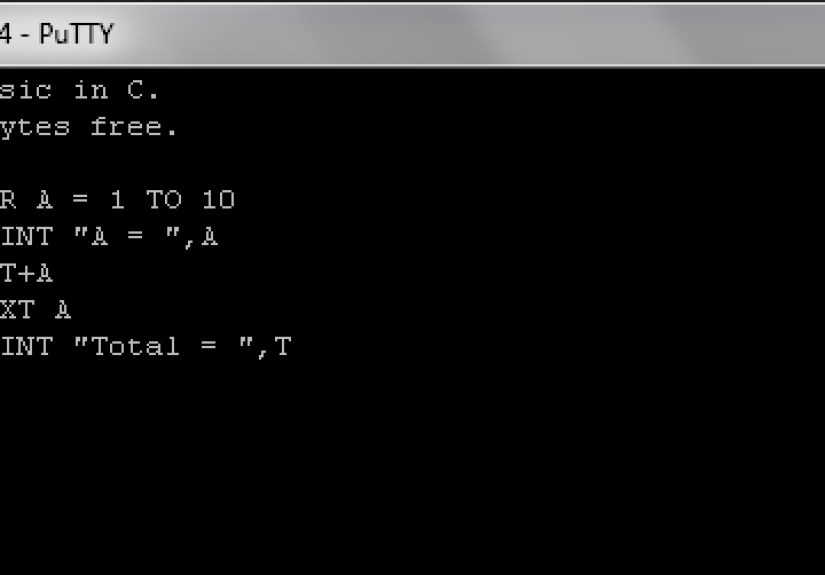
A BASIC interpreter is itself an Arduino sketch. You upload it using the Arduino IDE. Once installed, it listens for text commands through the serial connection. When you type a BASIC line, the interpreter stores it, parses it, and executes it when you type RUN. If you type a command without a line number, many interpreters execute it immediately.
This creates an interactive programming loop:
- Upload the BASIC interpreter to the Arduino.
- Open the serial monitor or a terminal program.
- Set the correct baud rate required by the interpreter.
- Type BASIC commands or numbered program lines.
- Run, test, edit, and repeat.
That workflow feels very different from normal Arduino development. There is less waiting and more tinkering. It rewards curiosity. It also punishes typos with vintage enthusiasm.
A Simple BASIC-Style Arduino Example
The exact syntax depends on the interpreter, but a simple LED blink concept may look something like this in a BASIC-style environment:
This example is intentionally simple. It sets pin 13 as an output, turns the built-in LED on, waits half a second, turns it off, waits again, and repeats. In standard Arduino C++, the same idea is usually written with setup() and loop(). In BASIC, the numbered lines make the flow visible. Line 60 says, with zero subtlety, “Go back and do it again.”
That visibility is useful for beginners. Loops, delays, and hardware states become easy to follow. You can change the delay from 500 to 100, run it again, and instantly see the LED become more caffeinated.
Reading Sensors With BASIC On Arduino
Sensor reading is another excellent use case. Suppose you connect a potentiometer to an analog input. In a BASIC-enabled Arduino environment that supports analog reading, the concept may look like this:
Now the Arduino repeatedly reads analog input 0 and prints the value. Turn the potentiometer, and the numbers change. This is a wonderful teaching moment because it connects physical movement to digital data. The student turns a knob, the board reads voltage, the interpreter prints a number, and suddenly electronics stops being invisible magic.
Memory Limits: The Tiny Elephant On The Breadboard
The Arduino Uno is beloved because it is simple, well documented, and rugged enough for beginner mistakes. However, it is not a memory monster. With only 2 KB of SRAM, memory must be treated like the last slice of pizza at a workshop: carefully, respectfully, and with awareness that someone else may already be reaching for it.
A BASIC interpreter needs RAM for variables, program storage, input buffers, and runtime operations. That means your BASIC programs must stay modest. Long strings, large arrays, and complicated logic can quickly run into limits. If you want a roomier BASIC experience, consider more capable Arduino-compatible boards with larger memory, such as boards based on SAMD, ESP32, or RP2040 chips.
Best Projects For BASIC Programming On Arduino
BASIC is not the right tool for every project, but it shines in several areas.
1. LED And Button Experiments
Start with the classics. Blink an LED. Add a pushbutton. Count button presses. Print messages over serial. These projects teach input, output, conditions, and loops with minimal hardware drama.
2. Sensor Dashboards
Read a temperature sensor, light sensor, potentiometer, or distance sensor and print values to the serial monitor. BASIC makes the project feel like a live instrument panel. The Arduino gathers data; BASIC turns it into readable feedback.
3. Classroom Demonstrations
Teachers can use BASIC on Arduino to show cause and effect quickly. Change a line, run the program, and watch the hardware respond. Students see programming as a direct action rather than an abstract document full of punctuation.
4. Retro Computing Projects
Pair an Arduino-compatible board with a keyboard, display, or serial terminal, and you can create a tiny retro-style computer. This is where BASIC becomes more than a teaching language. It becomes a vibe. A very nerdy, very wholesome vibe.
5. Serial-Controlled Gadgets
A BASIC-like shell can be useful for sending commands to hardware during testing. You might manually turn outputs on and off, read pin states, or trigger simple routines without recompiling firmware.
Common Problems And How To Avoid Them
Problem: The Serial Monitor Shows Gibberish
Check the baud rate. BASIC interpreters often require a specific serial speed. If your terminal uses the wrong setting, the Arduino may appear to be speaking ancient robot poetry.
Problem: The Program Runs Out Of Memory
Keep programs short. Avoid unnecessary strings. Use simple variable names if the interpreter benefits from them. Remove old test lines. If you need more room, move to a board with more memory.
Problem: Commands Do Not Match Online Examples
Different interpreters use different commands. One may support DWRITE, another may use DIGITALWRITE, and another may not include direct pin commands at all. Read the interpreter’s command list before assuming syntax.
Problem: BASIC Feels Too Limited
That is not a failure. It is a sign that you are growing. BASIC is excellent for learning and interactive control, but standard Arduino C++ gives you access to the wider Arduino ecosystem. When BASIC starts feeling cramped, take the win and move up.
Tips For Learning Arduino Through BASIC
Start with one output. The built-in LED is perfect because you do not need extra parts. Then add one input, such as a button or potentiometer. After that, combine them: read the input and change the output. This simple pattern is the heart of embedded systems.
Keep a notebook of working commands. BASIC encourages experimentation, but experiments are more useful when you remember what worked. Write down pin numbers, sensor values, baud rates, interpreter commands, and mistakes. Especially mistakes. Mistakes are just documentation with a dramatic backstory.
Compare BASIC examples with standard Arduino sketches. Write a blink program in BASIC, then write the same behavior in Arduino C++. Notice how GOTO compares with loop(), how pin commands differ, and how variables are handled. This comparison helps you understand programming concepts beyond any one language.
Is BASIC On Arduino Practical Or Just Nostalgic?
It is both. BASIC on Arduino is nostalgic in the best possible way. It brings back the pleasure of typing a command and getting an immediate response. But it is also practical for education, exploration, and lightweight hardware testing.
The key is to set expectations. BASIC will not replace the standard Arduino toolchain for serious embedded development. It will not magically give an Uno more memory. It will not make semicolons disappear from the universe, although we can dream. But it can make programming feel playful, direct, and understandable.
For beginners, that matters. The first goal is not to write perfect firmware. The first goal is to believe, “I can make this thing do something.” BASIC is very good at creating that moment.
Experience Notes: What BASIC Programming On An Arduino Feels Like In Real Life
The first experience of running BASIC on an Arduino is usually a mixture of delight and mild confusion. You upload the interpreter, open the serial monitor, and suddenly the board answers back. That moment feels different from uploading a normal sketch. Instead of sending code away and hoping the microcontroller behaves, you are sitting at a prompt, typing commands into a tiny electronic creature on your desk.
One of the most useful habits is to begin with direct commands before writing a full program. Test whether the interpreter responds. Print a message. Try a simple calculation. Then test one hardware command at a time. If pin control is supported, turn the built-in LED on and off manually. This is the embedded programming equivalent of tapping the microphone and saying, “Is this thing on?”
Another real-world lesson is that small changes teach quickly. When you adjust a delay value and see the LED blink faster, timing becomes obvious. When you read an analog input and watch numbers shift as you turn a knob, analog-to-digital conversion becomes concrete. When you write an IF statement that turns on an LED only above a certain sensor value, decision-making in code becomes physical. The board is no longer an abstract lesson. It is reacting to your hands.
There is also a healthy dose of humility. BASIC may be simpler than C++, but microcontrollers are still microcontrollers. Pins must be wired correctly. LEDs need resistors. Sensors need power and ground. Serial settings must match. Memory is limited. A missing connection can look like a programming problem, and a programming problem can look like a wiring problem. This is where Arduino teaches patience, whether you asked for it or not.
For students, BASIC can be a confidence builder. A learner who freezes at curly braces may relax when seeing numbered lines and direct commands. Once the learner understands loops, variables, input, and output in BASIC, moving to Arduino C++ becomes less frightening. The concept is already there. Only the grammar changes.
For experienced programmers, BASIC on Arduino is refreshing because it strips the project down to essentials. There are no giant frameworks, no dependency labyrinth, and no build system arguing about its feelings. There is just a board, a terminal, and simple instructions. That simplicity can be surprisingly productive during early hardware tests.
The best advice is to treat BASIC as a learning bench, not a cage. Use it to explore. Use it to teach. Use it to prototype simple behaviors. Then, when your project needs libraries, speed, multitasking, networking, or precise timing, graduate the idea into standard Arduino code. BASIC gets you moving; C++ helps you build the highway.
Conclusion
BASIC programming on an Arduino is a delightful bridge between retro computing and modern maker electronics. It gives beginners a friendly way to understand programming logic while giving hobbyists an interactive tool for quick experiments. By using a BASIC interpreter or BASIC-like shell, an Arduino can become a tiny command-driven computer capable of blinking LEDs, reading sensors, printing values, and teaching core embedded concepts.
It is not the most powerful way to program an Arduino, and it is not meant to replace the official Arduino C++ workflow. But it is approachable, memorable, and surprisingly educational. BASIC reminds us that programming does not have to begin with complexity. Sometimes it begins with a prompt, a blinking cursor, and the courage to type RUN.