Table of Contents >> Show >> Hide
- Meet Columbia: The Capsule That Brought Everyone Home
- Why the 3D Tour Is a Big Deal (Even If You’ve Seen the Capsule in Person)
- Apollo 11 Command Module at a Glance
- How a 3D Scan Captures a 1969 Spacecraft (Without Time Travel… Probably)
- Start Outside: Reading the Capsule’s “Skin”
- Step Inside: A Three-Person World in 210 Cubic Feet
- Life Support: The Systems That Keep “Breathing” From Becoming a Side Quest
- Guidance and Navigation: When “Where Are We?” Is a Serious Question
- Reentry: The Moment the Capsule Stops Being a Spaceship and Starts Being a Meteor (On Purpose)
- Hidden Details to Hunt for in the 3D Tour
- How to Take the 3D Tour (And Actually Enjoy It)
- Ideas for Teachers, Students, and Content Creators
- Quick FAQ
- Conclusion: The Smallest Room Where Something Huge Happened
- The Experience: What It Feels Like to Explore Columbia in 3D
- SEO Tags
If you’ve ever wondered what it felt like to live inside a spacecraft the size of a tight elevator ridewhile doing
history’s biggest group projectmeet the Apollo 11 Command Module, Columbia. This was the “home base”
for Neil Armstrong, Buzz Aldrin, and Michael Collins for most of their 1969 journey, and it’s the only piece of the
Apollo 11 spacecraft that actually came back to Earth.
Today, you can do something museum visitors usually can’t: step inside Columbia virtually. A high-resolution
3D scan lets you rotate, zoom, and explore the capsule’s interior like you’ve been handed the world’s most exclusive
backstage passminus the “please don’t touch the priceless artifact” security glare.
Meet Columbia: The Capsule That Brought Everyone Home
The Apollo spacecraft had multiple parts, but the Command Module was the star of the return trip. It’s the cone-shaped
crew cabin designed to survive launch vibrations, vacuum operations, and the full drama of high-speed reentrythen end
with a splashdown like it just casually wandered into the Pacific.
Columbia wasn’t built to feel spacious or stylish. It was built to work. The inside is dense with switches, gauges,
and labelsbecause when you’re flying to the Moon, “minimalist decor” is just another way to say “missing critical
controls.”
Why the 3D Tour Is a Big Deal (Even If You’ve Seen the Capsule in Person)
In a museum, Columbia is protected (as it should be). You can’t climb in, you can’t lean over the panels, and you can’t
poke your head around the crew couches to see how the storage and equipment bays were packed like the universe’s most
intense carry-on bag.
A high-resolution 3D scan flips that limitation on its head. You can inspect details that are hard to see through
reflections, distance, or display anglesdown to tiny labels, textures, and the “human fingerprints” of use. It’s part
engineering deep dive, part time machine, and part reminder that the Moon landing didn’t happen in a sleek sci-fi set.
It happened inside a compact, functional, very real machine.
Apollo 11 Command Module at a Glance
- Name: Columbia
- Role: Crew living quarters and control center for most of the mission; the only Apollo 11 component to return to Earth
- Crew: 3 astronauts
- Size: About 3.2 m (10 ft 7 in) tall and about 3.9 m (12 ft 10 in) in diameter
- Weight: Roughly 5,900 kg (about 13,000 lb), give or take depending on configuration details
- Interior living volume: Around 210 cubic feet of habitable space
- Where it is today: On display at the Smithsonian’s National Air and Space Museum in Washington, D.C.
Those stats are fun on paper, but they land differently when you “stand” inside the 3D model and realize 210 cubic feet
is basically “three adults + suits + gear + food + tools + systems” in a space that would make a studio apartment blush.
How a 3D Scan Captures a 1969 Spacecraft (Without Time Travel… Probably)
Digitizing Columbia isn’t like scanning a smooth statue. The Command Module includes reflective surfaces and incredibly
intricate interior dashboardsexactly the kind of materials and geometry that can confuse many capture methods. That’s
why the scanning effort required careful planning, specialized workflows, and collaboration with experienced partners.
The result is a detailed digital model made from an enormous number of measurements. Practically speaking, that means:
you can zoom in without everything turning into a blurry “pixel soup.” You can inspect surfaces and structures like a
conservator, a student, or a space-obsessed night owl who just said, “One more minute,” an hour ago.
Another bonus: digital access helps preserve the physical artifact. Every virtual visit is a “no-touch” visit, which is
the best kind for something that already survived reentry once and doesn’t need the extra challenge of modern-day elbows.
Start Outside: Reading the Capsule’s “Skin”
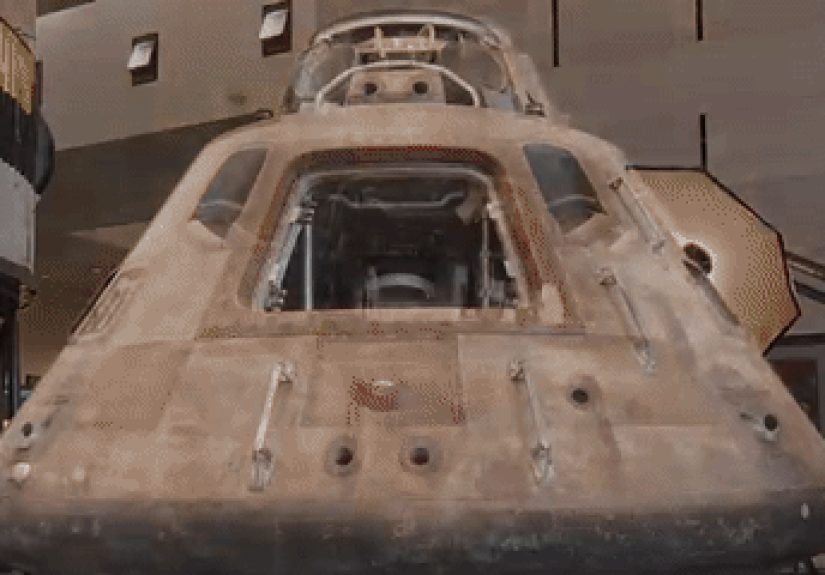
The exterior tells a story before you even step inside. Columbia’s shapea blunt conewasn’t chosen for aesthetics. It
was chosen because it works: a blunt body helps manage the brutal heating of atmospheric entry by forming a shockwave
that keeps the hottest gases a bit farther from the spacecraft.
The Heat Shield: The Unsung Hero With a Scorched Face
Reentry is where the Command Module earns its paycheck. Apollo used an ablative heat shield: material designed
to char and wear away in a controlled manner, carrying heat off as it sacrifices itself. Think of it as a high-stakes
“burn the toast to save the kitchen” strategyexcept the toast is engineered resin in a honeycomb structure and the
kitchen is Earth’s atmosphere.
The Apollo 11 press materials describe heat-shield construction using honeycomb structures with an ablative outer layer,
with thickness varying depending on expected heat loads. In the 3D view, you can appreciate how the capsule is built as
a system: structure, shielding, and recovery hardware all working together.
Windows, Hatch, and Hardware You’d Miss in a Quick Walk-By
The Command Module has small windows (because big windows are basically invitations for problems at reentry speeds).
The crew hatch and exterior detailsfasteners, seams, and surface texturesbecome easier to study in 3D because you can
rotate the capsule to angles you’d never get from behind a museum barrier.
Step Inside: A Three-Person World in 210 Cubic Feet
The interior is where the 3D tour really shines. Columbia’s cabin is a working cockpit, a living space, a storage unit,
and a survival systemall layered into a compact volume. If you’ve ever played “car trunk Tetris,” you’re emotionally
prepared. If not, welcome to the sport.
The Crew Couches: Seats That Are Also Safety Systems
The three astronaut couches are front and center, angled and positioned to support the crew during high-G phases like
launch and reentry. In a 3D view, you can trace how the couches align with the control layout and how little “extra”
space exists between crew positions and panels.
The Main Instrument Panel: A Dense Neighborhood of Switches
Apollo-era design favored direct human control and clear physical interfaces. That means a lot of switches, indicators,
and labels. The Command Module’s controls-and-displays philosophy was built around giving the crew the ability to operate
the spacecraft under both normal and contingency conditions. In 3D, you can explore the panel arrangement like you’re
reading a map of responsibilitieswho would reach where, and why.
Storage and Equipment Bays: The Hidden Backbone of “Daily Life”
Beyond the pilot-and-instrument romance, there’s the reality of supplies and systems: stowage for food, checklists,
cameras, emergency gear, and life support components. The 3D tour makes it easier to understand how much of the cabin’s
function lives in compartments, bays, and behind-the-scenes placementsnot just what you see on the forward panel.
Life Support: The Systems That Keep “Breathing” From Becoming a Side Quest
Apollo’s Command Module had to maintain a stable environment: breathable atmosphere, temperature control, and management
of carbon dioxide and humidity. This is the less glamorous side of spaceflightbecause nobody’s favorite movie scene is,
“And then they successfully maintained cabin pressure again.” But it’s the reason the astronauts got to come home and
tell the story.
In a digital tour, you can connect the idea of life support to physical reality: where systems are housed, how cramped
layouts force careful organization, and why Apollo spacecraft design is often described as a masterpiece of packing and
prioritization.
Guidance and Navigation: When “Where Are We?” Is a Serious Question
Apollo missions depended on guidance and navigation tools that balanced computer capability with crew procedures.
The Command Module’s displays, timers, and caution-and-warning systems were built so the crew could monitor spacecraft
health, run checklists, and respond quickly if something went sideways.
In the 3D model, you can linger over the control surfaces the way the crew couldn’t during high-workload phases.
It’s a reminder that the Moon landing wasn’t powered by mystery techit was powered by well-designed interfaces,
disciplined operations, and a whole lot of training.
Reentry: The Moment the Capsule Stops Being a Spaceship and Starts Being a Meteor (On Purpose)
Reentry is controlled chaos. The Command Module hits the atmosphere at extreme speed, generating intense heating. The
heat shield’s job is to take that energy and survive long enough to keep the cabin safe. Apollo’s ablative approach
involved engineered resins in honeycomb structures that charred and ablated to remove heat.
This is where the exterior details matter: subtle surface textures, edges, and shielding transitions aren’t random.
They’re part of the physics bargain Apollo engineers struck with Earth’s atmosphere: “You can have the heat. We’ll take
the survivability.”
Hidden Details to Hunt for in the 3D Tour
The most delightful part of exploring Columbia digitally is noticing the small thingsdetails that turn the capsule from
“legendary artifact” into “workspace used by real humans.”
- Labels and tiny markings: Look for the practical language of operationswitch names, warnings, and system groupings.
- Wear patterns: Small scuffs and surface changes reveal how the spacecraft was handled and where attention focused.
- Personal touches: Digitization projects have highlighted human traces like notes and markings that are easy to miss in physical display conditions.
- Panel density: Zoom out and notice how “information design” worked in 1969lots of discrete controls rather than a single screen.
These details are educational gold. They also make the experience weirdly relatable: even the most historic mission in
human history involved labeling, organizing, and leaving little remindersbecause humans are going to human.
How to Take the 3D Tour (And Actually Enjoy It)
Most Columbia 3D experiences work similarly: you can rotate the capsule, zoom in for detail, and shift your view to see
interior spaces. Some versions include “dollhouse” angles or guided views that help you navigate the cabin layout.
- Start with the exterior: Get orientedshape, windows, hatch location, and heat shield geometry.
- Move inside slowly: The interior is visually dense. Pick one area (crew couches, main panel, side panels) and explore it fully.
- Zoom in on labels: Labels reveal function. Function reveals why the layout looks the way it does.
- Look for context clues: Cameras, stowage, and access panels tell you what “daily life” required.
- Try it like a mission: Pretend you have a checklist: “Find the hatch. Find the main panel. Find where equipment is stored.” You’ll learn faster and have more fun.
Some Smithsonian-related releases have also offered downloadable data or alternate viewing options (including VR-friendly
formats). Even if you never put on a headset, the ability to move around freely in a high-detail model is the real win.
Ideas for Teachers, Students, and Content Creators
Columbia’s 3D model isn’t just a noveltyit’s a flexible learning tool. Here are a few ways to turn “cool spaceship” into
real understanding:
- Design challenge: Ask students to identify three features that exist because of reentry physics and explain why.
- Human factors: Have learners map how a crew member might move (or not move) within the cabin during different phases.
- Systems thinking: Pick a system (life support, communications, controls) and trace where evidence of it appears in the cabin layout.
- Storytelling: Create a “day in the capsule” narrative that includes sleep, eating, checklists, and workgrounded in visible stowage and panel structure.
The big lesson is that space history isn’t abstract. It’s physical. It’s cramped. It’s engineered. And it’s filled with
details that reward careful looking.
Quick FAQ
Is this the actual Apollo 11 Command Module?
The 3D tours are based on scans of the real Columbia artifactso what you’re seeing corresponds to the actual spacecraft
that supported Apollo 11 and returned to Earth.
Where is Columbia on display today?
Columbia is part of the Smithsonian’s National Air and Space Museum in Washington, D.C., featured in the museum’s lunar
exploration-focused exhibitions.
What’s the biggest misconception people have about the Command Module?
That it was roomyor even “comfortable.” The 3D tour makes it obvious: Columbia was brilliantly designed, but it was not
built for lounging. It was built for getting three people to the Moon and back alive. Comfort was… politely optional.
Conclusion: The Smallest Room Where Something Huge Happened
A 3D tour of the Apollo 11 Command Module is one of the best ways to understand what “Moon landing technology” really
looked like: not futuristic chrome fantasy, but a compact, purposeful, intensely human workspace. You see the tradeoffs.
You see the density. You see the discipline embedded into the design.
And maybe the most surprising thing you’ll take away is this: the Moon landing wasn’t just an epic moment under a lunar
sky. It was also thousands of tiny moments inside Columbiaswitch flips, checklist reads, stowed tools, worn edges, and
three people operating inside a machine that had no right to be this small and this successful.
500-word experience add-on
The Experience: What It Feels Like to Explore Columbia in 3D
The first thing you notice in a 3D tour isn’t a specific switch or a famous labelit’s the scale. You rotate the
capsule and your brain does that quick mental math: “Okay, three astronauts fit in there… with gear.” Then you tilt the
view, slide into the interior, and suddenly the math becomes a feeling: this is close. Not “cozy.” Not “snug.” Close in
a way that makes you respect every design decision that avoided wasted space.
As you move your viewpoint toward the crew couches, you start to understand why the cabin feels like a cockpit and a
storage locker had to share a studio apartment. The couches dominate the floor plan. They’re not decorative seats; they’re
a survival geometry. In 3D, you can hover at “eye level” and imagine how the astronauts’ bodies aligned with the panels
during work, and how their reach had to be predictable when the mission was busy. The capsule begins to read like a
choreography: hands here, eyes there, switch groupings placed where they needed to be, not where they looked nice.
Then comes the instrument panel momentthe point where you zoom in and realize this isn’t one “dashboard.” It’s a dense
neighborhood of controls, each with a job. You’ll likely catch yourself doing the same thing everyone does: zooming closer,
tracing lines, pausing on labels, and wondering how anyone could operate all of it without getting lost. And that’s the
hidden gift of the 3D tour: it makes you appreciate training and procedure. The hardware is impressive, but the human
system behind it is what makes the hardware usable.
The best way to explore is to give yourself small missions. Try this: “Find the hatch area.” Then: “Find the windows.”
Then: “Look for how storage is arranged around the crew space.” Each mini-goal reveals a new layer. You’ll notice that
there’s very little blank space. Even areas that look “empty” are often access pathways or surfaces designed to protect
something delicate. It’s a reminder that spacecraft interiors are more like mechanical ecosystems than rooms.
If you swing back outside after spending time inside, the exterior suddenly looks different, too. The capsule stops being
an icon and becomes a tool: a blunt shape built for physics, a shell built to protect a pressurized cabin, an ablative
strategy built to survive a punishing return. You may even start noticing how the “story” of reentry is written on the
surfaceshow the capsule’s skin is a record of what it endured.
By the end of the tour, you’re left with a weirdly modern emotion: admiration for the practicality of it all. Columbia
doesn’t seduce you with sleek futurism. It impresses you with thoughtful constraints. It’s the kind of design that says,
“We have limited space, limited weight, and no margin for failureso everything must earn its place.” And once you’ve
explored it in 3D, the Apollo 11 story feels even more real: history happened, quite literally, inside that tight little
cone.