Table of Contents >> Show >> Hide
- What Spotify’s In-App DMs Actually Are
- How Messages Works (and How to Start One)
- Why Spotify Built DMs for Music Sharing
- What This Changes About Discovery and Friend Groups
- New: Group Chats, Listening Activity, and Request to Jam
- Privacy and Safety: The Make-or-Break Details
- How to Use Spotify DMs Without Becoming “That Friend”
- FAQ: Quick Answers About Spotify Messages
- Conclusion
- Real-World Experiences: What Using Spotify Messages Feels Like
Sharing a song used to be simple: make a mix CD, hand it to a friend, and hope they don’t “accidentally” leave it in their car forever. Modern sharing is weirder: copy a link, paste it into a group chat, then send a follow-up message explaining the vibe like you’re a museum docent.
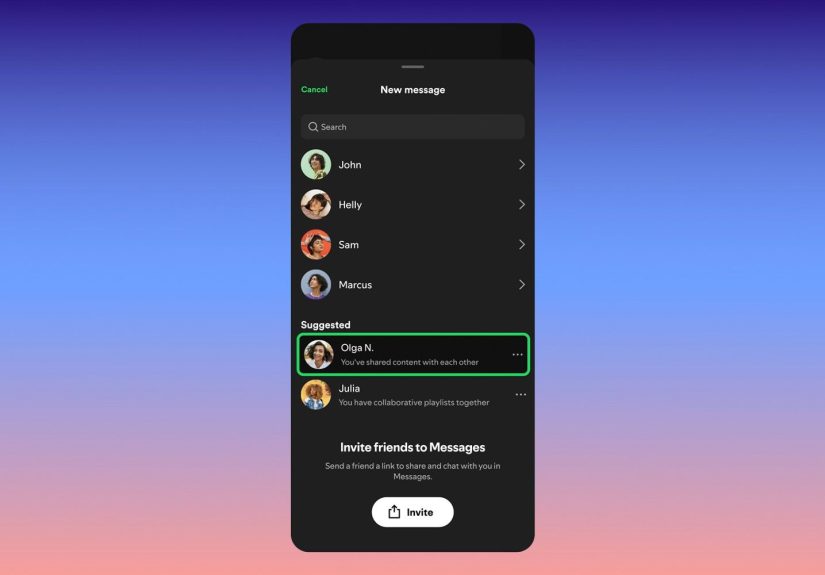
Spotify wants to cut out the copy-and-paste middleman. With its in-app direct messaging feature called Messages, you can DM friends inside Spotify to share songs, playlists, podcasts, and audiobooksthen react, reply, and keep swapping recommendations in one place. Spotify has also expanded Messages with group chats and social upgrades like Listening Activity and Request to Jam, making it easier to turn “listen to this” into “hit play right now,” then talk about it without leaving the app.
What Spotify’s In-App DMs Actually Are
Spotify Messages is a music-first inbox. The conversation can include text and emoji reactions, but the main event is always Spotify content: a track, an episode, an album, a playlist, or an audiobook. The feature is built into the mobile app and has rolled out gradually by region for both Free and Premium users who meet the minimum age requirement (Spotify has described it as 16+ where available).
Just as important: it’s not an “open DMs” free-for-all. Spotify limits who you can message to people you already have an in-app connection withlike someone on your Duo/Family plan or someone you’ve interacted with through tools such as Jams, Blends, or Collaborative Playlists. That design keeps the feature centered on real relationships and makes spam a lot harder.
It’s also a bit of a comeback story. Spotify previously had an Inbox/Messages feature years ago and removed it. The difference now is that Spotify has spent years building social listening features that create natural connections, so Messages can sit on top of relationships that already exist inside the app.
How Messages Works (and How to Start One)
Spotify designed Messages to feel like an extension of the Share button rather than a brand-new social network you must “maintain.” The flow is content-ledbecause the song is the opener and your text is the seasoning.
Start a message from what you’re listening to
- Play something (song, episode, playlist, audiobook).
- Tap Share from Now Playing.
- Select a friend you’re already connected with.
- Add context (“Start at the chorus,” “Perfect for your commute,” “This is your new gym anthem”).
- Send. The audio shows up right in the thread, ready to play.
In real life, that looks like: you find a new artist, send one track with a one-line “why,” and your friend can play it immediatelyno app-hopping required. If you’re sharing a podcast, you can point to the episode that answers a question you were already discussing. If you’re sharing an audiobook, you can send it the same way you’d recommend a book, but with “tap to listen” convenience built in.
Message requests and controls
If someone messages you and you haven’t chatted before, Spotify uses a message-request approach: you can accept or decline before a conversation opens. Spotify also provides blocking, reporting, and an option to opt out of Messages entirelyuseful for anyone whose ideal inbox is “empty, peaceful, and free of chaos.”
Where your Messages live
Messages live in the profile area of the mobile app. That matters because it turns random recommendations into a searchable archive. Instead of hunting through other apps for “that one song you sent me,” you can revisit a thread and pick up the exact tracks or episodes you never got around towithout scrolling past a week of unrelated chatter.
That “archive effect” sounds boring until you realize how often music sharing fails because life happens. A dedicated inbox makes it easier to treat recommendations like a queue: you can return after work, after travel, or after you’ve finally finished the thing you told everyone you were “definitely” doing.
Why Spotify Built DMs for Music Sharing
Spotify’s logic is simple: music discovery is already social, but the conversation usually happens elsewheretexts, Instagram DMs, group chats, Discord, or whatever platform your friends have declared “the main one” this month. Messages reduces friction by keeping sharing and playback inside Spotify, so more recommendations turn into actual listens.
There’s also a strategic benefit: social features can increase stickiness. When sharing becomes a habit inside the appespecially for Free usersit encourages return visits, more exploration, and more time spent listening. Spotify frames Messages as a complement to other platforms, not a replacement, but it clearly aims to make Spotify the easiest place to talk about what you’re hearing.
What This Changes About Discovery and Friend Groups
In practical terms, in-app DMs change how people recommend music. When it’s easy to attach a quick note, recommendations get more personal: “This sounds like your road-trip playlist,” or “This chorus is the reason I’m awake right now.” That context is often what makes someone actually listenbecause you’re not just sharing a track, you’re sharing a reason.
Messages also helps with follow-through. A lot of “music discovery” fails because the recipient forgets to come back later. Having an inbox dedicated to Spotify content makes it easier to treat recommendations like a queue you can return to. For friends who swap podcasts, it’s a quiet quality-of-life upgrade: episodes don’t get lost in a sea of memes, and you don’t have to remember whether your friend meant this show or the other one with a suspiciously similar title.
Finally, Messages nudges Spotify toward being a place you hang out, not just a place you play audio. That doesn’t mean it’s trying to become social media. It means Spotify wants the “shared experience” layer to feel nativeso discovery feels less algorithmic and more like hearing something great from someone you trust.
New: Group Chats, Listening Activity, and Request to Jam
After launching Messages as one-to-one DMs, Spotify expanded it with group chats for small circles (up to 10 people). The intent is “your crew,” not “a giant community feed.” In practice, that’s perfect for road-trip planning, study groups trading focus tracks, or friends running a weekly “new music” ritual.
- Listening Activity (opt-in): When enabled, friends you’re connected with in Messages can see what you’re listening to in real time (or your most recent play). It’s designed to feel like hanging out in the same roomwithout forcing you to broadcast your listening habits to everyone.
- Request to Jam: This feature helps you turn a recommendation into a shared moment. If a friend is listening to something that sparks your curiosity, you can request to start a Jam and join the session instead of just sending a “nice” reaction.
Together, these upgrades push Messages beyond a static inbox. They make it easier to move from “here’s a song” to “let’s listen together,” which is often where the best music memories happen.
Privacy and Safety: The Make-or-Break Details
Messaging features live or die on trust. Spotify’s guardrails are clear: you can only message people you already have a connection with, and new conversations go through message requests. Spotify has also described Messages as using encryption with industry-standard security, along with tools to block and report accounts.
From a user experience standpoint, the “connections-only” rule is doing two jobs at once: it reduces random inbound messages and it keeps the feature aligned with its stated purposesharing audio with people you already know. If you want to keep your listening life private, you can also leave Listening Activity off and simply use Messages as a recommendation inbox.
That said, “in-app” doesn’t automatically mean “invincible.” Treat Messages like any social space: connect intentionally, use privacy settings thoughtfully, and remember that the best safety feature is still the ability to say “nope” and hit block.
How to Use Spotify DMs Without Becoming “That Friend”
- Send fewer, better picks. One great track beats a 20-song barrage.
- Add one sentence of context. People listen more when they know why you sent it.
- Try micro-playlists. Three to five songs for a mood is an easy win.
- Use group chats for rituals. “New Music Friday” or “one song a day” keeps it focused.
- Use Request to Jam when timing is right. It turns discovery into a shared experience.
FAQ: Quick Answers About Spotify Messages
Is Spotify Messages available everywhere?
Spotify has rolled Messages out gradually by market, so availability can vary by region and account.
Can I message anyone on Spotify?
No. Messages is intentionally limited to people you already have an in-app connection with (shared plans, Jams/Blends, or collaborative playlists).
What can I share in Messages?
Spotify positions Messages for sharing music, podcasts, and audiobooksbasically, anything you can play in Spotify.
How big are Spotify group chats?
Group chats are designed for small circles, capped at 10 people.
Conclusion
Spotify’s in-app DMs are less about becoming your next messaging app and more about making music sharing feel native. Messages keeps recommendations organized, makes playback immediate, and adds social touchesgroup chats, opt-in Listening Activity, and Request to Jamthat can turn discovery into a shared moment. If Spotify keeps the guardrails strong and the feature music-focused, Messages could become the easiest place to say what we’ve all been saying forever: “You have to hear this.”
Real-World Experiences: What Using Spotify Messages Feels Like
1) “I’m sending you a feeling, not a link.”
The biggest difference is psychological. In a normal chat app, a Spotify link looks like something you’ll “get to later.” In Spotify, the recommendation sits inside the thread as a playable card. That removes the tiny “open another app” hurdle that kills so many good recs. Friends are more likely to hit play because they’re already in the listening environment.
2) Your recommendations stop vanishing.
Messages threads double as an archive. That’s especially helpful for podcasts and audiobooks, where the value is remembering which episode or chapter your friend swore was life-changing. Instead of scrolling back through weeks of unrelated chatter, you can revisit the thread and pick up where you left off.
3) Group chats feel like a tiny shared radio station.
The 10-person limit is a feature, not a bug. It keeps the room small enough that people actually react. The best group chats become rituals: one person drops a “song of the day,” another shares a new release, and suddenly the chat becomes a weekly soundtrack. It’s social, but it doesn’t feel like you’ve joined a whole new platform.
4) Listening Activity works best when you treat it like a lamp, not a spotlight.
Turning it on can spark effortless conversation starters (“Oh, you’re in your 2000s pop era again”). But it’s also the kind of feature you toggle depending on your mood. Some days you want the social energy; other days you want private listening time. The opt-in design makes it easy to be social when you wantand invisible when you don’t.
5) Request to Jam is where it gets genuinely “Spotify-native.”
A good recommendation doesn’t have to end with a thumbs-up. Request to Jam lets you turn discovery into a shared momentgreat for long-distance friends, couples, or anyone who misses passing the aux around. It’s also surprisingly useful for parties: one person starts the session, others join, and the music becomes collaborative without asking everyone to text the host their requests.
6) The only downside is… people.
A messaging feature can’t fix bad sharing habits. If you treat your friends like a dumping ground for every algorithmic suggestion, they’ll tune out. If you share like a mixtapecurated, contextual, and occasionalit feels personal and fun. The best rule: fewer picks, more intention.
7) It changes how you recommend, not just where you recommend.
Because Messages keeps everything in Spotify, it becomes easier to build tiny “threads” of taste. You might start with one track, follow it with a live version, then add a playlist that matches the moodwithout overwhelming someone with a 200-link spam attack. Over time, you and a friend can develop a shared rhythm: “new release → reaction → one more recommendation.” It’s not a radical new form of communicationit’s just the familiar act of sharing music, made faster and more organized, so it happens more often, with less effort, and with fewer missed listens.
Used well, Spotify Messages doesn’t feel like Spotify chasing social media. It feels like Spotify finally building the sharing flow we’ve all been improvising for yearsonly now the music is one tap away.