Table of Contents >> Show >> Hide
- What Is an Instagram Beta Tester?
- Why Become an Instagram Beta Tester?
- How to Become an Instagram Beta Tester on Android
- How to Become an Instagram Beta Tester on iPhone
- Important Things to Know Before Joining the Instagram Beta Program
- How to Report Bugs as an Instagram Beta Tester
- How to Leave the Instagram Beta Program
- Common Problems and Fixes
- Tips to Be a Better Instagram Beta Tester
- Who Should Become an Instagram Beta Tester?
- Real-World Experience: What It Feels Like to Be an Instagram Beta Tester
- Conclusion
Want to try Instagram features before most people even know they exist? Becoming an Instagram beta tester is one of the closest things regular users can get to peeking behind the velvet curtain. You may see experimental updates, interface changes, bug fixes, camera tools, Reels tweaks, messaging experiments, or performance improvements before they roll out widely. It is not exactly a secret VIP club with tiny sandwiches, but it can feel that way when your app suddenly has a feature your friends keep asking about.
Still, Instagram beta testing is not magic. It does not guarantee early access to every new feature, and it does not turn your account into an official Meta employee dashboard. Beta versions can be unstable, features may disappear, and some changes are controlled from Instagram’s servers rather than the app file installed on your phone. In plain English: you might join the beta and still not get the shiny new button everyone on Threads is talking about.
This complete guide explains how to become an Instagram beta tester on Android and iPhone, what to expect, how to give useful feedback, how to leave the beta program, and how to avoid sketchy “beta access” scams. Whether you are a creator, marketer, social media manager, tech enthusiast, or someone who just enjoys pushing buttons before everyone else, this guide will help you test Instagram more safely and effectively.
What Is an Instagram Beta Tester?
An Instagram beta tester is a user who installs a pre-release or testing version of the Instagram app. Developers use beta testing to identify bugs, crashes, performance problems, confusing layouts, and unexpected behavior before updates reach a broader audience. Think of it as a dress rehearsal for the app. The actors are ready, the lighting is mostly fine, but someone may still trip over a cable.
Instagram beta testers may receive updates faster than regular users. These updates can include small technical improvements, new design experiments, or limited-access features. However, Instagram also uses gradual rollouts and account-based testing, so two beta testers with the same app version may still see different features. That is normal. It does not mean your phone is cursed.
Why Become an Instagram Beta Tester?
Early Access to New Instagram Features
The biggest reason people join the Instagram beta program is early access. If Instagram is testing a new Reels editing option, profile layout, inbox feature, creator tool, or posting workflow, beta testers may be among the first to notice it. For creators and marketers, this can be useful because early familiarity with new tools can turn into a competitive advantage.
A Better Understanding of App Changes
If you work in social media, beta testing helps you understand how Instagram evolves. You may spot interface adjustments before clients, followers, or competitors do. That makes it easier to prepare tutorials, update workflows, and avoid panicking when a familiar button moves three pixels to the left.
A Chance to Improve Instagram
Beta testing is not only about getting new toys. It is also about feedback. When you report bugs clearly, you help developers fix problems before millions of users experience them. A good beta tester is not someone who simply says, “It broke.” A good beta tester says, “The app crashed after I tapped Share on a Reel draft using Android 15 on Wi-Fi.” Much more useful. Much less dramatic.
How to Become an Instagram Beta Tester on Android
Android is usually the most straightforward path for people who want to become Instagram beta testers. Instagram’s Android beta access is handled through Google Play’s beta testing system. Availability can change, and the beta may be full at times, but the basic process is simple.
Step 1: Use the Same Google Account as Your Play Store
Make sure you are signed in to the Google account you use on your Android device. Beta enrollment is tied to your Google Play account, not just your Instagram username. If you join using one Google account but your phone uses another, the beta update may not appear.
Step 2: Open Instagram on Google Play
Go to the Instagram listing in the Google Play Store. Scroll through the page and look for a beta program section. If the program is open, you may see an option such as “Join the beta.” If the beta is full, Google Play may tell you that no more testers are being accepted. That is annoying, yes, but not unusual.
Step 3: Tap Join and Wait for Enrollment
After tapping the join button, it may take several minutes for Google Play to register you as a beta tester. Once enrollment is complete, the Play Store should offer a beta version of Instagram as an update. Install it like any normal app update.
Step 4: Keep Instagram Updated
Beta builds change frequently. Turn on automatic updates if you want the newest version without checking manually. If you prefer more control, update manually from Google Play. Either way, do not judge a beta program based on one build. One version may be buggy, while the next version may fix the exact issue that made you question your life choices.
How to Become an Instagram Beta Tester on iPhone
iPhone beta testing works differently. Apple uses TestFlight for beta app distribution. To test an iOS beta app, you generally need an invitation from the developer or access through a public TestFlight link. This means joining Instagram beta on iPhone is usually less predictable than joining on Android.
Step 1: Install TestFlight
Download Apple’s TestFlight app from the App Store. TestFlight is the official Apple tool for testing beta versions of apps. It manages invitations, beta builds, updates, feedback, and expiration dates.
Step 2: Look for a Legitimate Invitation
If Instagram makes an iOS beta available, access may come through an email invitation or public TestFlight link. Be careful here. Many random websites, social posts, and chat groups share “Instagram beta” links that may be expired, full, unrelated, or suspicious. A legitimate TestFlight invitation should open inside Apple’s TestFlight environment and clearly show the app information.
Step 3: Accept the Invite and Install the Build
Once you open a valid TestFlight invitation, tap Accept, then Install. If the beta has reached its tester limit, you may not be able to join. Apple TestFlight beta builds also expire after a limited testing window, so you may need to keep updating if new builds become available.
Step 4: Send Feedback Through TestFlight
TestFlight allows testers to send feedback, including notes and screenshots. If Instagram crashes or behaves strangely, feedback from TestFlight can help developers understand what happened. Be specific: include the action you took, what you expected, what happened instead, and whether the issue repeats.
Important Things to Know Before Joining the Instagram Beta Program
Beta Versions Can Be Buggy
The word “beta” is a polite way of saying, “This may occasionally act weird.” You may see crashes, login issues, battery drain, broken buttons, delayed notifications, camera glitches, or features that appear and vanish. If Instagram is essential for your business, consider testing on a secondary device rather than your main phone.
You May Not Get Every Experimental Feature
Many Instagram features are controlled by server-side testing. That means Meta can enable or disable features for specific accounts, regions, devices, or test groups without requiring a new app download. You can be on the latest beta version and still not have the same feature as another beta tester. It is not personal. It is software experimentation.
Your Feedback Matters More Than Your Complaints
Complaining is emotionally satisfying. Feedback is useful. When reporting an Instagram beta problem, include your device model, operating system version, Instagram version, the steps that caused the problem, and screenshots or screen recordings if possible. “The new inbox is terrible” is an opinion. “The inbox freezes for five seconds after opening a message request” is actionable feedback.
Do Not Download Random APKs
One of the biggest mistakes Android users make is downloading Instagram beta APK files from unofficial websites. This is risky. Modified or repackaged APKs can contain malware, steal login information, or compromise your account. If you want to become an Instagram beta tester, use Google Play whenever possible. Your account security is worth more than getting a new sticker tool three weeks early.
How to Report Bugs as an Instagram Beta Tester
Bug reporting is the heart of beta testing. If you find a problem, report it while the details are still fresh. Instagram allows users to report technical problems from inside the app. You can usually go to your profile, open the menu, tap Help, and choose Report a Problem. Some versions also support shaking your phone to bring up the reporting menu.
A strong bug report should include:
- The exact feature you were using, such as Reels, Stories, DMs, comments, profile editing, or uploads.
- The steps to reproduce the issue.
- What you expected to happen.
- What actually happened.
- Your phone model and operating system version.
- Your Instagram app version.
- A screenshot or screen recording, if it does not expose private information.
For example, instead of writing, “Stories are broken,” write: “When I upload a 15-second Story video from my gallery, the preview loads, but tapping Next returns me to the gallery. This happened three times on Wi-Fi and mobile data.” That kind of report gives developers something they can investigate.
How to Leave the Instagram Beta Program
Leaving on Android
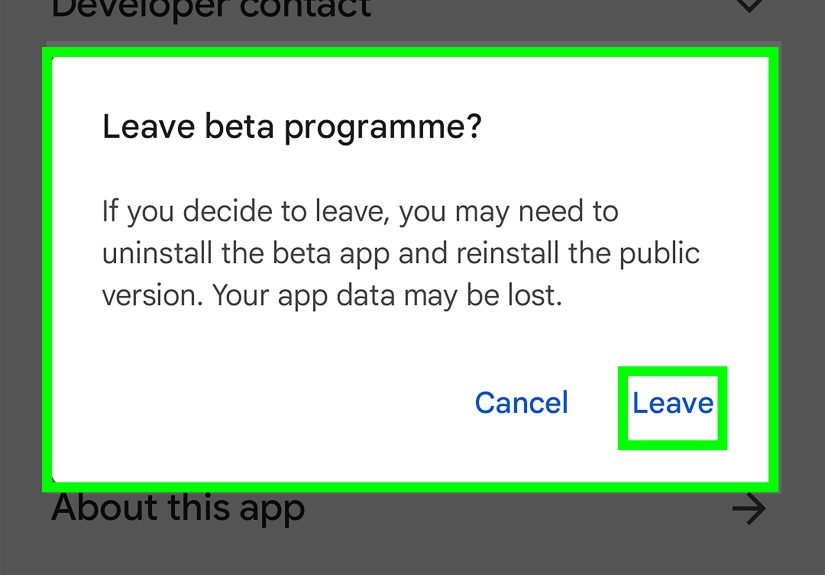
To leave the Instagram beta program on Android, open Google Play, go to Manage apps and device, find the beta section, select Instagram, and choose Leave. After leaving, uninstall the beta version and reinstall the regular public version from Google Play if needed. It may take a little time for Google Play to stop offering beta updates.
Leaving on iPhone
On iPhone, open TestFlight, select the beta app, and stop testing if the option is available. Then install the regular Instagram app from the App Store. If the TestFlight build has expired, you will need the public App Store version anyway.
Common Problems and Fixes
The Beta Program Is Full
This is common. Beta programs often have tester limits. Check again later, but avoid obsessively refreshing like you are trying to buy concert tickets. Slots may open when inactive testers leave or when the developer expands the program.
You Joined but Did Not Receive a Beta Update
Make sure you joined with the correct Google account or Apple ID. Restart your phone, check the app store again, and confirm that Instagram is installed from the official store. On Android, enrollment can take a few minutes before the beta update appears.
Instagram Keeps Crashing
Update to the newest beta build, clear cache on Android, restart your device, and report the crash. If Instagram is unusable, leave the beta and reinstall the stable version. Being a beta tester should not require heroic suffering.
A Feature Disappeared
That can happen. Instagram tests features, removes them, changes them, and sometimes rolls them out only to selected groups. A disappearing feature does not always mean your app is broken. It may simply mean the test ended.
Tips to Be a Better Instagram Beta Tester
Use a Secondary Account When Possible
If your main Instagram account supports your business, brand, or income, consider using a secondary account for testing. Beta features may affect posting, editing, messaging, or analytics. A secondary account gives you room to experiment without risking important content workflows.
Keep Notes on New Features
When something changes, write it down. Note the date, app version, device, and what changed. This is especially helpful for creators and marketers who track Instagram updates professionally. Over time, you will build your own mini update database.
Compare With the Stable Version
If you have a second device, keep one device on the stable version and one on beta. Comparing them makes it easier to identify what is actually new. It also helps you confirm whether a problem is caused by the beta build or by your account, connection, or settings.
Protect Your Account
Use two-factor authentication, avoid unofficial downloads, do not share login codes, and be suspicious of anyone promising guaranteed beta access. Instagram beta testing should never require giving your password to a third-party website. If a site asks for it, close the tab and maybe give your browser a comforting pat.
Who Should Become an Instagram Beta Tester?
Instagram beta testing is ideal for tech enthusiasts, creators, social media managers, digital marketers, app reviewers, and users who enjoy exploring new features. It is also useful for people who manage tutorials, blogs, YouTube channels, or newsletters about Instagram updates.
However, beta testing is not for everyone. If you need Instagram to be perfectly stable every day, the public version is safer. If you get irritated when buttons move or features glitch, beta testing may turn your peaceful scrolling session into a tiny software soap opera.
Real-World Experience: What It Feels Like to Be an Instagram Beta Tester
Becoming an Instagram beta tester sounds glamorous at first. You imagine yourself strolling into the future while everyone else is still living in the regular app. In reality, the experience is a mix of excitement, confusion, discovery, and occasional “Why is this button doing that?” energy.
The first thing many testers notice is that changes are often subtle. You may not open Instagram and immediately see a giant banner saying, “Congratulations, brave tester!” Instead, you might notice a slightly redesigned share menu, a new Reels editing shortcut, a different font weight, or a posting screen that has been rearranged. Sometimes the beta version feels almost identical to the public version. That can be disappointing until you realize that much of app testing is about performance, stability, and small improvements users barely notice when everything works correctly.
The second experience is unpredictability. One day, you may see a new feature. The next day, it may be gone. You might test a tool that never launches publicly. You might also see a feature weeks before your friends, only to discover that your account is not eligible for a different experiment. This is normal in modern app development. Instagram is not a single app experience delivered identically to every person. It is a constantly changing platform with app updates, server-side controls, regional testing, account experiments, and gradual rollouts happening at the same time.
Another real-world lesson is that beta testing makes you more patient with software. When a feature breaks, you start thinking like a tester instead of a frustrated user. What did I tap? Was I on Wi-Fi? Did the bug happen after uploading a video or after opening the camera? Could I repeat it? That mindset is useful beyond Instagram. It helps you troubleshoot apps, websites, and devices more calmly.
For creators and marketers, beta testing can be genuinely valuable. Early exposure to interface changes can help you update training materials, prepare clients, or create timely content. If Instagram changes how Reels drafts work, you can adapt your workflow before the update reaches everyone. If a new sharing option appears, you can test it and decide whether it is worth using for campaigns. In a fast-moving social media environment, a few days of early familiarity can make you look unusually prepared.
Still, the smartest beta testers set boundaries. They do not rely on beta builds for mission-critical publishing. They back up important content. They keep login recovery options updated. They avoid unofficial downloads. They understand that beta access is not a promise of special treatment; it is a trade-off. You get earlier access and a closer look at development, but you also accept more bugs and uncertainty.
The best attitude is curiosity with caution. Treat Instagram beta testing like visiting a construction site while wearing a hard hat. You get to see what is being built, but you should not be shocked if there is dust on the floor. Explore features, report issues clearly, and enjoy the process without expecting every test to become a permanent feature. That is how you get the most value from the Instagram beta tester experience.
Conclusion
Becoming an Instagram beta tester is a practical way to explore new app updates before they reach the wider public. Android users usually have the clearest path through Google Play’s beta program, while iPhone users depend on TestFlight invitations or public links when available. The process is not guaranteed, and beta access does not mean you will receive every experimental feature. Still, it can be a valuable experience for creators, marketers, tech fans, and anyone who likes understanding how Instagram changes over time.
The golden rule is simple: test responsibly. Use official channels, avoid suspicious downloads, protect your account, report bugs clearly, and leave the beta if the app becomes too unstable. Early access is fun, but account safety and reliable posting matter more. After all, no new feature is worth losing your login, your content, or your sanity.
Note: This guide is based on current public information about Instagram, Google Play beta testing, Apple TestFlight, app store behavior, and official in-app reporting practices. Availability can change at any time because beta programs often open, close, fill up, or shift by region and device.