Table of Contents >> Show >> Hide
- Why We Miss Buttons (It’s Not Just Nostalgia)
- Meet the Hackaday Prize Entry: A Tiny Button Rig Called kDrive
- A Quick, Serious Interruption: Tactile Controls Don’t Make Distracted Driving Safe
- Buttons Are Quietly Coming Back (Just… Sideways)
- Haptics: The Touchscreen’s Best Attempt at Pretending It’s a Button
- Accessibility: Tactile Input Is Independence
- Design Lessons from the Hackaday Build (If You Want to Rebuild the Idea Today)
- Where the Idea Goes Next: From DIY Rig to Real Interface Layer
- Conclusion: The Click Heard Around the Pocket
- Experiences: What It’s Like When Buttons Come Back to Your Phone (The Real-World, Slightly Messy Version)
Smartphones are miraculous. They can translate languages, navigate cities, andon bad daysturn into pocket-sized glass tiles
that refuse to register your thumb because it’s slightly sweaty and Mercury is in retrograde. We traded a whole universe of
physical buttons for one smooth slab, then acted surprised when our muscle memory filed a complaint.
If you’ve ever typed a perfect text without looking on an old-school keypad (or a BlackBerry) and felt like a wizard, you
already understand the appeal: tactile controls let your fingers “know” where they are. That matters for speed, accuracy,
accessibility, and, yes, situations where eyes and attention are already overloaded. Enter one of the more charming ideas to
come out of the maker universe: a Hackaday Prize project that tries to give phones their tactile buttons backwithout asking
phone manufacturers to time-travel to 2006.
Why We Miss Buttons (It’s Not Just Nostalgia)
Touchscreens are brilliant at being flexible. A keyboard can become a calculator, a game controller, a piano, or a row of
emoji you didn’t ask for but will definitely use. The trade-off is the loss of “landmarks.” Physical buttons have edges,
travel, spacing, and that unmistakable click that tells your brain, “Yes, that happened.”
Researchers have found that adding tactile feedback to touch interactions can improve text-entry performance, helping bring
touchscreen typing closer to the feel (and efficiency) of physical input. Even simple hapticstiny buzzescan reduce errors
and improve confidence because they restore a missing sensory loop: action → feedback → correction.
The big insight is this: tactile feedback isn’t a luxury feature for picky typists. It’s part of how humans operate tools
without staring at them. We don’t watch our fingers every time we press a light switch, because we can feel it. Phones just
decided we should.
Meet the Hackaday Prize Entry: A Tiny Button Rig Called kDrive
The Hackaday Prize entry at the heart of this story is a device built to control a smartphone remotely, without relying on
the touchscreen. The concept is straightforward: give the user real, physical controls that can be distinguished by feel,
then map those controls to the kinds of actions people actually do on a phonenavigation, selection, shortcuts, and simple
“go back” behavior.
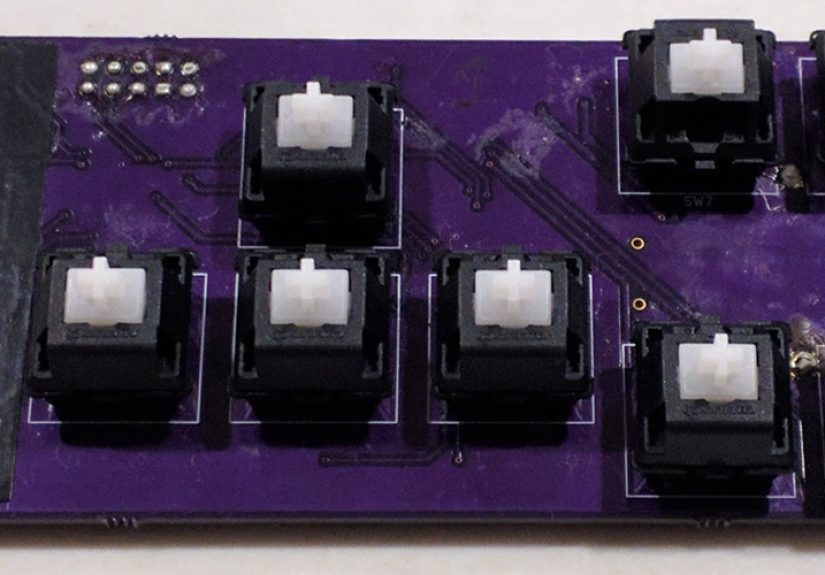
The build, documented as a Hackaday Prize project, uses a cluster of mechanical switches for satisfying tactile clicks, plus
a capacitive touch strip for smooth gestures like zooming. It’s basically the best of both worlds: click when you need a
definite “press,” glide when you want continuous control.
The Hardware Recipe: Clicky Switches, a Touch Slider, and BLE
This project leans into tactile reality. Instead of tiny dome switches, it uses multiple Cherry MX mechanical switchesbig,
unapologetically clicky components that feel like a deliberate rebellion against glass-only design. For the touch element,
it pairs in a capacitive touch controller and routes that into a Bluetooth Low Energy microcontroller module designed for
low-power operation.
Power comes from a coin cell battery (the classic CR2032), keeping the device small and portable. In other words: it’s not a
bulky accessory that needs to be charged every night. It’s closer to a “grab it and go” controller that can sit quietly
until you need it.
The Software Trick: Phones Already Understand Bluetooth Keyboards
Here’s the sneaky-smart part: modern phones already support Bluetooth keyboard input. That means you can send button presses
as keyboard-like commands, and the operating system can interpret them for navigation and shortcuts. The project also leans
on an app layer to make common actions less fussybecause the goal isn’t “type a novel,” it’s “do the thing with minimal
friction.”
On the engineering side, the project notes the kind of details makers love and users never see: the difference between
slower acknowledged BLE messages (“indications”) and faster unacknowledged ones (“notifications”), and how connection timing
affects responsivenessespecially when a touch slider can generate events quickly. This is where “a nice idea” becomes “a
usable device.”
A Quick, Serious Interruption: Tactile Controls Don’t Make Distracted Driving Safe
The project frames itself as a response to distracted driving: if people are going to interact with phones anyway, can we
reduce the amount of eyes-on-screen time? It’s a reasonable harm-reduction instinct, but it needs a clear reality check.
Safety authorities define distracted driving broadlyanything that diverts attention from driving. Texting and phone
interaction are especially risky because they combine visual, manual, and cognitive distraction.
So consider tactile controls a “make it less bad” idea, not a “now it’s fine” permission slip. The safest move is still the
simplest: if you’re driving, don’t use the phone. If you need navigation, set it before you roll. If you need a message
sent, use voice tools or pull over. Your future self (and everyone around you) will appreciate the upgrade.
Buttons Are Quietly Coming Back (Just… Sideways)
One reason this Hackaday project feels timelyeven though it’s from the 2017 erais that the market has been inching back
toward physical input. Not always through built-in keyboards, but through accessories that reclaim tactility.
A great example is the modern wave of physical keyboard cases, like Clicks: a case that adds a BlackBerry-style keyboard to
smartphones, pushing the display upward and giving your thumbs real keys again. Reviews and hands-ons describe the appeal as
equal parts productivity and nostalgiamore screen visible, shortcuts at your fingertips, and that unmistakable “I can type
without staring” vibe.
What’s extra interesting is how this “keys comeback” is expanding beyond one niche. Clicks moved from iPhone cases into
Android options, and the broader conversation about tactile input has spilled into new hardware conceptslike minimalist
messaging-focused devices and snap-on keyboards that attach magnetically. The demand signal is simple: some people want the
feel of real buttons, even in a world where glass dominates.
Haptics: The Touchscreen’s Best Attempt at Pretending It’s a Button
If physical buttons are the “real thing,” haptics are the touchscreen’s method acting career. Modern phones use vibration
actuatorsoften linear resonant actuators (LRAs)to create crisp, short feedback that feels more like a click than a buzz.
Apple’s Taptic Engine approach became famous for making notifications and UI feedback feel tight and intentional, and teardown
analyses show how these actuators differ from old-school spinning motors.
On Android, haptics have become more sophisticated too. Developer guidance emphasizes using haptics thoughtfullymatching
effect types to user expectations, respecting system settings, and taking device capabilities into account. Recent platform
documentation also highlights how richer haptics depend not just on the actuator, but on drivers that control things like
overdrive and braking to reduce lag and “ringing.” Translation: better haptics are as much about control as they are about
hardware.
Even the future of displays is flirting with physical sensation. Emerging approaches use piezoelectric transducers to make
the display itself act like a speakerand potentially a haptic surfacesuggesting a world where your screen could provide
localized vibration and sharper feedback without bulky components. If that matures, “buttons on glass” might stop feeling
like an imitation and start feeling like a new category.
Accessibility: Tactile Input Is Independence
Tactile controls aren’t just about typing faster. For many peopleespecially those with vision impairments or motor
challengesphysical buttons can be the difference between “I can do this privately” and “I need help.”
Organizations focused on blindness and accessibility have repeatedly pointed out that touch-only interfaces can exclude
users when there are no tactile landmarks. That’s why phones and accessories that combine touchscreen flexibility with
physical keys remain relevant. Reviews of accessible devices note the continued value of phones that offer both a touchscreen
and tactile buttons, and there’s a whole ecosystem of braille and tactile keyboards designed specifically to control modern
smartphones without relying on swipes and taps.
From that angle, the Hackaday project reads less like a quirky controller and more like a prototype philosophy: give the user
input options they can feel, and you expand who can use the technology confidently.
Design Lessons from the Hackaday Build (If You Want to Rebuild the Idea Today)
1) Start with “jobs,” not buttons
The most useful tactile control isn’t the one with the most keysit’s the one that maps cleanly to common actions. Think in
verbs: “next,” “back,” “select,” “home,” “voice,” “play/pause,” “navigate,” “favorite shortcut.” The Hackaday project even
emphasizes having a consistent “return to main screen” behavior, which is exactly the kind of UX glue that makes hardware
feel intuitive.
2) Make the layout readable by touch
Tactile UX is about shape and spacing. Use different keycap profiles, group keys in clusters, add a single “anchor” key with
a unique texture, or vary switch resistance. If every key feels identical, your fingers are back to guessingjust with more
clicking noises.
3) Prioritize low-latency feedback
A button without immediacy is just a suggestion. The project’s notes about BLE notification speed, connection intervals, and
event rates are the unglamorous truth: tactile hardware must feel instant. If your slider lags or your button press arrives
late, the brain loses trustand the whole point of tactile confidence collapses.
4) Treat power like a feature
A coin cell power strategy works when the device sleeps efficiently and only “goes fast” when needed. If you’re building a
modern version, you’d still borrow the same approach: keep a low-power baseline, then temporarily increase responsiveness
when the user is actively interacting (like when a slider is touched).
5) Use voice input as the teammate, not the enemy
One smart flow highlighted in the project is blending tactile controls with voice: use buttons to navigate and trigger,
then use voice for text entry or complex commands. That hybrid approach is often faster than typingbuttons give you
predictable control, voice handles the “long form.”
Where the Idea Goes Next: From DIY Rig to Real Interface Layer
The most exciting part of “giving phones tactile buttons back” is that it doesn’t have to be one solution. It can be a
family of solutions:
- Accessory keyboards that attach to phones for people who type a lot and hate glass typing.
- Small tactile remotes like the Hackaday build, optimized for a few high-value actions.
- Tactile overlays that add landmarks on top of a touchscreen for accessibility and precision.
- Smarter haptics that make virtual buttons feel more “real” through better actuator control and design.
- Next-gen displays that can generate sound and touch feedback from the screen surface itself.
Put differently: the future isn’t “go back to keypads.” It’s “stop pretending touch is the only way.” The best interfaces
are multi-sensory and choice-drivenbecause humans are, inconveniently, not all the same.
Conclusion: The Click Heard Around the Pocket
The Hackaday Prize entry (and its kDrive project documentation) captures a truth that big phone design often forgets:
fingers like certainty. A touchscreen is powerful, but it’s also ambiguousespecially when you can’t look, shouldn’t look,
or simply don’t want to look.
Whether you’re here for the maker ingenuity, the accessibility implications, or the simple joy of a button that actually
clicks, “giving phones their tactile buttons back” is more than a gimmick. It’s a reminder that good design isn’t only about
fewer partsit’s about better experiences.
Experiences: What It’s Like When Buttons Come Back to Your Phone (The Real-World, Slightly Messy Version)
The first time you use a physical button accessory with a smartphone, it’s oddly emotionallike running into an old friend
who still remembers your nickname. Your thumbs stop hovering anxiously over glass and start doing what they were trained to
do: find edges, press with intent, and move on. People often describe a weird sense of relief, because the interaction feels
“complete” again. Tap, click, done. No second-guessing whether the screen registered your input. No staring to confirm your
finger landed in the exact pixel neighborhood your phone demanded.
Then reality arrivesbecause tactile input isn’t magic, it’s engineering. Makers who prototype devices like the Hackaday
controller tend to hit the same funny obstacles. The early version is always a little too big, like a remote control that
ate another remote control. The buttons feel incredible, but the mounting is awkward. So you try a different layout. Then
you realize your “perfect” button placement is perfect only for your hands, at the exact angle you tested, in the exact
lighting where you could still cheat by peeking. Back to iteration. You add a distinctive “home” keycap so your thumb can
orient itself by touch. You cluster related actions together. You learnquicklythat tactile UX is not about adding more
buttons. It’s about making fewer buttons feel obvious.
If the project uses Bluetooth, there’s a classic experience: the day everything works… except it feels sluggish. You press a
button and the phone responds half a beat late, which is somehow worse than not working at all. Makers usually end up in a
deep dive of connection settings, message types, and event rates. A slider can be especially dramatic: move your finger and
the device generates a stream of updates, and suddenly your “simple” wireless link is doing cardio. When you finally tune it
so the feedback feels immediate, the whole device transforms from “interesting demo” into “I would actually use this.”
Another common experience is discovering how much you can do without typing. People set up buttons for “read last message,”
“reply with voice,” “navigate home,” “call favorite contact,” or “play/pause.” It becomes less about recreating a full
keyboard and more about reclaiming control. The joy is in the shortcuts: one press to do the thing you do ten times a day.
And when those buttons have real travel and real feedback, you start using them more because they’re satisfyingnot in a
gimmicky way, but in a “my tools respect my time” way.
Finally, there’s the social experience. The moment someone hears the click-click of mechanical switches coming from a phone
accessory, they will ask, “What is that?” And you get to explain that it’s not a tiny typewriter cosplaywell, not only
thatit’s about tactile certainty, accessibility, and reducing friction. The best reactions are from people who say,
“Honestly, I miss that,” and suddenly you’re not just talking about a gadget. You’re talking about how we want technology to
feel: not smoother, not thinner, not more minimaljust more usable. Sometimes the future really does sound like a click.