Table of Contents >> Show >> Hide
- What Made the E&L MMD-1 Special?
- The 1977 Restoration Challenge
- Power Supply: The First Boss Fight
- CPU, Memory, PROM, and the LED Language
- The Breadboarding Area: Where the MMD-1 Becomes a Lab
- Keyboard and Switch Restoration
- ROM Monitor and Program Entry
- Why the MMD-1 Still Feels Modern
- Common Restoration Mistakes to Avoid
- Preserving the Story, Not Just the Circuit Board
- Experience Notes: What Restoring an E&L MMD-1 Feels Like
- Conclusion
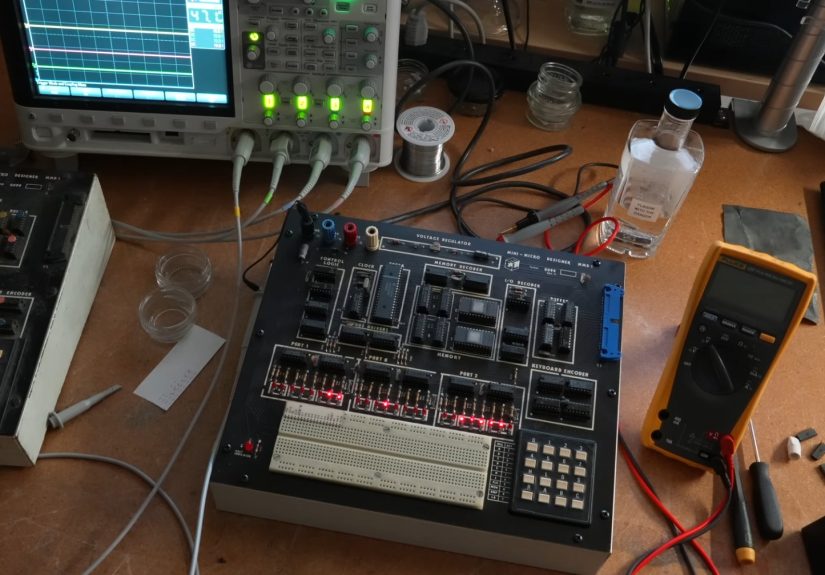
Some vintage computers arrive like museum pieces. Others arrive like a dare. The E&L MMD-1 Mini-Micro Designer belongs beautifully to the second group: a 1970s single-board computer built around the Intel 8080A, packed with LEDs, a hex keypad, onboard memory, a ROM monitor, and a breadboarding area that practically says, “Go ahead, poke the bus lines. What could possibly happen?”
Restoring the E&L MMD-1 is not just about reviving old electronics. It is about bringing back a hands-on learning machine from the moment when microprocessors were still mysterious, expensive, and slightly magical. Before personal computers became beige appliances under office desks, machines like the MMD-1 taught students and engineers how address lines, data lines, control signals, memory, input/output ports, and assembly language actually worked. No glossy touchscreen. No operating system begging for updates. Just switches, LEDs, silicon, and humility.
That is exactly why the MMD-1 still matters. It is a compact classroom for the 8080 era, and restoring one today is a trip into the practical roots of microcomputer design. It is also a reminder that “user interface” once meant pressing hex keys and watching lamps blink like a tiny electronic city at midnight.
What Made the E&L MMD-1 Special?
The E&L MMD-1, short for Mini-Micro Designer, was sold as an educational and engineering microcomputer system. It was associated with the Bugbook-style learning approach and designed for people who wanted to understand computers at the signal level, not merely use them. The board used an Intel 8080A or compatible processor, included onboard RAM and PROM, and provided a ROM monitor for entering and running programs directly from the keyboard.
In everyday language, the MMD-1 was a computer you could learn from because it did not hide very much. It displayed status and data with LEDs. It accepted program entry through a small keypad. It exposed important signals through a breadboarding socket and ribbon connector. That made it ideal for experiments involving input/output, memory expansion, control logic, and external circuits.
Modern computers are more powerful by absurd margins, but they are also opaque. Open a laptop and you mostly see shields, batteries, and warnings that make you feel like you are trespassing in a very expensive sandwich. The MMD-1 is the opposite. It invites inspection. It lets the user see what the processor is doing, one byte at a time.
The 1977 Restoration Challenge
Restoring an E&L MMD-1 Mini-Micro Designer from 1977 begins with patience. This is not the kind of machine you plug in “just to see what happens,” unless your restoration philosophy includes smoke signals. A computer this old may have tired electrolytic capacitors, oxidized sockets, brittle wiring, dirty switches, weak regulators, marginal RAM, missing PROMs, or previous repairs performed with the confidence of a raccoon holding a soldering iron.
The first step is always documentation. A restorer should compare the board against available manuals, schematics, photos, and parts lists. The MMD-1 manual is especially useful because it describes the system architecture, power supply, keyboard entry, LED display behavior, breadboarding socket, and bus connections. For a machine designed to teach hardware, the documentation is not a bonus. It is part of the machine’s soul.
A careful visual inspection can reveal a surprising amount. Look for damaged traces, lifted pads, corroded IC legs, cracked solder joints, incorrect replacement parts, scorched resistors, leaking capacitors, and signs that something once got very hot and then quietly regretted it. On machines with internal power supplies, safety matters even more. Mains-powered vintage electronics should be inspected cautiously, preferably with the help of someone experienced in old power supplies and line-voltage equipment.
Power Supply: The First Boss Fight
Every vintage computer restoration has a villain, and very often it wears the cape labeled “power supply.” The MMD-1 includes an internal supply designed for 115 or 230 VAC operation, producing regulated DC rails used by the logic and interface circuitry. Before applying power to the full board, a restorer should verify the supply condition, fuse rating, wiring configuration, rectifiers, regulators, capacitors, and output voltages.
The goal is simple: do not feed unstable power to rare 1970s chips. The Intel 8080A and its support components are not impossible to replace, but they are old enough that every unnecessary electrical surprise feels rude. Bringing the power supply up cautiously, checking unloaded and loaded voltages, and watching for ripple or excessive heat can prevent a small repair from becoming an archeological tragedy.
Old electrolytic capacitors deserve special attention. Some may still work. Some may work only until they remember they are nearly half a century old. Replacement is often sensible when leakage, swelling, high ESR, or unstable voltage appears. The trick is to preserve originality where possible while still making the unit safe and reliable enough to operate.
CPU, Memory, PROM, and the LED Language
At the heart of the MMD-1 is the Intel 8080A family architecture. The 8080 was one of the defining microprocessors of the 1970s, powering machines, trainers, terminals, arcade hardware, and early personal computer systems. In the MMD-1, the processor is surrounded by the support logic needed to make an educational computer understandable: memory decoding, input/output decoding, keyboard encoding, bus drivers, timing, status indicators, and programmable LED outputs.
The LEDs are more than decoration. They are the MMD-1’s conversation style. Instead of printing text to a display, the system shows address and data information through rows of lights. For beginners in the 1970s, this made invisible processor activity visible. For restorers today, those same LEDs are diagnostic friends. If they latch correctly, respond to the monitor, or run a simple pattern, they tell you the system is waking up.
One classic test is a “chasing lights” style program, where LED patterns move across the display. It is simple, visual, and oddly satisfying. When a restored MMD-1 finally runs that kind of test, it feels less like watching a computer boot and more like watching a tiny 1977 marching band get back in formation.
The Breadboarding Area: Where the MMD-1 Becomes a Lab
The breadboarding area is one of the MMD-1’s most charming features. Many early microcomputer systems were boxes with switches, sockets, or card cages. The MMD-1 went further by giving users a place to build circuits directly alongside the processor system. Important bus and control signals were routed to the breadboarding socket, allowing experiments with external logic, displays, interfaces, memory, and other custom hardware.
This is what separates the MMD-1 from a simple trainer. It was not only a machine for entering opcodes. It was a platform for learning how a microprocessor talks to the outside world. Students could connect circuits, observe results, and build confidence through experiments that linked software instructions to physical signals.
Today, that breadboarding area also creates restoration concerns. Sockets may be worn, contacts may be oxidized, and prior experiments may have left bent pins, broken jumpers, or mysterious modifications. Cleaning and testing the socket area can be just as important as checking the CPU board. After all, a computer trainer with a bad breadboard is like a classroom with no desks: technically still a room, but not exactly fulfilling its destiny.
Keyboard and Switch Restoration
The MMD-1’s keyboard is part of its identity. Program entry happens through keys for octal or hex-style input and control functions such as examine, deposit, go, reset, and address selection. When restoring the machine, unreliable keys can cause maddening symptoms. A bad key might look like bad RAM, bad ROM, or a haunted CPU with a grudge.
Switch cleaning should be careful and conservative. The goal is not to drown the keyboard in contact cleaner and hope for a miracle. The goal is to inspect, clean, and test each key until it behaves consistently. A logic probe or oscilloscope can help confirm whether the keyboard encoder and related circuitry are producing the expected signals.
Once the keyboard works, the rest of the machine becomes easier to evaluate. You can enter bytes, examine memory, run routines, and check whether the LEDs display the expected values. In a system like the MMD-1, the keyboard is not a peripheral. It is the front door.
ROM Monitor and Program Entry
The MMD-1’s ROM monitor is one of its most important features. It allows direct entry and execution of small programs without needing a disk drive, terminal, or modern development environment. This is historically significant because early microcomputer education often happened at the byte level. Users learned by entering machine code, watching results, making mistakes, and then learning exactly why the machine was unimpressed.
Testing the ROM monitor involves confirming that the PROMs are present, readable, and correctly mapped. If a monitor PROM is missing or corrupted, the machine may appear dead even if the CPU and RAM are healthy. In that case, restoration may require comparing PROM contents against known images or documentation, then carefully recreating the original behavior.
This is where vintage computer restoration becomes part electronics, part detective work, and part polite negotiation with entropy. The machine will tell you what is wrong, but usually in the least convenient dialect available.
Why the MMD-1 Still Feels Modern
The MMD-1 may look primitive beside a modern single-board computer, but conceptually it feels surprisingly current. Today’s maker boards, microcontroller kits, and STEM lab platforms all promise hands-on learning through direct experimentation. The MMD-1 did that in the 1970s with an 8080A, LEDs, breadboard pins, and educational manuals.
Its design philosophy remains powerful: expose the important signals, let users experiment, and make the computer understandable. That is still how people learn electronics best. You can watch a thousand videos about bus timing, but one afternoon debugging a real data line will teach you lessons that stick forever, mostly because you earned them the hard way.
Common Restoration Mistakes to Avoid
One common mistake is replacing parts too quickly. Vintage boards often contain socketed ICs, discrete logic, and connectors that can fail in subtle ways. A dead machine is not automatically a dead CPU. It may be a missing clock, bad reset circuit, weak power rail, dirty socket, broken trace, or one logic chip holding a bus line hostage.
Another mistake is ignoring previous modifications. Training systems were meant to be used, modified, and experimented on. That means an MMD-1 may have extra wires, added sockets, replaced regulators, unusual jumpers, or undocumented “improvements” from decades ago. Some may be clever. Some may be crimes against solder. All of them deserve careful review before power is applied.
A third mistake is restoring only for appearance. A shiny case and clean keypad are nice, but the real success is functional understanding. A restored MMD-1 should not merely look good on a shelf. It should run programs, respond to the monitor, drive LEDs, and support experiments through its breadboarding interface. The best restoration returns the machine to its educational purpose.
Preserving the Story, Not Just the Circuit Board
Every restored MMD-1 carries a story about early microcomputer education. It connects the world of magazine projects, kit computers, classroom labs, Intel processors, PROM monitors, and hands-on engineering. The system reflects a time when learning computing meant learning electronics, and learning electronics meant being close enough to smell warm components.
Preservation should include photographs, notes, measured voltages, ROM images where legally and practically possible, repair logs, and documentation of any changes made. Future collectors, historians, and restorers benefit from careful records. A machine restored silently is useful. A machine restored with documentation becomes part of the shared historical record.
Experience Notes: What Restoring an E&L MMD-1 Feels Like
Restoring the E&L MMD-1 Mini-Micro Designer is the kind of project that changes your sense of what a computer is. At first, it looks like a board full of old chips and intimidating labels. Then, slowly, the logic becomes personal. You stop seeing “a vintage computer” and start seeing a living map of decisions: why the keyboard was arranged that way, why the LEDs were grouped into ports, why the breadboard socket mattered, and why the designers wanted students to touch the machine’s nervous system.
The most memorable part is usually the first successful sign of life. It may not be dramatic. No startup chime, no colorful logo, no cheerful desktop. Maybe one LED changes state. Maybe the reset line behaves correctly. Maybe the address display finally shows something that makes sense. But in that moment, the machine feels less like an artifact and more like a conversation has resumed after a 40-year pause.
There is also a strange pleasure in slowing down. Modern troubleshooting often involves firmware updates, USB adapters, and search results that contradict each other with great confidence. The MMD-1 forces a more physical rhythm. Check the rail. Check the clock. Check reset. Check the bus. Check the socket. The process is methodical, almost meditative, except for the occasional moment when a flaky connection makes you question your career choices.
Another experience unique to the MMD-1 is learning through visibility. The LEDs are not decorative nostalgia; they are honest feedback. When a program runs and the lights move, you can feel the relationship between code and hardware. A single instruction is no longer an abstract line in a manual. It is an electrical event. That is why machines like this remain valuable even in an age of powerful emulators. Emulation can teach logic, but original hardware teaches respect.
The breadboarding section adds another layer of satisfaction. Once the base computer works, the restorer can build small interface circuits and watch software interact with real hardware. Even a simple display or input experiment feels rewarding because the MMD-1 was designed for exactly that purpose. It is not merely being restored; it is being allowed to teach again.
Finally, restoring the MMD-1 gives a deep appreciation for 1970s educational engineering. The designers were not trying to hide complexity. They were organizing it so students could climb it like a ladder. That approach still feels fresh. In fact, after spending time with the MMD-1, many modern devices feel almost too sealed, too polished, too unwilling to explain themselves. The MMD-1 may be old, but its best idea remains timeless: the best computer for learning is the one that lets you see how the magic trick works.
Conclusion
The E&L MMD-1 Mini-Micro Designer is more than a collectible 1977 single-board computer. It is a teaching instrument, a restoration challenge, and a snapshot of the moment when microprocessors moved from specialist laboratories into classrooms, workshops, and curious hands. Restoring one means respecting its history while carefully returning its circuitry to working order.
From the Intel 8080A processor to the ROM monitor, LED displays, keyboard input, power supply, and integrated breadboarding area, the MMD-1 represents a wonderfully direct kind of computing. It does not hide behind layers of software. It shows its work. And when those LEDs finally blink again, the reward is not just a working machine. It is a small, glowing reminder that the personal computer revolution was built one bit, one bus line, and one stubborn restoration at a time.