Table of Contents >> Show >> Hide
- What Is Debian Bookworm?
- Why Raspberry Pi OS Bookworm Matters
- Wayland Becomes The Default: The Big Desktop Shift
- Wayland vs. X11: What Actually Changes?
- PipeWire: A Modern Audio Backbone
- NetworkManager Becomes The Networking Standard
- Better Foundation For Raspberry Pi 5
- App Compatibility: Mostly Smooth, But Not Magic
- Fresh Install vs. Upgrade
- Who Benefits Most From Raspberry Pi OS Bookworm?
- Potential Problems To Watch For
- Why This Move Is Bigger Than Raspberry Pi
- Practical Tips Before Moving To Bookworm
- Hands-On Experience: Living With Bookworm And Wayland On Raspberry Pi
- Conclusion
- SEO Tags
Raspberry Pi OS has always had a charming split personality. On one hand, it is friendly enough for classrooms, hobby benches, and weekend projects involving blinking LEDs. On the other hand, it sits on top of serious Linux foundations that power servers, developer workstations, robotics rigs, kiosks, media centers, and more tiny computers than anyone can count without spilling coffee on a GPIO header.
With the move to Debian Bookworm, Raspberry Pi OS took one of its most important steps forward in years. The change was not just a fresh wallpaper, a few updated apps, and a polite wave from the update manager. It brought Raspberry Pi OS in line with Debian 12, modernized the desktop stack, shifted core system tools, and made Wayland the default display system for newer Raspberry Pi boards. In plain English: the operating system under the hood became newer, cleaner, and more future-facing.
The headline change is easy to state: Debian Bookworm came to Raspberry Pi, and Wayland replaced the old X11-based desktop path as the default on supported models. But the real story is richer. It touches performance, security, graphics, remote access, audio, networking, app compatibility, and the everyday experience of using a Raspberry Pi as a real desktop computer instead of a “cute little board that might eventually become a weather station.”
What Is Debian Bookworm?
Debian Bookworm is Debian 12, the stable release that followed Debian Bullseye. Debian releases are famous for being steady, conservative, and dependable. They are not usually the distribution equivalent of a fireworks show, but that is exactly the point. Debian favors reliability, long-term maintainability, and broad software support. For Raspberry Pi OS, which is built on Debian, moving to Bookworm meant receiving a newer base system with updated libraries, drivers, desktop components, development tools, and security improvements.
For Raspberry Pi users, this matters because the operating system is the quiet layer that decides how everything else behaves. A newer Debian base can improve hardware support, application compatibility, package availability, and the long-term health of the platform. It also gives developers a more current foundation for building projects, whether that project is a Python-powered greenhouse monitor, a home dashboard, a lightweight server, or a full desktop workstation squeezed into a board smaller than a sandwich.
Why Raspberry Pi OS Bookworm Matters
The Bookworm release was especially important because it arrived alongside the Raspberry Pi 5 era. Raspberry Pi hardware had become more powerful, and the software stack needed to keep pace. Users were no longer only asking, “Can this run Linux?” They were asking, “Can this run a modern browser, handle multiple displays, manage audio properly, connect smoothly to networks, and feel like a normal computer?”
Bookworm helped answer that question with a confident yes, though not without a few transition bumps. Raspberry Pi OS had to move away from older assumptions, especially around the desktop. The classic X Window System, usually called X11, had served Linux desktops for decades. It was reliable, familiar, and supported by almost everything. It was also old enough to have seen more Linux flame wars than most users have seen login screens.
Wayland represents the newer approach. It is designed to simplify how applications talk to the display server, improve security boundaries, reduce legacy complexity, and support smoother graphics behavior. For Raspberry Pi, adopting Wayland was not just about chasing what larger Linux desktops were doing. It was about building a desktop environment that could better match modern graphics expectations while staying light enough for small-board hardware.
Wayland Becomes The Default: The Big Desktop Shift
The most talked-about change in Raspberry Pi OS Bookworm was the move to Wayland by default on Raspberry Pi 4 and Raspberry Pi 5. Earlier Raspberry Pi models continued to use X11 at first because the newer desktop stack needed more optimization for lower-powered hardware. That distinction matters. The Raspberry Pi Foundation did not simply flip a switch and hope every board would magically become a tiny graphics workstation. It introduced the change where the hardware could handle it best.
In the Bookworm desktop, Raspberry Pi OS used Wayfire as the Wayland compositor for supported boards. A compositor is the part of the desktop system that manages windows, effects, screen drawing, and how applications appear on the display. If the desktop were a stage play, the compositor would be the stage manager, lighting crew, and person whispering “your window is supposed to be over there” from behind the curtain.
Wayfire gave Raspberry Pi OS a more modern Wayland-based desktop. Users could see subtle visual polish, smoother window behavior, and a foundation that better aligned with where Linux desktops are heading. Later Raspberry Pi OS releases moved toward labwc, a lighter Wayland compositor that became the default across Raspberry Pi models after additional optimization. That later step is important because it shows the transition was not a one-time stunt. It was a multi-stage modernization of the Raspberry Pi desktop.
Wayland vs. X11: What Actually Changes?
For many users, the honest answer is: not much at first glance. The desktop still has panels, menus, windows, icons, browser shortcuts, terminal access, file management, and the usual Raspberry Pi feel. That is good. A successful platform transition should not make users feel like their computer was replaced overnight by a spaceship dashboard.
Under the hood, however, the difference is significant. X11 was designed in a very different computing era. It allowed broad access between applications and the display server, which helped flexibility but created security and complexity concerns. Wayland takes a more modern approach, giving applications less unnecessary access and shifting more responsibility to the compositor.
In practical terms, Wayland can mean better isolation between apps, cleaner graphics handling, reduced screen tearing, and a path toward improved performance. It can also mean some older tools need updates or workarounds. Screen capture utilities, remote desktop tools, custom window managers, automation scripts, and certain legacy applications may behave differently. That is the price of moving away from decades of X11 habits. Progress sometimes arrives wearing a hard hat and carrying a compatibility checklist.
PipeWire: A Modern Audio Backbone
Bookworm also brought PipeWire into the spotlight for Raspberry Pi OS. PipeWire is a modern multimedia server that handles audio and video streams. It has become increasingly common across Linux distributions because it can replace older sound systems while also supporting modern use cases such as screen sharing, Bluetooth audio, low-latency workflows, and professional audio routing.
For a regular Raspberry Pi user, PipeWire is not something you necessarily think about every day. Ideally, it simply makes sound work. But its presence matters. Raspberry Pi boards are used in media centers, classroom setups, software-defined radio projects, music experiments, video kiosks, conferencing tools, and portable maker builds. A more capable multimedia layer helps those projects feel less like fragile experiments and more like dependable systems.
NetworkManager Becomes The Networking Standard
Another major Bookworm-era improvement was the use of NetworkManager as the default way to manage network connections. This change is easy to underestimate until you have spent a long evening debugging Wi-Fi on a headless Raspberry Pi while muttering things no official documentation should ever quote.
NetworkManager provides a modern, widely used system for managing Ethernet, Wi-Fi, VPNs, hotspots, and changing network conditions. It is familiar to users of many Linux desktop distributions and gives Raspberry Pi OS a more standard networking foundation. That is especially useful as Raspberry Pi devices move between roles: desktop today, server tomorrow, travel router next week, and “temporary project that somehow stays installed forever” after that.
For beginners, better network management means fewer confusing configuration files. For advanced users, it means more predictable integration with Linux tooling. For everyone, it means the network icon in the top panel has more responsibility than just sitting there looking confident.
Better Foundation For Raspberry Pi 5
The Raspberry Pi 5 raised expectations. It offered more performance than previous boards and made the idea of using a Raspberry Pi as a daily desktop feel more realistic. Bookworm was part of that story because newer hardware needs updated software support. A modern kernel, updated graphics stack, newer Mesa components, refreshed desktop tools, and improved system services all help the Pi 5 stretch its legs.
That does not mean a Raspberry Pi 5 suddenly replaces every laptop. It still has limits, especially with heavy browser tabs, large development environments, video editing, and anything that treats RAM like an all-you-can-eat buffet. But with Bookworm, the Pi 5 feels more coherent as a desktop machine. Browsing, coding, writing, light image editing, media playback, and everyday learning tasks are more comfortable than they were in earlier Raspberry Pi generations.
App Compatibility: Mostly Smooth, But Not Magic
The move to Wayland does not mean old X11 applications instantly disappear. Many Linux apps run fine under Wayland, and XWayland exists to support applications that still expect X11. That compatibility layer is one reason the transition can feel surprisingly normal. You open the app, the app opens, and nobody needs to hold a ceremony.
Still, not every workflow is identical. Some screen recording tools, remote desktop utilities, clipboard managers, window positioning scripts, or niche graphical programs may need updated versions or different settings. Users who rely on specialized software should test before upgrading a mission-critical Raspberry Pi. If your Pi controls a display in a shop, a dashboard in a classroom, or a kiosk at an event, do not discover compatibility surprises five minutes before people arrive. That is how computers learn to smell fear.
Fresh Install vs. Upgrade
For major Raspberry Pi OS releases, a clean installation is often the safest route. Updating an existing system can work in some cases, but a fresh image reduces the chance of old configuration files fighting new system components. This is especially true when the release changes major desktop architecture, audio handling, network management, and display behavior.
The practical approach is simple: back up important files, note installed packages, export project configurations, and flash a new Raspberry Pi OS Bookworm image using Raspberry Pi Imager. After booting, restore your projects carefully instead of dragging every old setting into the new system like a suitcase full of mysterious cables.
Who Benefits Most From Raspberry Pi OS Bookworm?
Desktop Users
Desktop users benefit from the modern Wayland direction, updated applications, better audio handling, and improved networking. Raspberry Pi 4 and Raspberry Pi 5 owners in particular can enjoy a more polished experience. The desktop still feels familiar, but the foundation is newer and better prepared for future development.
Developers
Developers get newer toolchains, updated libraries, and a base system closer to current Debian. That matters when building web apps, Python tools, hardware projects, containers, educational software, or embedded systems. A newer base reduces friction when documentation assumes modern package versions.
Makers And Hardware Tinkerers
Makers gain a stronger platform for projects that combine graphics, audio, networking, and hardware control. For example, a touchscreen dashboard can benefit from Wayland and improved display handling, while a smart speaker project can benefit from PipeWire and better Bluetooth audio behavior.
Schools And Labs
Schools and labs benefit from consistency, security updates, and a more modern environment. Raspberry Pi remains popular in education because it makes computing visible and affordable. Bookworm keeps that mission alive while making the software stack less dusty.
Potential Problems To Watch For
No major operating system transition is perfectly smooth. Raspberry Pi OS Bookworm changed enough core pieces that some users noticed differences. The most likely issues involve display behavior, remote access, screen capture, older software, custom startup scripts, and unusual hardware setups.
Remote desktop is one area to examine carefully. Wayland handles screen access differently from X11, and tools that once assumed X11 may need replacement, reconfiguration, or updated versions. Similarly, scripts that depend on X11 utilities such as xrandr, xdotool, or certain display environment variables may not behave as expected under Wayland.
The best strategy is not panic. It is testing. Try Bookworm on a spare microSD card first. Confirm that your display, keyboard, mouse, Wi-Fi, audio, camera, browser, development tools, and project software work as expected. Once everything checks out, migrate with confidence.
Why This Move Is Bigger Than Raspberry Pi
The Raspberry Pi move to Bookworm and Wayland mirrors a larger Linux desktop shift. Fedora, Ubuntu, Debian, GNOME, KDE, and many Linux projects have been moving toward Wayland for years. Raspberry Pi OS joining that movement matters because it brings Wayland to a huge audience of beginners, students, makers, educators, and hobbyists.
Raspberry Pi has always been a gateway computer. Many users meet Linux for the first time on a Pi. When Raspberry Pi OS modernizes, it changes what new Linux users learn as “normal.” A generation of learners may now treat Wayland, PipeWire, and NetworkManager as standard parts of the Linux desktop instead of optional advanced topics. That is a quiet but meaningful shift.
Practical Tips Before Moving To Bookworm
Before switching to Raspberry Pi OS Bookworm, make a full backup. Save important files, scripts, SSH keys, project folders, configuration files, and notes about installed packages. If your Raspberry Pi runs a server or automation project, document ports, services, cron jobs, systemd units, and hardware connections.
Next, consider using a fresh microSD card or SSD for testing. Boot Bookworm separately, install your required tools, and check performance. Test browsers, audio output, camera modules, GPIO libraries, remote access, and any specialized software. If you use your Pi for a display project, test the exact monitor or TV you plan to use. Display quirks are much easier to solve before the Pi is mounted behind a screen with zip ties and optimism.
Finally, keep expectations realistic. Bookworm is not a magic turbo button. It is a modernized foundation. The biggest benefits are long-term support, cleaner architecture, better standards alignment, and improved desktop potential. Some users will notice smoother daily use immediately. Others will mainly appreciate that the system feels more current and better prepared for future updates.
Hands-On Experience: Living With Bookworm And Wayland On Raspberry Pi
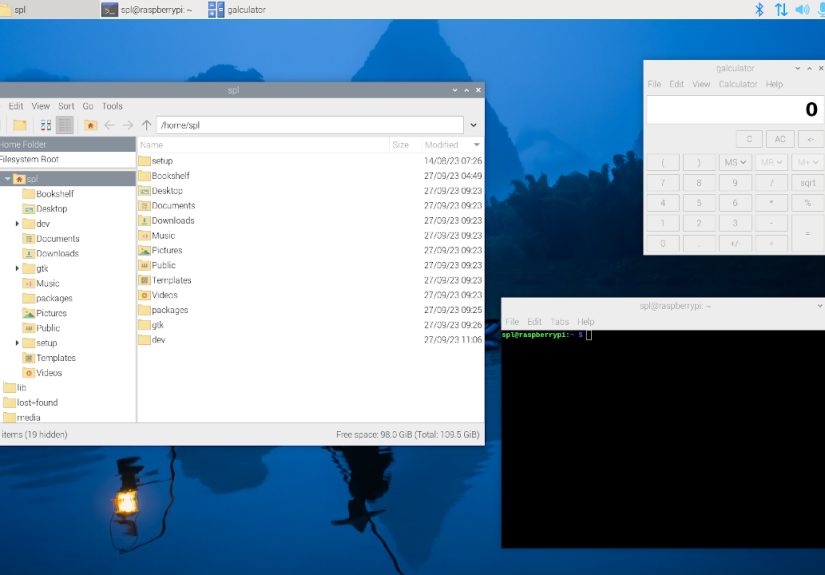
Using Raspberry Pi OS Bookworm with Wayland feels a little like moving into a renovated apartment where the walls are the same color, but the wiring no longer looks like it was installed during a thunderstorm. At first boot, the experience remains familiar. The panel is where you expect it, the menu behaves normally, and the desktop does not shout, “Welcome to the future!” in neon letters. That restraint is a good thing. The best operating system changes often work quietly.
On a Raspberry Pi 5, the desktop feels more comfortable than older Raspberry Pi desktop setups. Opening the file manager, launching the terminal, adjusting settings, and using the browser all feel like normal computer tasks rather than experiments in patience. Wayland does not make every action instantly faster, but the environment feels cleaner and more composed. Window movement is smooth, and the visual experience feels less like a board pretending to be a desktop and more like a small computer that knows its job.
The real improvement becomes noticeable when you use the Pi for mixed tasks. For example, you might keep a browser open with documentation, run a Python script in the terminal, connect to Wi-Fi, play audio through Bluetooth speakers, and use a small HDMI display. On older software stacks, that combination could feel slightly fragile. With Bookworm, PipeWire, NetworkManager, and the newer desktop path, the pieces feel more coordinated. The Pi still has hardware limits, but the software gets out of the way more often.
There are still moments when Wayland reminds you that Linux transitions are rarely invisible. A screen recorder may need a different tool. A remote desktop setup may require new instructions. A script written years ago for X11 may fail with the confidence of a cat knocking a glass off a table. But these are manageable issues, especially for users who test first and avoid upgrading critical systems in a hurry.
For project builders, the best experience is using Bookworm as a clean starting point. Flash a new image, update packages, install only what the project needs, and build from there. This avoids carrying old configuration clutter into a new architecture. It also makes troubleshooting easier because you are not trying to guess whether a problem comes from Bookworm, Wayland, a leftover Bullseye setting, or that one command you copied from a forum in 2018.
For desktop learning, Bookworm is excellent. It gives students and hobbyists a more modern Linux experience without overwhelming them. They can still learn the terminal, Python, package management, networking, and hardware projects, but they are doing so on a system aligned with where Linux is going. That makes Raspberry Pi OS Bookworm more than a routine update. It is a bridge between the Raspberry Pi’s educational roots and its future as a capable, modern small-board computer platform.
Conclusion
Debian Bookworm coming to Raspberry Pi OS was more than a version bump. It marked a meaningful modernization of the Raspberry Pi software stack. With Debian 12 as the base, Wayland becoming the default display path on supported boards, PipeWire handling modern multimedia needs, and NetworkManager simplifying connectivity, Raspberry Pi OS became better prepared for the next generation of users and projects.
The move is especially important because Raspberry Pi sits at the intersection of education, hobby electronics, Linux experimentation, and practical computing. A modern desktop stack gives beginners a better first experience and gives advanced users a stronger base for serious projects. Wayland may still require adjustment for certain workflows, but the direction is clear: Raspberry Pi OS is moving forward, and Bookworm was one of the biggest steps on that road.
If you use a Raspberry Pi 4 or Raspberry Pi 5 as a desktop, development machine, media device, or maker platform, Bookworm is worth exploring. Start with a fresh installation, test your workflow, and keep backups close. The result is a Raspberry Pi OS that feels familiar on the surface but much more modern underneath. In other words, the Bookworm has arrived, and it brought a very useful toolbox.