Table of Contents >> Show >> Hide
- Why a PSP Still Makes Sense in a Home Workshop
- What Makes the PSP a Good Workshop Media Player?
- Understanding PSP Media Support
- How to Set Up a PSP Media Player in the Workshop
- Practical Uses for a PSP in the Home Workshop
- Workshop Mounting Ideas
- Limitations You Should Know Before Starting
- Is a PSP Better Than a Phone or Tablet?
- Tips for Getting the Best Experience
- of Workshop Experience: Living With a PSP Media Player
- Conclusion
Note: This article is written as publication-ready HTML and is based on real PSP media features, official PlayStation format support, practical workshop use cases, and maker-style repurposing ideas.
Why a PSP Still Makes Sense in a Home Workshop
The Sony PSP may not be the first gadget people think of when setting up a modern home workshop, but that is exactly why it is interesting. While today’s phones, tablets, smart speakers, and wall-mounted displays can all play music or videos, the PSP has one advantage that workshop people quietly appreciate: it is old enough to be expendable, small enough to fit anywhere, and capable enough to do the job without turning into a notification machine.
A home workshop is not a living room. It is a place where sawdust drifts into corners, metal shavings appear out of nowhere, glue somehow lands on objects three feet away, and every flat surface becomes temporary storage. Bringing an expensive phone or tablet into that environment can feel like inviting a silk sofa to a welding class. A PSP, on the other hand, is sturdy, compact, and surprisingly useful as a dedicated media player.
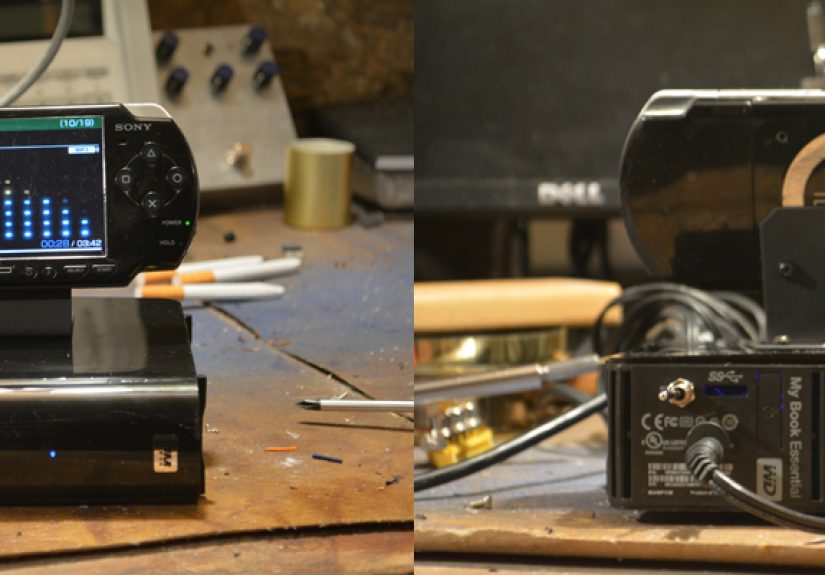
The idea behind a PSP media player for the home workshop is simple: take a handheld gaming device that may be sitting forgotten in a drawer and give it a second career. Instead of collecting dust, it can play music, podcasts, repair videos, saved tutorials, audiobooks, and short reference clips while you work. It is not trying to replace a modern computer. It is trying to be the little media buddy that does one job without drama.
What Makes the PSP a Good Workshop Media Player?
The PSP was designed as more than a game console. From the beginning, Sony positioned it as a portable entertainment device that could play games, music, videos, and photos. That multimedia DNA is what makes it surprisingly useful in a workshop setting.
Compact Size and Easy Placement
The PSP’s small body makes it easy to place on a shelf, clamp near a workbench, or tuck into a simple homemade dock. It does not need a full monitor arm or a dedicated table. A basic stand, a scrap-wood cradle, or even a repurposed phone holder can turn it into a bench-side screen.
Because the device is lightweight, it can be moved around the workshop as needed. Sanding station today, electronics bench tomorrow, bicycle repair corner next weekend. It travels without asking for a renovation plan.
Built-In Screen and Controls
Unlike a Bluetooth speaker, the PSP gives you a screen. That means you can browse your media library, pause a video, skip tracks, or check a tutorial step without needing another device. The physical buttons are also useful in a shop. When your fingers are dusty or slightly sweaty, tapping a glass screen is not always fun. Buttons are easier to operate, and they feel right in a practical environment.
Headphone Jack and Simple Audio Output
The PSP includes a standard 3.5mm headphone output, which is ideal for connecting powered speakers, an old stereo receiver, computer speakers, or a small workshop amplifier. If you already have a pair of speakers that survived three garage cleanouts, the PSP can probably feed audio into them with a basic cable.
This is one of the easiest ways to make the device useful. Load it with music, plug it into speakers, place it somewhere safe, and suddenly the workshop has a dedicated audio station. No phone battery drain. No incoming calls interrupting your favorite playlist. No accidentally covering your main device in sawdust because you just had to replay that one song.
Understanding PSP Media Support
To get the best results, it helps to understand what the PSP can and cannot play. The PSP supports common media types from its era, including MP3 audio, AAC audio in MP4 containers, WAV files, JPEG images, and properly encoded MP4 video. It can also play H.264/MPEG-4 AVC video when formatted correctly.
That “formatted correctly” part matters. A modern 4K video downloaded from the internet will not magically play on a PSP. The PSP was built for a 480 x 272 screen, so video should be converted to PSP-friendly resolution, bitrate, and codec settings. The good news is that workshop use rarely needs cinema-level quality. A clear 480p-style reference clip is more than enough when you are trying to remember which screw goes into which bracket.
Best Audio Formats for Workshop Use
For music, MP3 is the easiest choice. It is widely supported, simple to manage, and works well for long playlists. If you have old albums, podcast episodes, or downloaded instructional audio, converting them to MP3 is usually the most painless route.
For a workshop setup, consider organizing audio into folders such as:
- Workshop Playlists
- Podcasts
- Audiobooks
- Repair Notes
- Background Music
Simple folder names make navigation faster. You do not want to scroll through a chaotic library while holding a wrench and wondering why “Track 07 Final Final New Mix” keeps appearing everywhere.
Best Video Formats for PSP
For video, MP4 is the practical choice. Use H.264 or MPEG-4 video with AAC audio, and keep the resolution close to the PSP screen size. A video encoded around 480 x 272 will look natural on the display and keep file sizes manageable.
This is useful for short workshop clips such as:
- Tool setup demonstrations
- Soldering technique videos
- Small engine repair steps
- Woodworking jig instructions
- 3D printer maintenance clips
- Bike repair tutorials
- Safety reminders for unfamiliar tools
The PSP is not ideal for watching a two-hour masterclass while standing at a bench, but it is excellent for replaying a three-minute “how does this part fit again?” clip.
How to Set Up a PSP Media Player in the Workshop
Setting up a PSP as a workshop media player does not require a complicated build. You can keep it simple or make it fancy depending on your tools, patience, and willingness to turn a five-minute idea into a weekend project.
Step 1: Check the PSP and Battery
Start by checking whether the PSP powers on, charges properly, and reads the memory card. Older lithium-ion batteries can swell or fail, so inspect the battery carefully. If it looks swollen, damaged, or suspicious, replace it rather than using it. A workshop media player should be useful, not spicy.
If the PSP works on AC power but the battery is weak, it can still serve as a stationary media player. Just place it where the power cable will not be pulled, pinched, or attacked by a rolling toolbox.
Step 2: Prepare a Memory Stick
Most PSP models use Memory Stick Duo or Memory Stick PRO Duo storage. Many owners use adapters with microSD cards, but compatibility can vary depending on the adapter and card size. For a simple media setup, a modest-size card is usually enough. Music and low-resolution videos do not require huge storage.
Format the card in the PSP when possible, then connect the device to a computer using USB mode. This helps create the proper folder structure. After that, add music, videos, and photos to the appropriate folders.
Step 3: Convert Videos Properly
If a video will not play, the problem is usually the codec, resolution, file name, or folder placement. Convert the video to an MP4 format suitable for PSP playback. Keep the resolution modest, use AAC audio, and avoid extremely high bitrates.
For workshop videos, prioritize clarity over file size obsession. Text labels, close-up shots, and hand movements should be visible. If the tutorial shows tiny screws or wiring colors, test the clip on the PSP before relying on it during a project.
Step 4: Build or Buy a Dock
A dock makes the PSP feel like a real workshop appliance instead of a handheld sitting nervously beside a drill press. You can use a basic phone stand, a 3D-printed holder, a bent acrylic stand, or a wooden cradle made from scraps.
The ideal workshop dock should hold the PSP at a readable angle, keep the charging cable accessible, and prevent the device from sliding off the bench. Add rubber feet or foam padding if the surface vibrates. Workshops are full of small earthquakes caused by sanders, compressors, and people dropping things they definitely meant to place gently.
Practical Uses for a PSP in the Home Workshop
A PSP media player can fit into many workshop routines. Its value comes from being dedicated, simple, and separate from your main phone or computer.
Music Without Phone Distractions
Music is the obvious use. Load a few playlists, connect speakers, and let the PSP handle the soundtrack. This keeps your phone away from dust and reduces the temptation to check messages every time you change tracks.
For repetitive tasks like sanding, organizing hardware, painting trim, or assembling parts, a dedicated music player helps create rhythm. It also makes the space feel more inviting. A silent workshop can be peaceful, but after an hour of sorting screws, even a humble MP3 playlist starts to feel like a luxury feature.
Offline Tutorials and Reference Videos
The PSP is especially useful for saved videos. Internet access in garages, basements, and backyard sheds is often unreliable. Instead of depending on Wi-Fi, you can store important clips directly on the memory card.
For example, if you are rebuilding a carburetor, replacing a laptop screen, tuning a derailleur, or assembling a CNC kit, you can save the most relevant short clips and replay them offline. That way, your instructions do not vanish just because the router is on the other side of three walls and a refrigerator.
Photo Reference Library
The PSP can display photos, which makes it handy for reference images. Take pictures before disassembling something, transfer them to the PSP, and use the device as a visual guide during reassembly.
This is particularly helpful for wiring layouts, furniture hardware, small appliance repairs, and anything involving “I’m sure I’ll remember where this goes.” Famous last words, right next to “This should only take ten minutes.”
Audio Notes and Checklists
You can also use the PSP for audio notes. Record reminders on another device, convert them to MP3 if needed, and store them in a project folder. This can be useful for repeated procedures, such as finishing steps, tool maintenance routines, or project checklists.
For example, a folder named “Table Saw Setup” might include short audio reminders about blade height, fence alignment, dust collection, and push-stick placement. It is not a replacement for proper safety training, but it can help reinforce good habits.
Workshop Mounting Ideas
One of the most enjoyable parts of this project is deciding how the PSP should live in the workshop. A good mount protects the device, improves visibility, and makes it feel like part of the workspace.
Simple Shelf Setup
The easiest option is a small shelf above the bench. Place the PSP in a stand, route the power cable neatly, and connect audio to speakers. This keeps it away from spills and most dust while still making the controls accessible.
Wall-Mounted Cradle
A wall-mounted cradle works well in tight spaces. A simple wooden bracket can hold the PSP at eye level. Add a lip at the bottom and side stops to prevent slipping. Leave room for the power cable, headphone jack, and memory card access.
Tool-Cart Media Station
If you use a rolling tool cart, mount the PSP on the top tray or side panel. This creates a mobile media station that follows you around the shop. Add a small pair of powered speakers or a compact rechargeable speaker with line-in support.
Dust-Smart Placement
Avoid placing the PSP directly beside sanding, cutting, or grinding stations. Dust can clog buttons, ports, and speakers. If your workshop gets very dusty, consider a clear protective cover when the device is not in use. Do not fully seal it while operating, because electronics need ventilation.
Limitations You Should Know Before Starting
The PSP is useful, but it is not magic. Understanding its limitations will save frustration.
The Screen Is Small
The PSP screen is clear for its size, but it is still small compared with a tablet or monitor. It works best for short videos, close-up reference clips, and simple menus. Long technical videos with tiny text may be uncomfortable to watch.
File Compatibility Takes Patience
Modern media files may need conversion. If you expect every video to play instantly, the PSP will humble you. Once you find a good conversion setting, however, the process becomes easy. Create a preset and reuse it for future workshop clips.
Storage Is Limited by Modern Standards
Even with adapters, the PSP is not a modern media server. Keep your library focused. A curated collection of useful files is better than a giant digital junk drawer. Your future self will thank you when you can actually find the video called “router-bit-depth-example.mp4.”
Old Hardware Needs Care
Buttons, screens, batteries, and charging ports can wear out. Treat the PSP as a practical vintage device. Keep it clean, avoid rough handling, and do not leave it in extreme heat or moisture.
Is a PSP Better Than a Phone or Tablet?
In raw performance, no. A modern phone or tablet has a better screen, faster storage, streaming apps, Bluetooth, and easier file management. But the PSP wins in a different category: dedicated usefulness.
A phone is too important. It holds messages, banking apps, photos, work accounts, and the endless glowing portal of distraction. A workshop PSP does not ask you to check social media. It does not interrupt a podcast with delivery notifications. It does not make you worry as much when it sits near a pile of lumber.
A tablet is better for detailed plans, PDFs, and high-resolution videos. But if you only need music, short clips, and reference photos, the PSP is charmingly sufficient. It turns obsolete hardware into a practical tool, which is exactly the kind of thinking that belongs in a home workshop.
Tips for Getting the Best Experience
To make the setup smoother, keep the PSP media library organized from the start. Use short folder names, label files clearly, and test important videos before beginning a project. Create separate folders for music, tutorials, reference photos, and project-specific media.
Use powered speakers if you want enough volume to compete with fans, compressors, or hand tools. The PSP’s built-in speakers are fine for quiet use, but they are not meant to battle a shop vacuum. A small pair of desktop speakers can make the system much more enjoyable.
Keep a charging cable permanently routed to the dock. If you have to hunt for the charger every time, the setup will slowly stop being used. Convenience is what turns a clever idea into a daily habit.
Finally, consider making the PSP part of your workshop ritual. Turn it on when you enter, start a playlist, and let it mark the beginning of project time. Small rituals make creative spaces feel alive.
of Workshop Experience: Living With a PSP Media Player
Using a PSP as a media player in a home workshop feels oddly satisfying because it matches the personality of the space. A good workshop is usually a mix of practical tools, reused materials, half-finished ideas, and objects that were too useful to throw away. The PSP fits right in. It is not the newest gadget on the bench, but it has character, and more importantly, it works.
The first experience most people notice is how freeing it feels to leave the phone somewhere safer. In many workshops, the phone becomes the default music player, timer, camera, notebook, and tutorial screen. That sounds convenient until it is sitting beside a glue bottle, under a cloud of sawdust, or one careless elbow away from the floor. A dedicated PSP changes that habit. Your phone can stay in your pocket or on a clean shelf while the PSP handles entertainment and quick reference.
Another real benefit is focus. When you use a phone for music, every skip or volume adjustment can become a trap. One moment you are changing songs; the next moment you are reading messages, checking news, or wondering why a stranger on the internet is arguing about lawn mower oil. The PSP has fewer distractions. It plays what you loaded onto it. That limitation becomes a feature.
For hands-on projects, the PSP works best with short, prepared media. Before starting a repair, you can load a few reference photos and one or two key videos. For example, if you are fixing a small appliance, take pictures during disassembly and keep them available on the PSP. When it is time to put things back together, those images can save you from the classic workshop mystery: one leftover screw and a nervous silence.
The PSP also brings a little fun to repetitive work. Sanding, sorting parts, painting, cleaning tools, and organizing hardware are not glamorous tasks. A playlist makes them easier. Because the PSP feels like a repurposed gadget rather than a polished smart device, it adds a maker-style charm. It is the electronic equivalent of using an old coffee jar to store bolts: not fancy, but perfect.
There are small annoyances. Video conversion can be fussy. The screen is not ideal for complex diagrams. Battery life depends heavily on the age of the device. The storage system feels old compared with modern drag-and-drop convenience. But once the PSP is set up and sitting in its dock, those issues fade into the background.
The best experience comes when you stop treating it like a modern tablet and start treating it like a dedicated workshop appliance. It does not need to do everything. It just needs to play your project soundtrack, show a saved clip, display a reference photo, and survive in a space where “clean room conditions” means someone swept last Tuesday.
In that role, the PSP is genuinely useful. It is proof that old electronics do not always need to become e-waste. Sometimes they just need a new job, a charging cable, a memory card, and a dusty corner of the workshop where they can quietly become helpful again.
Conclusion
A PSP media player for the home workshop is not about chasing the latest technology. It is about using what you already have in a smart, practical way. The PSP’s compact design, built-in screen, physical controls, audio output, and media playback support make it a surprisingly capable workshop companion.
It can play music, store offline tutorials, display reference photos, and keep your main phone away from dust and damage. With a simple dock, organized media folders, and properly converted video files, an old PSP can become a dedicated media station that feels right at home among clamps, cables, scrap wood, and unfinished ideas.
For makers, tinkerers, DIY fans, and anyone who enjoys giving old hardware a second life, this project is a small but satisfying win. The PSP may no longer be the king of portable gaming, but in the home workshop, it can still earn its spot on the bench.