Table of Contents >> Show >> Hide
- Before You Start: 60 Seconds That Can Save Your Screen
- Way 1: Pull Tabs + Spring-Loaded Side (Most Common)
- Way 2: Pin or Plunger Retention (Common on Casement and Awning Windows)
- Way 3: Turn Clips, Latches, or Screws (Often Older or Custom Screens)
- Way 4: Flex-Frame “Pop-In” Screens (Modern Specialty Systems)
- When Your Window Screen Won’t Open: Troubleshooting Without Rage
- Cleaning and Reinstalling: Keep It Simple
- FAQ: Quick Answers to Common Screen Questions
- Real-World Experiences and Lessons Learned (The “So That’s Why It Wouldn’t Budge” Section)
Window screens are like that one friend who’s always helpfuluntil you grab them the wrong way, and suddenly they’re bent, torn, or giving you the silent treatment from the garage. If you’ve ever tried to “just pull it out” and ended up holding a wobbly aluminum rectangle of regret, you’re not alone.
The good news: most window screens are designed to be removable. The slightly annoying news: there are several different retention styles, and they all feel like they were invented by a committee that hated fingers. This guide breaks down four common ways to open (remove) a window screen, with clear steps, what to look for, and how to avoid turning your screen frame into modern art.
Before You Start: 60 Seconds That Can Save Your Screen
1) Identify what you’re dealing with
Don’t start with forcestart with clues. Look at the screen frame edges and corners:
- Pull tabs (usually plastic) on one side or at the bottom? You probably have spring-loaded retention.
- Small metal pins or plungers on the side/top? That’s a pin-retained screen (common on casement/awning windows).
- Rotating clips, tiny latches, or screws holding the frame? That’s clip/screw-retained (often older or custom installs).
- No hardware and the screen frame looks slightly flexible? It may be a flex-frame “pop-in” style.
2) Gather a few helpful items
- Clean towel (to protect the frame and your knuckles)
- Soft brush or vacuum (to remove grit that makes screens “stick”)
- Plastic putty knife or old gift card (for gentle persuasion)
- Painter’s tape + marker (label which window it came fromfuture you will be grateful)
3) Safety note (because gravity is undefeated)
If the screen is on an upper story and would fall outward, remove it from inside if possible. If you must work from outside, don’t lean, don’t overreach, and don’t treat a screen like it’s a safety rail (it is not).
Way 1: Pull Tabs + Spring-Loaded Side (Most Common)
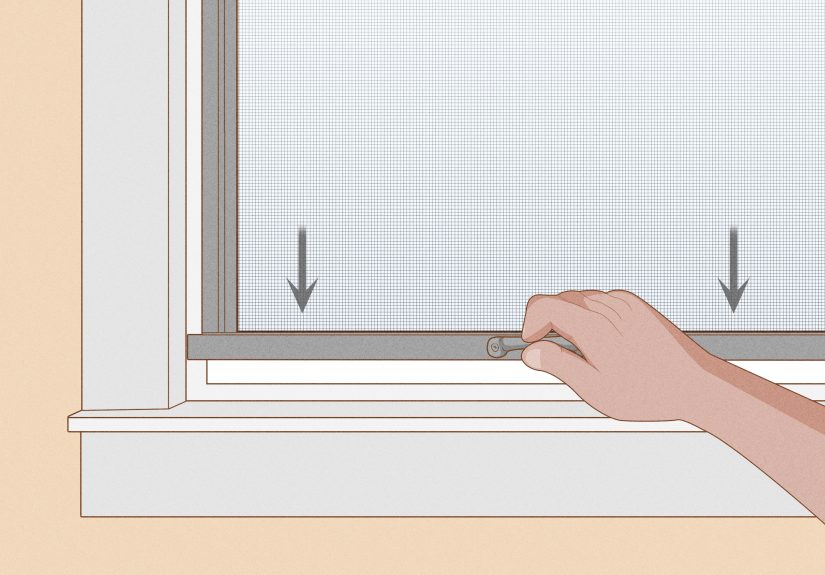
This is the classic setup for many double-hung, single-hung, and sliding windows. One side of the screen frame has tension springs. The other side has pull tabs or a rigid lip. The trick is not “pull harder.” The trick is: compress the spring side first, then lift or angle the other side free.
What it looks like
- Two pull tabs (often at the bottom of a half screen, or one side of a full screen)
- One vertical edge feels “springy” when pushed sideways
- The opposite edge sits in a channel or behind a thin stop
Step-by-step: Remove a spring-loaded screen
- Open the window enough to access the screen frame. For a double-hung/single-hung, raise the lower sash fully. For a slider, slide the operable sash open.
- Clean the track edge quickly if it’s gritty. Grit = extra friction = bent frame risk.
- Push the screen toward the spring side. Use your palm on the screen frame (not on the mesh). You’re trying to compress the springs so the opposite edge can clear its channel.
- While keeping that sideways pressure, pull the tabs (or grip the rigid edge) and gently lift/angle the free edge out of the channel.
- Work corner-by-corner. Once one corner is free, keep the frame supported and free the next corner. Then lift the screen out.
Common mistakes (aka “How tabs get snapped”)
- Pulling on the tabs without compressing springs tabs are not designed to win a tug-of-war.
- Twisting the frame screens bend easily and then never sit flat again.
- Grabbing the mesh it stretches, dents, and makes you say words you don’t want the neighbors to learn.
Quick reinstall tip
Reverse the steps: insert the non-spring edge first, compress the spring side, then drop the screen into place. If it rattles, it may not be fully seated in its channel.
Way 2: Pin or Plunger Retention (Common on Casement and Awning Windows)
Casement and awning windows often use screens that mount on the interior side (because the window cranks outward). These screens are frequently held in place by pins or spring plungers, sometimes paired with small clips. The winning move here is a controlled “pinch and release,” not a dramatic yank.
What it looks like
- Small metal pins that stick out from the screen frame edge
- Plunger pins you can press inward (often with a small thumb tab)
- Screen frame that sits flush against an interior channel
Step-by-step: Remove a pin-retained screen
- Locate the pinsusually one on each side or corner.
- Support the screen with one hand so it doesn’t drop or swing when the first pin releases. (Yes, screens can be dramatic.)
- Press the plungers (or gently shift the frame to relieve pressure) so the pins retract. If there are pull tabs, use them to keep your fingers from slipping.
- Once one side is free, angle the screen out and release the remaining pins. Keep the frame square as you remove it.
If it feels glued in place
Paint buildup, dirt, or slight frame warping can make a screen feel “stuck.” Try these in order:
- Vacuum or brush the perimeter seam
- Press near corners to find the “give” point instead of prying randomly
- Use a plastic putty knife to gently separate the frame edge from the channelslowly, moving an inch at a time. Avoid metal tools on vinyl frames if you can.
Way 3: Turn Clips, Latches, or Screws (Often Older or Custom Screens)
Some screens are held in with rotating turn buttons, small latches, or screws. These are common on older wood frames, some aluminum frames, and certain custom installations where the screen sits in a recess and is “mechanically” held in. This method is less about strength and more about not losing tiny hardware to the great void beneath your deck.
What it looks like
- Little rotating metal tabs around the screen perimeter
- Small Phillips screws through clips that overlap the screen frame
- Spring clips you can push or rotate to release
Step-by-step: Remove a clip/screw-retained screen
- Open the window so you can reach the screen fasteners comfortably.
- Take a photo first of how the clips sit. Seriously. It’s the cheapest insurance policy you can buy.
- Rotate turn clips so they no longer overlap the frame (usually 90 degrees). If screws are involved, loosen them just enough to swing the clip awaydon’t remove every screw unless you have to.
- Support the screen as you release the last fastener. Some screens are heavier than they look, especially in wood frames.
- Lift the screen out evenly, keeping it square to avoid snagging.
Stubborn hardware tip
If clips won’t rotate, they may be painted over or corroded. A gentle wiggle and cleaning around the fastener usually helps. If a screw head is stripped, stop and use the correct bit size or a rubber-band grip trickforcing it makes the problem bigger.
Way 4: Flex-Frame “Pop-In” Screens (Modern Specialty Systems)
Some newer screens are designed to install and remove with minimal hardware. These frames can be slightly flexible, allowing you to bow the frame just enough to pop it in or out of a channel. If you’ve ever removed a car sunshade, it’s that vibeonly less glamorous and more likely to contain pollen.
What it looks like
- A full-frame screen with no visible springs, tabs, or pins
- Frame has a bit of “give” when pressed
- Often sits very flush and clean inside the window opening
Step-by-step: Remove a pop-in screen
- Find a handholda small frame lip, discreet pull point, or edge you can press without crushing the mesh.
- Press inward to bow the frame slightly. The goal is to reduce the effective width/height so one edge clears the channel.
- Free one corner, then work along the edge until the frame comes out evenly.
- Carry it like a pizza boxflat and supportedso it doesn’t twist.
Storage matters
Store screens flat or upright with support so they don’t warp. Warped screens are the origin story of many future “why won’t this go back in?” moments.
When Your Window Screen Won’t Open: Troubleshooting Without Rage
Problem: “It won’t move at all.”
- Check for paint sealing the frame edge to the window trim. Carefully score the seam with a utility knife (light pressure).
- Remove gritvacuum the track and frame edge; dirt can wedge like concrete.
- Look for hidden fasteners at the top corners or side rails.
Problem: “The tabs are missing (or snapped).”
- Use a towel on the frame edge for grip and compress the spring side with your palm.
- If you must pry, use a plastic tool and lift gently along the framenot the mesh.
- Once removed, replace pull tabs before reinstalling so next time doesn’t become an Olympic event.
Problem: “It comes loose on one side but won’t clear the other.”
- You may be compressing the wrong side. Look for which edge has spring tension and push toward that edge.
- Try freeing the top corner first if the bottom is catching on the track lip (or vice versa).
- Keep the frame square; twisting binds the corners.
Cleaning and Reinstalling: Keep It Simple
Once the screen is out, a gentle wash usually does the trick: mild soap, soft brush, rinse, and let it dry fully before reinstalling. Avoid blasting the mesh with high pressurescreens aren’t meant to reenact a hurricane.
Before reinstalling, wipe the screen channels and sills. Clean tracks make screens slide and seat properly, which reduces rattles, gaps, and “why is this crooked?” debates.
FAQ: Quick Answers to Common Screen Questions
Do all window screens come out from the inside?
Many doespecially casement/awning screens. Some older or exterior-mounted screens may require outside access, but if you’re on an upper story, prioritize safe interior removal whenever possible.
Why do I have to push the screen sideways first?
Because springs and pins need space to retract. Side pressure compresses the retention mechanism so the opposite edge can clear the channel. It’s mechanical, not personal.
What if my screen frame is bent?
Small bends can sometimes be corrected by gently straightening on a flat surface, but severe warping often leads to poor fit and gaps. If the mesh is torn too, it may be time for a re-screen or replacement.
Real-World Experiences and Lessons Learned (The “So That’s Why It Wouldn’t Budge” Section)
Homeowners and DIYers tend to learn window screen removal the same way people learn not to touch a hot pan: confidently, quickly, and with immediate regret. The most common “experience” story starts with a perfectly normal goalclean the glass, let in a breeze, rescue a houseplant that has evolved into a window jungleand ends with someone holding a screen by the mesh like a sad trampoline.
One of the most frequent real-world hiccups is the paint-sealed screen. You can do everything right compress the springs, lift the corner, angle it outand still feel like the screen is welded to the window. It usually isn’t welded. It’s paint. A thin bead can bond the frame edge to the trim so well that the first movement feels impossible. The lesson: if the screen doesn’t “give” at all, stop pulling and inspect the perimeter seam. A light scoring cut along the seam can turn a 20-minute fight into a 30-second removal.
Another classic scenario is the missing pull tab. Tabs break. Dogs chew them. Sun makes plastic brittle. And then you’re left with a smooth frame edge designed specifically to defeat human grip. The smartest workaround people discover is to forget about “pulling” and instead focus on “compressing”: use the heel of your hand to push the spring side inward, then use a towel for traction on the opposite edge. Once the screen is out, replace those tabs immediately. Otherwise, you’re just scheduling a sequel for next season.
Sliding windows bring their own special personality. Sometimes the screen is easytwo seconds, done. Other times the screen is in a channel that’s packed with dust, pet hair, and a mysterious substance best described as “historic debris.” People who have been through this once tend to do the same thing every time afterward: vacuum the track first. It’s not glamorous, but it prevents the screen frame from binding and bending when you try to lift it out. Think of it as clearing your path before moving a couch through a doorway.
Casement screens often surprise first-timers because they feel like they’re part of the window, not an accessory. The experience most folks report is pressing randomly until something finally clicks. The better approach is to locate the pins or clips, then release them with steady support under the frame so it doesn’t suddenly drop or tilt. If you’re removing multiple screens for cleaning, label them. Screens that look identical can fit slightly differently, and trying to reinstall the “wrong” one can make you believe your window changed shape overnight.
Finally, there’s the “I only wanted fresh air” moment. Screens are not designed to resist a determined cat, a curious toddler, or an enthusiastic arm leaning while watching the neighborhood drama. People who’ve had a screen pop loose unexpectedly tend to check seating on reinstall: press along the perimeter, listen for a solid fit, and confirm there are no corners floating out of their channels. It’s a small habit that prevents big surpriseslike your screen taking a spontaneous trip to the backyard during a windy day.
The recurring lesson in all these experiences is simple: window screens respond to alignment and gentle pressure, not brute force. If it doesn’t move, something is holding itsprings, pins, clips, paint, dirtso find that “something,” release it, and your screen will come out the way it was meant to: quietly, cleanly, and without a dramatic soundtrack.