Table of Contents >> Show >> Hide
- The Big Idea: A Refrigerator That Communicates (Without Being Passive-Aggressive)
- 1) It Helps You Remember What’s in Your Fridge (So You Stop Collecting Duplicate Mustard)
- 2) It Can Reduce Food Waste (By Being the One Adult in the Room)
- 3) It Gives You Remote Control (Yes, Over TemperatureNot Over Teenagers)
- 4) It Sends Alerts That Actually Matter
- 5) It Can Help Diagnose Problems (Before You Panic-Buy a New Fridge)
- 6) It Can Become a Kitchen Command Center (If You Want It To)
- 7) It Can Help You Use Less Energy (But It Won’t Magically Defeat Physics)
- 8) The Not-So-Fun Part: Privacy, Security, and the Long Life of a “Smart” Feature
- What to Look for When Buying a Smart Refrigerator
- Who a Smart Refrigerator Is Perfect For (and Who Should Skip It)
- Conclusion: A Smart Refrigerator Can Save You Time, Waste, and Mental BandwidthIf You Buy It for the Right Reasons
- Experience Snapshots: What It Feels Like Living With a Smart Refrigerator (About )
The refrigerator has always been the quiet overachiever of the kitchen: it works 24/7, never asks for a day off,
and somehow still gets blamed when the lettuce turns into a science project. A smart refrigerator
is what happens when we finally decide to give that overachiever a Wi-Fi connection, a brain, and (sometimes) a
touchscreen big enough to make it feel like your fridge is about to pitch you a startup idea.
But beyond the shiny “look, it plays music!” party trick, today’s smart fridge features can be
legitimately usefulespecially if you’re juggling a busy household, trying to waste less food, or simply tired of
buying ketchup because you can’t remember whether you already have three bottles hiding behind the milk.
Let’s break down what a smart refrigerator can actually do for you, what’s hype, and what’s worth paying for.
The Big Idea: A Refrigerator That Communicates (Without Being Passive-Aggressive)
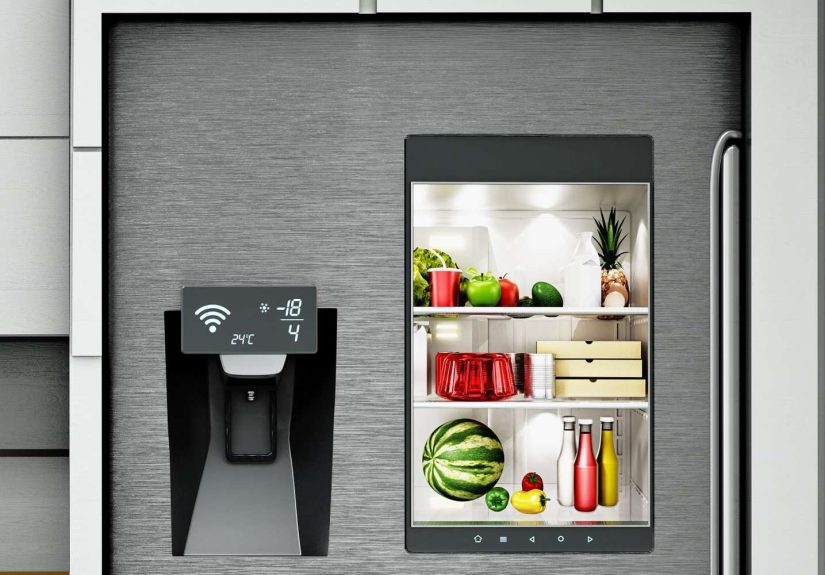
At its core, a smart refrigerator is a connected appliance that pairs with an app (and sometimes a built-in
display) to help you monitor, control, and manage what’s happening inside your fridgeeven when you’re not home.
That can mean anything from a door-left-open alert to inventory tracking to diagnostics that save you a service call.
Think of it as “fridge plus visibility,” not “fridge replaces your personality.”
1) It Helps You Remember What’s in Your Fridge (So You Stop Collecting Duplicate Mustard)
Interior cameras: your groceries’ unofficial yearbook photo
One of the most talked-about upgrades is the fridge with a camera: open the app at the store, peek inside your
refrigerator, and confirm whether you’re out of eggsor merely suffering from egg-related anxiety.
This is especially helpful for households where “we’re out of everything” is a daily rumor, not a fact.
Barcode scanning and assisted inventory: less guessing, more cooking
Some newer models take it further with barcode scanning or inventory tools that build a digital list of what you’ve
got. Scan an item as you stock it, and the system can help generate a shopping list that’s more accurate than your
memory after a long day. The best versions don’t try to be magical; they try to be practicalhelping you track
staples, cut duplicates, and plan meals with what’s actually available.
Shopping lists that don’t live on a greasy sticky note
Whether it’s typed on a screen, added in an app, or updated by voice, the grocery list is one of the most
universally useful smart features. A connected list is shareable, editable in real time, and far less likely to
vanish the moment someone “cleans the counter.”
2) It Can Reduce Food Waste (By Being the One Adult in the Room)
Expiration nudges and “use-this-first” reminders
Many smart fridges and companion apps support food remindersprompting you to use items before they expire.
This isn’t about guilt-tripping you over yogurt; it’s about preventing those “How long has this been here?”
mysteries that end with a trash bag and regret.
Recipe suggestions based on what you have
Some ecosystems tie inventory or food lists into meal planning and recipe suggestions. The dream scenario:
it notices you have chicken, spinach, and half a lemon, then suggests dinner options that don’t require a
special trip for a rare ingredient harvested under a full moon.
Realistically, recipe tools vary by brand and model. The best ones help you answer the daily question:
“What can I make right now?” The worst ones suggest a 14-step soufflé when you’ve got 12 minutes and
a meeting in 18. Choose accordingly.
3) It Gives You Remote Control (Yes, Over TemperatureNot Over Teenagers)
Adjust temperature and modes from your phone
With many Wi-Fi refrigerators, you can adjust temperature settings remotely. That’s handy when you’re traveling,
when someone accidentally changed a setting, or when you want to switch into a faster chill/freezer mode after
a big grocery run.
Specialized zones and flexible drawers
Higher-end models often include convertible drawers or temperature zones that can shift between “chill,” “deli,”
and “freeze” ranges. That flexibility is great for families who buy in bulk, entertain often, or simply want a
dedicated spot for beverages that doesn’t shove aside actual food.
4) It Sends Alerts That Actually Matter
Door-ajar notifications (the modern “Did you close the fridge?”)
Door-left-open alerts are low-key lifesavers. If you’ve ever discovered a slightly-open door after someone grabbed
a snack and wandered off like a raccoon at dusk, you know the pain. Smart alerts can help prevent spoiled food and
wasted energy.
Filter and maintenance reminders
Many smart refrigerator apps can remind you when it’s time to replace the water filter or address a maintenance
issue. This is the kind of boring, useful feature that quietly pays offbecause “I forgot the filter” is how water
starts tasting like it traveled through a history museum.
5) It Can Help Diagnose Problems (Before You Panic-Buy a New Fridge)
Diagnostics are a genuinely valuable benefit of connected appliances. Some smart fridges can
surface error codes, guide you through troubleshooting, or share useful data for servicepotentially saving time
and preventing multiple technician visits. This is the “grown-up” side of smart features: not flashy, but extremely
practical when something goes wrong.
6) It Can Become a Kitchen Command Center (If You Want It To)
Calendars, notes, and family coordination
Smart displays (like those found on certain flagship models) can act like a central message board: calendars,
notes, reminders, and shared to-dos. If your household runs on a chaotic blend of school schedules, work meetings,
and “who’s picking up the dog,” a fridge that centralizes information can actually reduce friction.
Entertainment: music, video, and “please stop scrolling on the fridge”
Some smart refrigerators offer media streaming, photo displays, and other entertainment features. These can be fun
(especially during cooking), but they’re rarely the reason you should buy a smart fridge. Consider them bonus points,
not the headline actunless you’ve always wanted to watch a recipe video on a screen that is also guarding your cheese.
Smart home integration
Depending on the brand, a smart refrigerator may integrate with a smart home kitchen setup:
controlling compatible devices, surfacing notifications, or working with voice assistants.
The key is compatibilitysome fridges play nicely with popular ecosystems, while others prefer you stay inside their
brand’s universe like it’s a gated community with excellent ice.
7) It Can Help You Use Less Energy (But It Won’t Magically Defeat Physics)
A smart refrigerator isn’t automatically more efficient just because it has Wi-Fi. Efficiency comes from solid
refrigeration engineering: compressors, insulation, and smart defrost/temperature management.
That said, energy-saving benefits can show up in a few real ways:
- Better baseline efficiency: Many modern refrigeratorssmart or notare designed to meet higher efficiency standards, especially ENERGY STAR certified models.
- Behavior change: Door-ajar alerts and “view inside” features can reduce unnecessary door opening (which helps temperature stability and energy use).
- Monitoring tools: Some ecosystems provide energy reporting or settings that encourage more efficient operation.
Translation: choose an efficient model first, then treat smart features as a helpful sidekick.
If you want lower bills, start with a high-efficiency refrigerator and good habitsbecause even the smartest fridge
can’t fix someone staring into it like it’s going to reveal the meaning of life (or a snack).
8) The Not-So-Fun Part: Privacy, Security, and the Long Life of a “Smart” Feature
Data collection: convenience usually comes with a privacy policy
If your refrigerator connects to the internet, it may collect usage datahow you use features, when doors open,
how often the dispenser runs, and so on. Different brands handle data differently, but the general rule applies:
connected convenience often means more data trails.
Security basics: make your fridge harder to mess with than your streaming password
The good news: you don’t need to be a cybersecurity wizard to protect a smart fridge.
The best practices look a lot like other smart devices:
use strong unique passwords, keep firmware/apps updated, enable extra security options if offered, and don’t connect
features you’ll never use.
Software support: the “smart” part needs updates
Here’s the uncomfortable truth: refrigerators last a long time. Apps and software support don’t always.
Before you pay extra for advanced smart functions, consider whether the brand is transparent about updates and how
long it supports connected features. The smartest purchase is often the one that remains useful five years from now,
not just impressive on day one.
Ads on appliance screens: yes, this is a thing now
On some platforms, smart screens may eventually include promotional content or ads (sometimes delivered through
software updates). This isn’t guaranteed across all brands or models, but it’s worth considering if you’re buying a
big display for your kitchen. If the idea of your fridge trying to sell you something while you’re holding a bag of
broccoli makes you tired, prioritize models where core functions don’t depend on the screen.
What to Look for When Buying a Smart Refrigerator
Start with “fridge quality,” then add smarts
A smart refrigerator should first be a great refrigerator: stable temps, good layout, reliable ice and water
systems, and a design that fits your kitchen. Smart features are icingsometimes literally, if you love fancy ice.
Choose smart features you’ll actually use
- Must-have for many people: door alerts, filter reminders, remote temperature control, diagnostics
- Nice-to-have: cameras, inventory tools, recipe integration, family calendar/notes
- Fun but optional: streaming media, giant touchscreen experiences
Check ecosystem compatibility
If you already use a smart home platform, verify that your fridge integrates the way you want.
“Works with” can mean anything from “fully integrated” to “it can turn on a light once a month if the moon is right.”
Plan for the future: updates and repairability
Ask practical questions: Does the manufacturer have a track record of app support? Are service options accessible
in your area? Are replacement filters and parts easy to get? The smartest fridge is the one you can maintain without
turning your kitchen into an ongoing support ticket.
Who a Smart Refrigerator Is Perfect For (and Who Should Skip It)
Smart refrigerators shine for:
- Busy families who want shared lists, calendars, and fewer “we already have that” grocery mistakes
- Meal planners who benefit from reminders and inventory visibility
- Entertainers who love flexible storage zones and quick access features
- Tech-forward homes where connected appliances fit naturally into daily routines
You might want to skip (or simplify) if:
- You want a fridge that lasts forever with minimal digital fuss
- You dislike app ecosystems, accounts, and updates
- You’re primarily shopping for the best cooling performance per dollar
- You don’t want a screen (or the possibility of future ads) in your kitchen
Conclusion: A Smart Refrigerator Can Save You Time, Waste, and Mental BandwidthIf You Buy It for the Right Reasons
A smart refrigerator can do a lot for you: help you track groceries, reduce food waste, keep temperatures steady,
send useful alerts, and even diagnose problems before they become expensive surprises. For the right household, it’s
not a gimmickit’s a real quality-of-life upgrade.
The trick is choosing smarts that solve your actual problems. If you want fewer wasted groceries, prioritize cameras,
lists, and reminders. If you want fewer repair headaches, prioritize diagnostics and strong support. And if you just
want a reliable fridge that doesn’t require a login, it’s totally okay to keep your refrigerator gloriously “dumb.”
Cold food is still a miracle, even without Wi-Fi.
Experience Snapshots: What It Feels Like Living With a Smart Refrigerator (About )
Let’s make this real. Not “marketing real” with a spotless kitchen and a bowl of lemons that has never known
sufferingactual, day-to-day real.
Monday: The Door-Left-Open Save
You’re unloading groceries, someone grabs a drink, and the door doesn’t fully close. In a normal week, you’d find
out later when the milk feels… emotionally warm. With a smart fridge, your phone pings: Door ajar.
It’s not glamorous, but it’s the kind of small win that prevents food waste and saves your mood. You close the door
and feel like you just defused a tiny domestic bomb.
Wednesday: The “Do We Have Parmesan?” Mystery Ends
You’re at the store, staring at the cheese section like it’s a choose-your-own-adventure novel.
With a fridge camera, you check your shelves and confirm: yes, you already have Parmesan. In fact, you have
Parmesan and an unopened backup Parmesan you forgot about. You walk away feeling smug, like you’ve outsmarted
your own past self (a rare and beautiful moment).
Thursday: The Filter Reminder You Didn’t Know You Needed
A notification pops up: time to replace the water filter. Normally you’d ignore this for six months until the water
tastes like it took a scenic route through a cardboard factory. This time, you order the filter immediately.
It arrives, you replace it, and you feel like the kind of person who also schedules dentist appointments on time.
Is it personal growth? Maybe. Is it the fridge? Also maybe.
Saturday: The Shopping List Becomes a Shared Source of Truth
The household grocery list lives in the app. People add items as they notice things running low. No more texts like
“We need eggs” followed by “we already bought eggs” followed by “why do we have 36 eggs?”
The list becomes a living document, updated in real time, and you get fewer surprise duplicates.
It’s not that the fridge is “running the house.” It’s that the fridge finally has a way to communicate without
yelling across rooms.
Sunday: The Quiet Convenience of Diagnostics
You hear a weird soundnothing dramatic, just enough to spark a late-night “Is the fridge dying?” spiral.
You open the app, run a basic check, and see no alerts. Maybe it’s just an ice cycle doing ice things.
You sleep anyway. That’s an underrated smart feature: fewer unnecessary panic moments.
In the best-case scenario, living with a smart refrigerator feels like having a calm assistant who handles the
small stuff: reminders, visibility, and alerts that keep your kitchen running smoothly. In the worst-case scenario,
it feels like an expensive screen you stop using after the novelty fades. The difference usually comes down to one
question: did you buy smart features that match your real habits, or did you buy them because the fridge looked
cool in the showroom lighting?