Table of Contents >> Show >> Hide
- What Prusa Actually Unveiled
- Why the MINI Shook Up the Competition
- A Small Printer With Big Strategic Energy
- The Real Secret Sauce Was Never Just Hardware
- Where the Competition Felt the Pressure
- Who This Kind of Printer Is Best For
- Experience: What Living With a Prusa MINI-Style Printer Actually Feels Like
- Final Verdict
Every now and then, a 3D printer shows up and does something deeply annoying to the rest of the market: it makes them all look a little lazy. That was the vibe when Prusa pulled the curtain back on the Original Prusa MINI. On paper, it sounded like a smaller, cheaper sibling. In practice, it looked more like a carefully aimed cannonball fired straight at the entry-level 3D printer market.
At the time, desktop 3D printing had a familiar problem. If you wanted something cheap, you often had to accept quirks, compromises, and the occasional emotional support screwdriver. If you wanted something polished, reliable, and backed by excellent software and support, you usually had to spend a lot more. Prusa saw that gap and marched right into it with muddy boots and a $349 price tag.
The result was a machine that felt less like a stripped-down “starter printer” and more like a deliberate challenge to the idea that affordable 3D printing had to be flimsy, frustrating, or endlessly fiddly. The MINI was compact, smart, reasonably fast for its class, and packed with features that made hobbyists do a double take. It did not try to be the biggest printer in the room. It tried to be the one that made the most sense. That was the real disruption.
What Prusa Actually Unveiled
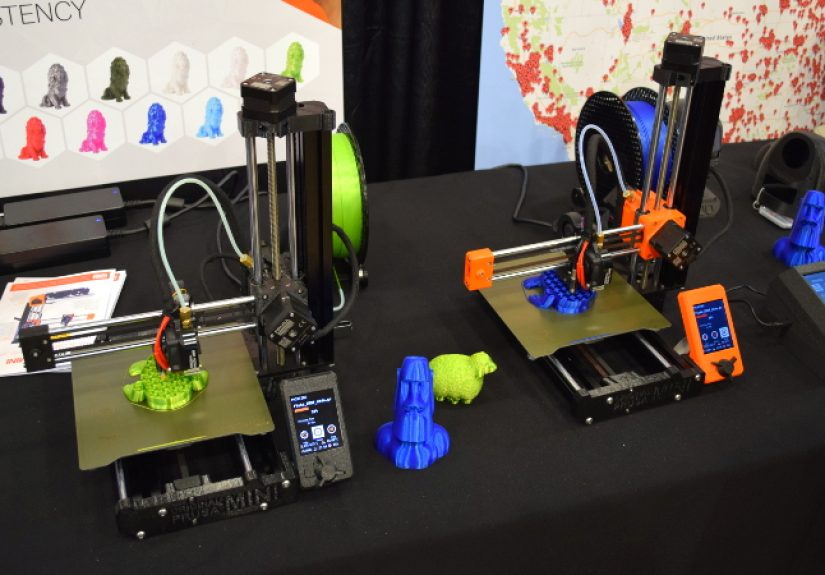
The Original Prusa MINI arrived as a compact FDM desktop 3D printer with a 180 x 180 x 180 mm build volume, or roughly 7 x 7 x 7 inches. That may not sound enormous, but it landed in a sweet spot: large enough for miniatures, cosplay accessories, prototypes, brackets, enclosures, classroom projects, and everyday household prints, while still keeping a small footprint on a desk or shelf.
Prusa did not phone this one in. The MINI launched with a custom 32-bit Buddy mainboard, silent Trinamic 2209 drivers, Ethernet networking, optional Wi-Fi, a 2.8-inch full-color LCD, USB printing, automatic mesh bed leveling, removable spring steel sheets, and a Bowden extruder with 3:1 gearing. Translation for non-printer people: it came with a smarter brain, friendlier controls, easier print removal, and features that made day-to-day use feel much less like operating a temperamental garage experiment.
Just as important, Prusa positioned the printer as a minimal-assembly machine. Instead of turning setup into a heroic saga involving 417 screws and a strained relationship with Allen keys, the MINI was designed to go together quickly. That mattered. A lot. For beginners, schools, and busy makers, the first hour with a printer often determines whether 3D printing feels exciting or like an unpaid internship in mechanical troubleshooting.
The Price That Turned Heads
The headline-grabber was obvious: $349. That put the MINI at less than half the price of the Prusa i3 MK3S kit at launch. In other words, Prusa was no longer just the company people recommended when the budget was “healthy.” It was suddenly poking around in the territory usually dominated by lower-cost brands and budget machines.
That move mattered because Prusa already had a strong reputation for print quality, software, support, and long-term reliability. The company was not entering the low-cost conversation as an underdog trying to get noticed. It was entering as the grown-up in the room saying, “What if inexpensive didn’t have to mean annoying?” The rest of the market heard that loud and clear.
Why the MINI Shook Up the Competition
The MINI did not shake things up because it had the biggest build volume, the highest temperature, or some sci-fi gimmick that made people spill coffee at trade shows. It shook up the competition because it attacked the most painful weakness in the budget 3D printer category: the overall user experience.
Before that moment, many affordable 3D printers were sold on raw value. You got a lot of metal and motion for the money, but often with rough documentation, inconsistent quality control, noisy operation, limited support, weaker software, or setup experiences that felt like a trust fall with gravity. That market absolutely had gems, but it also had a lot of machines that expected the buyer to finish the manufacturer’s homework.
Prusa came in with a different pitch. The MINI was not merely a cheaper printer. It was a cheaper Prusa. That meant buyers were also getting access to the company’s broader ecosystem: polished slicing software, detailed documentation, a huge community, recognizable upgrade paths, and a support reputation that many lower-cost rivals simply could not match.
It Changed the Meaning of “Budget”
In consumer tech, “budget” often translates to “please lower your expectations.” The MINI tried to rewrite that phrase. Instead of asking users to forgive obvious shortcomings because the price was low, it made a stronger argument: a budget 3D printer should still feel thoughtfully engineered.
That showed up everywhere. The flexible spring steel build plate made part removal easier. The color screen made navigation more approachable. The Ethernet and optional Wi-Fi path hinted at a future where even smaller printers could live comfortably in networked workflows. The custom 32-bit board suggested Prusa was not just filling out a price tier, but laying down a platform for future features.
And that last point is where Prusa has often been sneaky in the best possible way. The company tends to think in ecosystems, not just hardware releases. The MINI was built to sit inside a larger world that included PrusaSlicer, Printables, firmware updates, remote management ambitions, and print-farm logic. That is not the kind of stuff that makes for flashy unboxing videos, but it is exactly the kind of stuff that makes owners happier six months later.
A Small Printer With Big Strategic Energy
The smart thing about the MINI is that it never pretended to be everything for everyone. Prusa already had larger machines. The MINI was meant to do something more surgical: offer a compact, capable, lower-cost printer for people who wanted real performance without surrendering a whole desk, a whole paycheck, or a whole weekend to setup drama.
That opened the door for multiple audiences at once. Beginners could see it as a first serious printer. Schools could see it as a more realistic classroom option. Experienced makers could use it as a second machine. Small businesses and farm operators could look at the economics and start thinking, “Two smaller printers might beat one larger printer for certain jobs.” That is a very different conversation from “Can it print a giant helmet in one go?” Sometimes the smartest business move is not bigger. It is multiplying reliable output.
Print Farms, Schools, and Sensible People
Prusa explicitly talked about the MINI as a strong fit for print farms, and the logic was easy to understand. The machine’s compact footprint meant multiple units could fit on shelving more easily than larger printers. For operations producing lots of smaller parts, miniatures, prototypes, accessories, or repeatable pieces, that matters. One failed giant print is painful. Several smaller, distributed jobs can be a much saner workflow.
Schools also benefited from the MINI’s philosophy. A classroom printer has to do more than print well. It has to survive student curiosity, instructor time pressure, and the reality that nobody wants to spend chemistry class explaining why a first layer has suddenly decided to become interpretive dance. Prusa’s reputation for documentation, consistency, and easy maintenance made the MINI a more sensible education tool than many bargain-bin alternatives.
The Real Secret Sauce Was Never Just Hardware
Here is the part many spec-sheet arguments miss: in 3D printing, the machine is only half the story. Software, profiles, maintenance, community support, and documentation matter just as much. Sometimes more. A printer with decent hardware and great software will often beat a printer with great hardware and chaotic software, because one produces parts and the other produces forum posts that begin with “Help.”
Prusa understood this better than most. The MINI benefited from the same ecosystem thinking that helped make the company’s larger machines so well regarded. Factory-tuned PrusaSlicer profiles lowered the learning curve. Detailed manuals reduced setup friction. Ongoing firmware work meant the printer was not frozen in amber the day it shipped. That combination made the MINI feel less like a cheap printer you grow out of and more like an affordable printer you can actually grow with.
The MINI+ Proved the Launch Was Not a Fluke
The strongest evidence that the original MINI was more than launch-day hype is what happened afterward. The platform matured into the Prusa MINI+, and later updates added even more polish. Prusa’s current MINI+ messaging highlights Input Shaper, Pressure Advance, remote management through Prusa Connect, OTA-style firmware convenience, and continued compatibility with the company’s broader software ecosystem.
That is a big deal. Many lower-cost printers arrive with fanfare and then age like unrefrigerated potato salad. The MINI platform aged more gracefully because Prusa kept feeding it software improvements. The current MINI+ is still pitched as a compact workhorse for beginners, everyday users, and print-farm setups. In a market obsessed with shiny new hardware, ongoing support is a competitive advantage that deserves more applause than it gets.
Even outside Prusa’s own marketing, later reviews reinforced the same theme: the MINI+ may not have been the cheapest small printer on the market, but it earned praise for being sturdy, approachable, and easy to live with. That is how disruption really sticks. Not with a loud first impression, but with a long stretch of proving the original promise was real.
Where the Competition Felt the Pressure
When Prusa launched the MINI, other manufacturers had two uncomfortable choices. They could compete on price alone, or they could start improving the total ownership experience. Suddenly, it was harder to sell a bare-bones machine with spotty software and shrug-worthy support if buyers could point to the MINI and ask, “Why can’t this be easier?”
That pressure rippled across the category. Over time, the broader desktop 3D printer market moved toward better interfaces, better automatic calibration, improved print profiles, more network features, and more beginner-friendly onboarding. Prusa did not cause that shift alone, of course. Competition from other fast-moving brands intensified it. But the MINI was one of the more important moments where a respected company signaled that quality-of-life features belonged in smaller, less expensive machines too.
In that sense, the MINI did not just compete with other printers. It competed with old assumptions. It challenged the idea that compact printers were toys. It challenged the idea that cheaper printers should be rough around the edges. And it challenged the idea that a “first printer” had to feel like a compromise you would soon regret.
Who This Kind of Printer Is Best For
A machine like the Prusa MINI makes the most sense for people who value reliability, compact size, and ecosystem quality more than sheer build volume. If you mostly print functional parts, desk accessories, brackets, cosplay details, tabletop terrain, mini projects, prototypes, or repeatable farm-style jobs, this format is surprisingly practical.
It is also ideal for people who want 3D printing to be a hobby, not a hostage situation. Some users love endless tweaking. Others want to click slice, hit print, and continue with their lives. The MINI category serves that second group beautifully. You still get room to learn, mod, and experiment, but you are not forced into a constant cycle of rescue missions.
Of course, the MINI is not magic. If you need huge prints, advanced engineering materials all day long, or the newest race-to-the-bottom speed wars, there are other machines built for that. But as a smart, compact, polished printer with a clear design philosophy, it remains one of the more influential machines in the modern desktop 3D printing story.
Experience: What Living With a Prusa MINI-Style Printer Actually Feels Like
The funny thing about compact 3D printers is that people tend to judge them by what they cannot do before they appreciate what they do brilliantly. You look at the build area and think, “Well, I am not printing a medieval helmet in one piece.” Fair enough. But after a few weeks of actual use, your mindset starts to change. You stop treating the printer like a stunt machine and start treating it like an incredibly useful tool that happens to sit politely on a desk instead of devouring half the room.
A MINI-style experience is all about momentum. You can set it up without feeling like you have enrolled in an evening mechanical engineering program. You can navigate the controls without needing to decode a monochrome relic from the printer Stone Age. You can remove prints from the flexible sheet without performing the ancient ritual of “careful scraping while pretending you are calm.” These things sound small until you realize they are the difference between printing often and printing only when you feel emotionally prepared.
There is also something wonderfully practical about a smaller printer that starts behaving like the reliable co-worker in the office. It does not demand applause. It just keeps making useful things. Cable clips. Shelf brackets. Raspberry Pi cases. Tabletop scenery. Tool organizers. Replacement knobs. Small prototypes. Random household fixes that make you feel suspiciously powerful for someone wearing socks and making coffee at the same time.
For beginners, this kind of experience is especially important. A first printer that works consistently does more than save frustration. It teaches good habits. You learn slicing, materials, supports, orientation, and design thinking without constantly wondering whether the machine itself is sabotaging you out of spite. That confidence compounds fast. One successful print becomes five. Five becomes fifty. Before you know it, you are staring at a broken plastic hinge in your house and thinking, “I can absolutely make that,” which is either empowering or the beginning of a very specific personality type.
For experienced users, the appeal is different but just as real. A compact reliable printer becomes the machine you keep around because it is always useful. It can run smaller jobs while the big printer handles a larger project. It can sit in a workshop, office, classroom, or small studio without demanding special treatment. It becomes the printer you trust for frequent, low-drama output, and that is not glamorous, but it is valuable.
That is probably the best way to understand why the Prusa MINI mattered so much. It was not trying to be a spectacle. It was trying to be a printer people genuinely enjoyed owning. And in 3D printing, that is a bigger innovation than it sounds.
Final Verdict
Prusa’s MINI did not shake up the competition because it was the loudest announcement in desktop 3D printing history. It shook things up because it was a sharp, strategic, well-engineered answer to a very obvious market problem. Buyers wanted affordability without chaos. They wanted compact size without toy-like compromises. They wanted a beginner-friendly printer that did not feel disposable. Prusa delivered exactly that.
The MINI’s legacy is bigger than its frame. It helped push the market toward better user experience, stronger software, smarter electronics, and more realistic expectations for what a budget-friendly desktop 3D printer should offer. In a category where hype often arrives faster than reliable first layers, that was a meaningful accomplishment.
So yes, the headline still works. Prusa unveiled a new mini 3D printer, and it absolutely shook up the competition. Not with empty noise. With smart design, aggressive pricing, ecosystem thinking, and the deeply radical notion that a small printer could still act like a serious machine.