Table of Contents >> Show >> Hide
- Why Triangle Meshes Usually Make CAD Act Weird
- What Makes BREP.io Different
- Why a Browser-Based CAD Tool Changes the Conversation
- Why This Mesh-Friendly Approach Matters in the Real World
- Where BREP.io Still Has to Prove Itself
- The Experience of Using a Browser-Based CAD Tool That Actually Likes Meshes
- Conclusion
- SEO Tags
Browser-based CAD used to sound like one of those ideas people described with brave faces and weak laptops. Sure, it looked futuristic, but serious modeling still seemed destined for heavyweight desktop software, giant installs, and a fan loud enough to be mistaken for takeoff clearance. That story is changing fast. A new wave of web-native and cloud-delivered design tools has been pushing CAD into the browser, and one of the most interesting recent examples is BREP.io, an open-source project that takes an unusually friendly approach to triangle meshes.
That matters because triangle meshes are everywhere. STL files show up in 3D printing. OBJ files wander in from visualization tools. Scan data arrives wearing a polygon suit and asking for help. Yet in many traditional CAD workflows, meshes are treated like distant cousins: welcome at the reunion, but nobody wants them touching the parametric model. BREP.io flips that mood. Instead of acting like meshes are a temporary nuisance that must be converted and sanitized before any “real” work begins, it tries to make them part of the modeling conversation from the start.
In plain English, this is what makes the project worth paying attention to: it runs in the browser, performs geometry work client-side, keeps a feature history, supports familiar CAD operations, and uses a topology layer on top of triangle meshes so designers can still think in terms of faces, edges, and solids. That is a big deal for makers, engineers, tinkerers, and anyone who has ever downloaded an STL and then immediately muttered, “Great, but how do I actually edit this thing?”
Why Triangle Meshes Usually Make CAD Act Weird
A lot of modern CAD software is built around boundary representation, or B-rep. That means a model is described through mathematically defined faces, edges, and vertices. B-rep is excellent for precision. It is why solid modeling programs are so good at exact dimensions, clean fillets, controlled extrusions, and manufacturing-friendly geometry. If you are designing a bracket, enclosure, fixture, or mechanical part, B-rep is usually the grown-up in the room.
Triangle meshes, on the other hand, are polygonal approximations of surfaces. They are practical, portable, and wildly common. They are also messy. A mesh can be watertight or full of holes. It can be clean or riddled with overlapping triangles, bad normals, and non-manifold nightmares that make software blink slowly and reconsider its life choices. Meshes are great for sharing, printing, scanning, and rendering, but they are not always easy to edit like a native parametric solid.
That tension shows up in mainstream tools too. Onshape supports mixed modeling and can work with mesh geometry, but it still draws a clear line between editable B-rep geometry and imported mesh data. Autodesk Fusion offers mesh tools, repair steps, face-group generation, and mesh-to-solid conversion methods because turning polygon data into something solid-modeling-friendly is often not simple or automatic. In other words, the industry already knows the problem: meshes are useful, but they do not naturally behave like feature-rich CAD solids.
The usual workaround is conversion. Clean the mesh. Reduce the face count. Repair the holes. Generate face groups. Convert to a faceted or prismatic solid. Hope for the best. Pray a little. Then continue modeling. That workflow can work, but it is not exactly elegant. It is more like diplomacy between two geometry systems that keep showing up to the same meeting with different expectations.
What Makes BREP.io Different
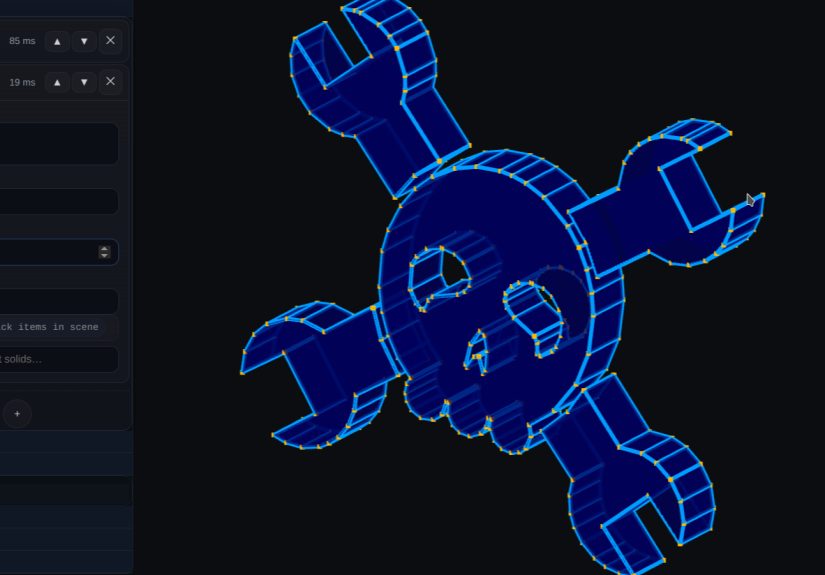
BREP.io is interesting because it does not treat triangle meshes as second-class geometry that must be fully translated before useful work can happen. Its core idea is to use a B-rep-style modeling environment with explicit topology objects like solids, faces, edges, and vertices, while still leaning on mesh-based operations internally. In other words, the interface and modeling workflow speak fluent CAD, but the underlying geometry pipeline is willing to get its hands dirty with triangles.
That hybrid approach gives the project its personality. According to the project documentation, BREP.io includes an editable feature-history pipeline, a 2D sketch system with a constraint solver, robust manifold booleans, mesh repair and import tooling, assembly constraints, PMI support, and familiar features like extrude, loft, revolve, fillet, chamfer, and mirror. The important part is not just the feature list. Lots of CAD tools have feature lists. The important part is that these operations are being built around a topology-aware layer that rides on top of mesh geometry.
That sounds technical, because it is technical, but the user-facing benefit is simple: selections make more sense. Instead of treating an imported mesh as an endless bag of tiny triangles, BREP.io can group triangles into larger face-like regions so a human can work with something more meaningful. That is the difference between clicking one sensible face and clicking 4,000 tiny shards like you are trying to pick glitter out of soup.
The project also leans on the Manifold library for robust boolean operations on manifold triangle meshes. That matters because boolean operations are where many geometry tools either become heroes or collapse into interpretive dance. Union, difference, and intersection sound basic until floating-point precision, coplanar surfaces, and ugly input meshes arrive to ruin the party. A robust manifold-first boolean strategy gives BREP.io a stronger foundation for turning mesh-based operations into usable solid results.
Another smart detail is its handling of history. The software maintains replayable modeling timelines so features can be edited and recomputed. That is the heart of parametric modeling. It is also where many systems run into the classic topological naming problem, where changing earlier geometry can confuse later references to faces and edges. BREP.io has been described as avoiding that problem through its underlying approach, which is one reason the project has drawn attention beyond the usual “look, a new CAD demo” crowd.
Why a Browser-Based CAD Tool Changes the Conversation
There is another layer to this story, and it is not geometry. It is delivery. BREP.io runs in the browser and performs geometry processing on the client side. That sets it apart from cloud-native CAD platforms that use the browser as a window into server-managed infrastructure. Both approaches have value, but they solve different problems.
Traditional cloud-native CAD platforms such as Onshape emphasize collaboration, centralized data, built-in PDM, automatic updates, and reduced IT headaches. That model is great for teams, distributed product development, and companies tired of version chaos. BREP.io points in a slightly different direction. It suggests that the browser itself has become powerful enough to host serious modeling workflows locally, with WebGL for hardware-accelerated interactive 3D graphics and WebAssembly for near-native performance in CPU-intensive tasks.
This is where modern web technology quietly becomes the unsung hero. WebGL allows rich real-time 3D interaction without plug-ins, while WebAssembly lets developers bring high-performance code and computationally expensive routines into the browser. That combination is why browser-based CAD no longer feels like a stunt. The web platform has matured from “can it draw a spinning cube?” to “can it run meaningful geometry operations without embarrassing itself?” Increasingly, the answer is yes.
So when BREP.io performs fillets, lofts, and multi-body booleans directly in the browser, it is not merely showing off. It is demonstrating that serious modeling logic can live close to the user, not only in a remote desktop app and not only on a server farm. That is a subtle but important shift, especially for open-source tools, educational environments, rapid experiments, and maker workflows that benefit from zero-install access.
Why This Mesh-Friendly Approach Matters in the Real World
The practical value of a mesh-friendly CAD system becomes obvious the moment real-world data enters the pipeline. Imagine downloading an STL for a tool holder, then deciding it needs a larger mounting hole, a mirrored version, and a cleaner fillet on one corner. In a conventional workflow, that can turn into a detour through repair tools, conversion steps, and a few moments of emotional growth. A system designed to work with mesh-based geometry more naturally can shorten that journey.
The same goes for reverse engineering and scan-driven design. A scan often arrives as mesh data. A printable part often leaves as mesh data. Plenty of hobbyist and manufacturing workflows start or end in STL, OBJ, or 3MF. A tool that can bridge parametric features with polygonal geometry is valuable because it spends less time arguing with the file format and more time helping the designer actually finish the job.
BREP.io also makes an interesting nod toward interoperability through feature-aware 3MF export. The project documentation describes exporting triangulated geometry together with embedded feature history, which means the file can preserve more than just the surface shell. That is a clever move. A lot of geometry exchange today still strips away design intelligence. Preserving history alongside mesh output hints at a more useful future where files are not forced to choose between printable geometry and editable intent.
Where BREP.io Still Has to Prove Itself
None of this means the browser has defeated every desktop CAD package and claimed the crown while waving a triangulated flag. BREP.io is still an actively developing project. That matters. Early-stage CAD systems can be brilliant, promising, and slightly feral at the same time. The leap from “technically impressive” to “daily driver for demanding engineering work” is a long one.
There are still open questions around scale, deep enterprise workflows, advanced surfacing, import and export breadth, collaboration models, and how gracefully the system behaves under large or ugly datasets. CAD is not just a geometry engine. It is also reliability, repeatability, file management, documentation, manufacturing readiness, and user trust built slowly over time. That trust is earned one clean recompute at a time.
But that does not make the project less important. Quite the opposite. New CAD systems are rare because they are brutally hard to build. A fresh architecture that rethinks the relationship between topology and triangle meshes is worth watching even if it is still growing into its boots.
The Experience of Using a Browser-Based CAD Tool That Actually Likes Meshes
What is the experience around a tool like this really like? Surprisingly refreshing. The first emotional shift comes from the browser itself. There is no ceremonial install process, no giant download, and no feeling that you need to clear your afternoon just to test an idea. You open a tab, land in a modeling environment, and start poking at geometry. That sounds minor, but it changes the mood immediately. The barrier between “I am curious” and “I am building” gets a lot thinner.
Then comes the second surprise: a mesh does not feel like contraband. In many CAD tools, importing a mesh can feel like bringing a raccoon into a hotel lobby. Everyone gets nervous. With a mesh-friendly system, the reaction is calmer. You import the STL or 3MF, inspect it, repair it if needed, and keep going. Because the software groups triangles into face-like regions and lets you work with topology-aware selections, the model becomes easier to reason about. It still is a mesh under the hood, but it stops behaving like static baggage and starts acting more like editable design material.
That changes the everyday workflow in useful ways. A maker adjusting a downloaded enclosure does not necessarily want a PhD in geometry repair; they want to add a cutout for a switch and move on with life. A student exploring parametric design wants to see feature history, constraints, and recompute logic without wrestling a heavyweight desktop environment first. A small team experimenting with browser-based tooling wants proof that modern web tech can do more than render pretty previews. In all of those cases, a system like this feels nimble.
There is also a distinct pleasure in seeing familiar CAD ideas show up in a web-native setting without feeling watered down. Sketches, constraints, extrudes, fillets, booleans, and history-based edits make the experience recognizable to anyone who has used solid modeling software before. At the same time, the project does not simply imitate old desktop conventions for nostalgia’s sake. Its identity comes from how it handles mesh geometry and browser delivery together, which makes it feel less like a clone and more like an experiment with a point of view.
Of course, the experience is not magical in the fairy-dust sense. Early tools remind you that they are early tools. You notice rough edges. You wonder how the system would behave on a truly massive imported scan. You compare the polish to mature commercial software and realize the gap is still real. But even those moments are informative. They reveal where browser CAD is already strong, where mesh-centric workflows have an advantage, and where the next wave of development needs to happen.
The biggest impression, though, is philosophical. Using a tool like BREP.io makes browser CAD feel less like a compromise and more like a design choice. It suggests a future where geometry engines, topology tracking, and parametric workflows are not locked to giant local installs or forced through awkward mesh conversions every time a printable file shows up. That future is not fully here yet. But you can absolutely see it from this tab.
Conclusion
“New Browser-based CAD System Is Best Friends With Triangle Meshes” is more than a catchy headline. It points to a real shift in how CAD can be built and used. BREP.io stands out because it does not merely cram conventional modeling ideas into a browser shell. It rethinks the relationship between topology, parametric history, and mesh-based geometry in a way that could make browser CAD more practical for real tasks.
That is why the project matters. Triangle meshes are not going away. Browser-native workflows are not going away. And the designers, makers, and engineers stuck between precise solid modeling and messy real-world mesh data definitely are not going away. A tool that makes those worlds cooperate a little better is not just interesting. It is timely.