Table of Contents >> Show >> Hide
- What Is Spotify Wrapped, Exactly?
- When Does Spotify Wrapped Come Out?
- How to See Your Spotify Wrapped When It Goes Live
- Can You See Spotify Wrapped on Desktop?
- Why You Might Not See Your Spotify Wrapped
- What to Do If Spotify Wrapped Is Not Showing
- How to Find Your Wrapped Playlists After the Main Story Ends
- What You Will Usually See Inside Spotify Wrapped
- How to Share Spotify Wrapped
- Tips to Make Sure You Do Not Miss Next Year’s Wrapped
- Past Wrapped vs. Current Wrapped: What Is the Difference?
- Final Thoughts
- Experiences With Spotify Wrapped: What It Feels Like in Real Life
- SEO Tags
Every December, Spotify Wrapped takes over phones, group chats, Instagram Stories, and at least one friend’s personality. Suddenly, everyone is posting neon slides about their top artists, their minutes listened, and the one song they played so often it practically became a roommate. If you have ever opened Spotify and thought, “Okay, where is my Wrapped, and why is the app acting mysterious?”, you are not alone.
This guide breaks down exactly how to see your Spotify Wrapped, when it usually appears, why it sometimes goes missing, what counts toward your stats, and what you can still find after the main slideshow disappears. In other words, this is your no-panic, no-tech-jargon, no-algorithm-worship roadmap to one of Spotify’s most talked-about features.
What Is Spotify Wrapped, Exactly?
Spotify Wrapped is Spotify’s annual year-in-review feature. It turns your listening habits into a personalized recap that usually includes your top songs, top artists, listening minutes, favorite genres, and a custom playlist built from the music that defined your year. Depending on the year, Spotify may also add extras like artist thank-you messages, podcast highlights, audiobook stats, listening “personality” details, or other playful data stories.
Think of it as your musical report card, except there is no principal’s office if you streamed the same breakup song 413 times. There is only self-awareness.
The big appeal is simple: Spotify Wrapped makes your listening history feel fun, visual, and shareable. It is part data, part storytelling, and part annual reminder that your “eclectic taste” somehow always includes one extremely embarrassing song.
When Does Spotify Wrapped Come Out?
If you are searching for Spotify Wrapped in spring, summer, or early fall, the most important thing to know is this: Wrapped is not available year-round in its full interactive form. Spotify typically releases it in early December. That means if you are trying to find the full animated experience in April, June, or September, you are probably early, not cursed.
In recent years, Spotify has launched Wrapped at the beginning of December, then kept the interactive experience live for a limited window. So if you miss that launch period, the main slideshow-style recap may disappear even though some related playlists can still be found later.
That timing is why Wrapped feels like a pop culture event. It drops, the internet loses its mind for a few weeks, and then it slips away until the next year like a glitter cannon with commitment issues.
How to See Your Spotify Wrapped When It Goes Live
1. Update the Spotify app first
This is the least glamorous step and the most important one. If Spotify Wrapped has launched and you do not see it, the first thing to do is update the Spotify app on your iPhone or Android device. A lot of “Where is my Wrapped?” panic comes down to people opening an outdated app and expecting holiday miracles.
Go to the Apple App Store or Google Play Store, search for Spotify, and tap Update if that option appears. Then reopen the app.
2. Open the Spotify mobile app
In recent Wrapped cycles, Spotify has pushed the personalized experience primarily through the mobile app. That means your best bet is not your laptop, not a random browser tab from three months ago, and definitely not wishful thinking. Open Spotify on your phone and head to the Home screen.
3. Look for the Wrapped tab, banner, or feed
Once Wrapped is live, Spotify typically places it in obvious spots inside the app. You may see:
- A Wrapped tab near the top of the Home screen
- A colorful banner that says something like “Your Wrapped”
- A dedicated Wrapped feed or hub with your recap and editorial playlists
If Spotify wants you to see Wrapped, it usually does not hide it behind a secret trapdoor. It tends to put it right where your thumb can find it.
4. Use Search if the homepage is being stubborn
If the Home screen is not cooperating, use the search bar and type Wrapped or the current year, such as 2025 Wrapped when that year’s recap is active. In many cases, that is enough to surface the personalized hub or at least your related playlists.
This step is especially handy when the app is technically working but behaving like it needs coffee.
5. Tap into the experience and start swiping
Once you are in, Spotify Wrapped usually opens as a story-style experience. You will tap or swipe through slides showing your stats, favorite tracks, artists, genres, and other listening patterns. Some years include share cards, side features, or special segments you can revisit separately.
Take screenshots if you care about preserving the full experience. That is not paranoia. That is preparation.
Can You See Spotify Wrapped on Desktop?
Here is where many users get tripped up. While Spotify may let you find related playlists or certain Wrapped content outside the phone app, the full personalized experience is generally built for mobile. If your goal is the animated recap with all the flashy cards and stats, start on iPhone or Android.
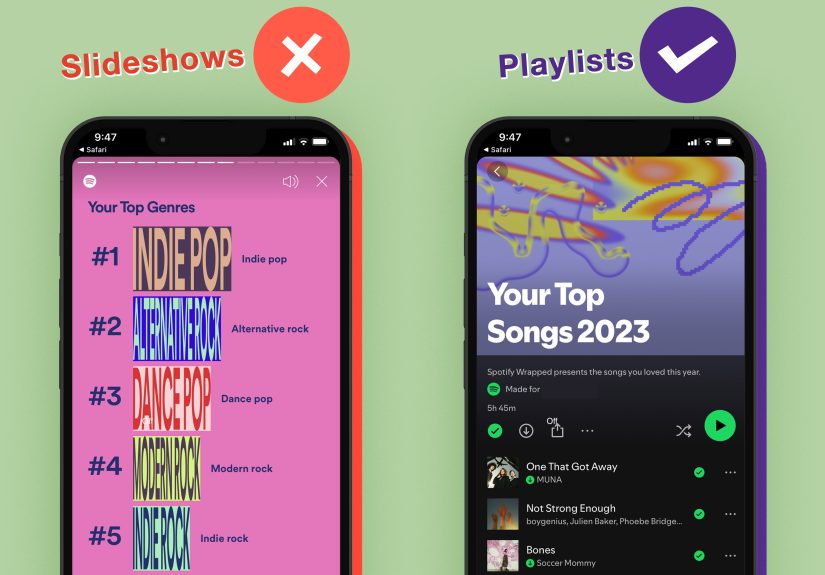
Desktop can still be useful, though. If the main Wrapped story is over or not loading properly, you may still be able to search for your Your Top Songs playlist or other year-specific playlists from the desktop app or web player. So desktop is less “front-row VIP entrance” and more “side door that still gets you to the snacks.”
Why You Might Not See Your Spotify Wrapped
If Wrapped is officially out and yours is still nowhere to be found, do not assume the music gods have rejected you. There are a few common reasons.
Your app is not updated
This is the most common issue. Update the app, close it fully, then reopen it.
You do not meet the listening requirements
Spotify has said that eligibility can depend on your listening activity. In recent guidance, Spotify explained that users needed to stream at least 30 songs for more than 30 seconds each and listen to at least five different artists to qualify for the personalized experience. If you only used Spotify casually all year, the app may not have enough data to build a meaningful recap.
Private Mode or excluded listening may affect it
Spotify has also noted that streams from Private Mode or music excluded from your Taste Profile may not count toward Wrapped eligibility. So yes, your secret “songs I only play while reorganizing my sock drawer” session may stay secret in more ways than one.
Wrapped may not be available in every market or for every feature
Spotify has clearly stated that Wrapped and some Wrapped features are not available to all users in all cases. Availability can vary by market and by specific eligibility rules.
The campaign window may have ended
If you are checking long after launch, the full story-style recap may simply be gone. That does not always mean your playlists are gone too, but the flashy main presentation may no longer be available.
What to Do If Spotify Wrapped Is Not Showing
Try these steps in order:
- Update the Spotify app
- Force-close Spotify and reopen it
- Search for Wrapped or Your Top Songs [Year]
- Visit Spotify on your phone and try the Wrapped page while logged in
- Log out and log back in
- Clear the app cache if your device allows it
- Try a different device using the same account
If none of that works and Wrapped is currently live, it may be an eligibility issue or a rollout problem. In that case, check Spotify Support or the Spotify Community for current troubleshooting updates.
How to Find Your Wrapped Playlists After the Main Story Ends
This is the part a lot of people miss. Even after the full Wrapped slideshow disappears, you may still be able to find year-end playlists tied to your account, especially your Your Top Songs [Year] playlist.
Search Spotify for phrases like:
- Your Top Songs 2025
- Your Top Songs 2024
- Wrapped
- [Year] Wrapped
If you find the playlist, save it to your library right away. That is the smart move. Think of it as putting leftovers in the fridge before someone else “accidentally” eats them.
Some users assume the whole Wrapped experience is one permanent feature. It is not. The playlist often outlives the main recap, so preserving it is the easiest way to keep your year in music accessible long after the social media frenzy cools down.
What You Will Usually See Inside Spotify Wrapped
The exact format changes from year to year, but most Spotify Wrapped experiences include some version of the following:
- Your top songs
- Your top artists
- Total minutes listened
- Your most-played genres
- A personalized top songs playlist
- Shareable story cards
- Occasional bonus features, such as artist clips, podcast stats, or themed listening insights
Some years lean harder into data. Other years lean harder into storytelling. Either way, Wrapped tends to give you enough information to feel seen and enough design flair to make you forget you listened to one comfort song like it was medically prescribed.
How to Share Spotify Wrapped
Wrapped is engineered for sharing because Spotify understands human nature. Give people colorful stats and a button, and they will absolutely broadcast their emotional relationship with indie pop to the entire internet.
Inside the Wrapped experience, look for the Share option on individual data cards or playlists. Spotify typically lets you send those directly to social apps, messages, or other sharing destinations on your phone. Some years also include special sharing cards designed for Stories and social posts.
If you want to share your top songs playlist instead of the full recap, open the playlist, tap the menu, and choose the share option from there.
Tips to Make Sure You Do Not Miss Next Year’s Wrapped
Use Spotify regularly
The easiest way to qualify is to actually listen on Spotify throughout the year. Revolutionary advice, I know.
Keep your app updated
When early December rolls around, check for updates before you start searching.
Watch for the December rollout
Wrapped usually lands in early December, so that is the time to start paying attention.
Save your playlists immediately
Once your Wrapped playlist appears, add it to your library or save it elsewhere so it does not become a “Wait, where did it go?” situation later.
Take screenshots of your favorite cards
Because the story may not hang around forever, screenshots are your best insurance policy.
Past Wrapped vs. Current Wrapped: What Is the Difference?
Your current Wrapped is the fully interactive, annual experience Spotify launches near the end of the year. Past Wrapped access is usually more limited. You may be able to recover playlists, search for older year labels, or revisit saved content, but you may not get the original animated storytelling back once that campaign window closes.
So if you are wondering whether you can go watch a three-year-old Wrapped recap exactly as it first appeared, the answer is often: not fully. But can you still hunt down the playlist and relive your oddly intense synth-pop phase? Very possibly, yes.
Final Thoughts
Seeing your Spotify Wrapped is usually easy once it is live: update the mobile app, open Spotify, tap the Wrapped banner or tab, and enjoy the yearly algorithmic roast of your listening habits. The confusion starts when users search too early, check the wrong device, miss the launch window, or assume the full story will stay online forever.
If you remember just three things, make them these: Wrapped usually arrives in early December, the mobile app is the main place to view it, and the full recap may disappear after a limited time even if playlists remain searchable.
So when the next Wrapped season arrives, do not overthink it. Open Spotify, update the app, and let the neon chaos begin. Then prepare yourself emotionally for the possibility that your “top genre” is something so specific it sounds like a candle scent.
Experiences With Spotify Wrapped: What It Feels Like in Real Life
Spotify Wrapped is not just a feature. It is a yearly event with the emotional range of a holiday dinner and the speed of a social media pile-on. For some people, opening Wrapped is pure delight. They see their top artist, nod proudly, and post the card before breakfast. For others, it is a shocking audit of the choices they made while stressed, sleep-deprived, heartbroken, or very committed to one gym playlist.
One of the most common experiences is surprise. People think they know what they listened to all year, and then Wrapped hands them the truth. Maybe they expected cool underground rock and got “that one pop anthem from March” instead. Maybe they thought they were branching out musically, but their top five songs were all from the same artist. Wrapped has a way of exposing patterns you never noticed while living inside them.
Another relatable experience is the friend-group comparison game. The minute Wrapped goes live, the screenshots start flying. One friend has 87,000 listening minutes and suddenly seems like they legally live inside headphones. Another has a top genre nobody can define without consulting a chart. Someone always has a beautifully curated list that makes them look effortlessly sophisticated, and someone else has a top song that raises several excellent questions.
Then there is the latecomer panic. This person logs in after the main excitement has passed, cannot find the recap, and begins a frantic search through tabs, menus, and old links. If that has ever been you, welcome. You are part of a large and slightly stressed club. The good news is that even when the main slideshow is gone, the playlists often become the real time capsule. They are less flashy, but they are often more useful because you can actually keep listening to them.
Spotify Wrapped also creates a weirdly personal form of nostalgia. A single track from your top songs can send you back to a road trip, a rough semester, a new relationship, a breakup, or a season when you played the same album on repeat because life felt too loud. That is why people care so much about Wrapped. It is not only a list of songs. It is a snapshot of moods, routines, obsessions, and little pieces of memory.
And yes, sometimes it is funny. Sometimes Wrapped reminds you that your “taste” for three straight months was basically “dramatic songs for staring out windows.” Sometimes it reveals that the song you claimed you were sick of somehow finished in your top three. Wrapped does not judge. It simply presents the evidence in bright colors and lets you process it however you want.
That mix of honesty, nostalgia, and social fun is why Spotify Wrapped keeps people coming back. It turns everyday listening into a story worth revisiting. Even when it embarrasses you a little, it also makes the year feel real. And honestly, if an app can make your chaotic soundtrack look meaningful, that is at least a little magical.