Table of Contents >> Show >> Hide
- Why Use a Driving Simulator Before Real Road Practice?
- How to Learn to Drive in a Driving Simulator: 15 Steps
- 1. Choose the Right Driving Simulator Setup
- 2. Set Up Your Seat and Controls Like a Real Car
- 3. Learn the Dashboard and Basic Controls
- 4. Practice Smooth Acceleration and Braking
- 5. Master Steering and Lane Position
- 6. Learn Road Signs, Signals, and Pavement Markings
- 7. Build a Mirror-Checking Routine
- 8. Practice Defensive Driving and Space Management
- 9. Train Your Eyes to Scan Far Ahead
- 10. Start With Simple Routes, Then Add Complexity
- 11. Practice Intersections Until They Feel Predictable
- 12. Learn Parking One Skill at a Time
- 13. Practice Hazard Perception Scenarios
- 14. Review Mistakes After Each Session
- 15. Move From Simulator Practice to Supervised Real Driving
- Common Mistakes Beginners Make in Driving Simulators
- Best Skills to Practice in a Driving Simulator
- How Often Should You Practice?
- 500-Word Experience Section: What Learning in a Driving Simulator Actually Feels Like
- Conclusion
Note: This article is written for web publishing and is based on real driver-education principles, simulator-training research, DMV-style practice guidance, defensive driving recommendations, and novice-driver safety best practices. A driving simulator can help you build confidence, awareness, and decision-making skills, but it should not replace licensed instruction, supervised road practice, or your state’s official driver education requirements.
Learning to drive can feel like being handed the controls to a rolling living room with mirrors, pedals, blind spots, traffic signs, unpredictable humans, and at least one impatient driver behind you who believes honking is a personality trait. That is exactly why a driving simulator can be such a useful training tool. It gives beginners a safe place to practice the basics before they face real roads, real traffic, and real consequences.
A driving simulator helps new drivers learn steering control, braking, acceleration, lane position, hazard awareness, parking, road signs, and defensive driving habits in a low-risk environment. You can stall, miss a turn, drift too close to the curb, or panic-brake for an imaginary squirrel without damaging a car, your confidence, or anyone’s mailbox. Better yet, many modern simulators let you repeat the same scenario until your brain stops yelling “what is happening?” and starts calmly saying, “mirror, signal, check, move.”
Still, the key is using the simulator the right way. Treat it like practice, not like an arcade game. The goal is not to set a lap record through downtown traffic. The goal is to build safe habits that transfer to real driving. Below are 15 practical steps to help you learn to drive in a driving simulator, improve your confidence, and prepare for supervised behind-the-wheel training.
Why Use a Driving Simulator Before Real Road Practice?
Driving simulators are especially helpful for beginners because they separate learning from danger. Instead of trying to master steering, speed control, scanning, road signs, and decision-making all at once in a real car, you can break those skills into smaller lessons. That matters because new drivers often struggle with attention management. They may focus too much on the car directly ahead and forget to scan mirrors, check side streets, watch pedestrians, or anticipate changing traffic lights.
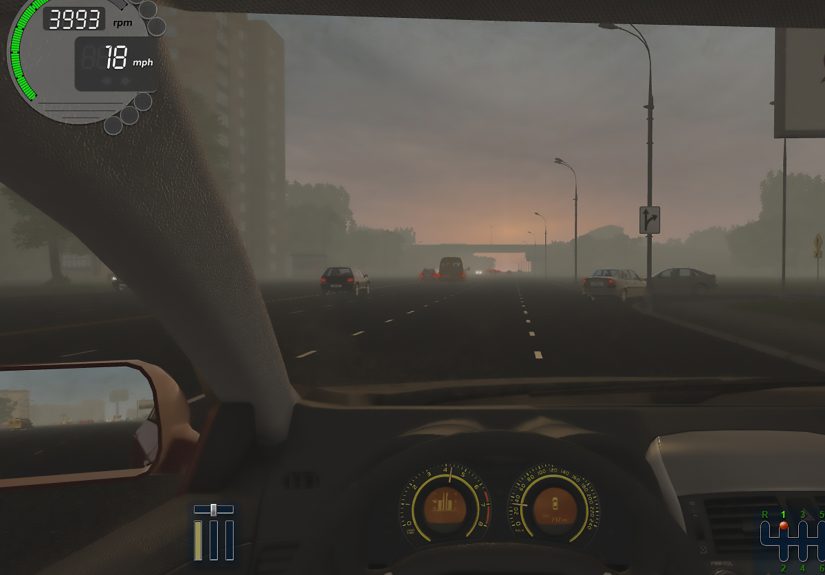
Simulator training can also introduce situations that are difficult or unsafe to recreate on demand in real life. For example, you can practice heavy rain, night driving, sudden braking, highway merging, distracted pedestrians, emergency vehicles, and complex intersections without putting anyone at risk. The best simulators also provide feedback, helping you see what went wrong and how to improve.
However, a simulator has limits. It cannot fully duplicate the weight of a real vehicle, the feel of tires on pavement, weather smells, road vibration, or the emotional pressure of driving beside an actual semi-truck. Think of it as a training gym for your driving brain. It builds useful muscles, but you still need real-world coaching before you drive independently.
How to Learn to Drive in a Driving Simulator: 15 Steps
1. Choose the Right Driving Simulator Setup
Start with a simulator that feels realistic enough to teach real habits. A basic keyboard setup may be fine for learning road signs, but it is not ideal for practicing smooth steering or braking. For better results, use a steering wheel, pedals, and, if possible, a gear selector. You do not need a professional-grade cockpit that costs as much as a used motorcycle. A stable wheel-and-pedal setup, a clear screen, and adjustable settings are enough for most beginners.
Look for software that includes city driving, traffic rules, intersections, parking, highway merging, and weather conditions. Racing games can improve reaction time, but they often reward speed rather than caution. For learning to drive, choose a simulator that values safe behavior: stopping properly, yielding, checking mirrors, maintaining lane position, and obeying speed limits.
2. Set Up Your Seat and Controls Like a Real Car
Before your first practice session, adjust your seat position. Sit upright, keep your shoulders relaxed, and place your hands comfortably on the wheel. Your knees should remain slightly bent when pressing the pedals. If the simulator allows it, adjust mirror views so you can practice checking them naturally.
This may sound boring, but good driving starts before the car moves. Real drivers adjust seats, mirrors, and controls before starting. Practicing this routine in a simulator makes it automatic later. Your future driving instructor will appreciate it, and so will your neck.
3. Learn the Dashboard and Basic Controls
Spend time learning what each control does. Practice using turn signals, headlights, windshield wipers, hazard lights, gear selection, parking brake, and mirrors. Many beginners focus only on the steering wheel and pedals, then become surprised when they need to signal while turning, slow down, check a mirror, and avoid a pothole at the same time.
A simulator lets you practice control coordination without pressure. Turn your signal on before changing lanes. Use headlights in low visibility. Activate wipers in rain. Shift into reverse only when stopped. Build the habit of using the right control at the right moment.
4. Practice Smooth Acceleration and Braking
New drivers often treat the gas and brake pedals like light switches: fully on or fully off. Real driving requires smooth pressure. In the simulator, practice accelerating gently from a stop and braking gradually before intersections. Your goal is to stop without making your imaginary passengers perform an unplanned bow.
Use empty roads first. Drive forward, reach a low speed, then slow to a controlled stop. Repeat until your stops feel predictable. Then add traffic lights, stop signs, and vehicles ahead. Smooth braking is one of the most important beginner skills because it improves comfort, control, and safety.
5. Master Steering and Lane Position
Steering is not just turning the wheel. It is guiding the vehicle smoothly while keeping it centered in the lane. In the simulator, practice driving straight without drifting left or right. Use gentle steering inputs and look far ahead rather than staring at the hood of the car.
When turning, slow down before the turn, look where you want to go, and allow the wheel to return smoothly. Practice right turns, left turns, wide turns, and narrow turns. If you keep clipping curbs in the simulator, do not panic. The curb is digital. The lesson is real.
6. Learn Road Signs, Signals, and Pavement Markings
A driving simulator is a great place to connect textbook knowledge with real situations. Practice responding to stop signs, yield signs, speed limit signs, school zones, lane arrows, crosswalks, railroad crossings, and traffic signals. Pay attention to pavement markings, including solid lines, broken lines, turn lanes, and bike lanes.
Instead of memorizing signs only for a written test, learn what they mean while driving. For example, a yellow light does not mean “floor it and hope.” It means prepare to stop if you can do so safely. A yield sign does not mean “good luck, everyone.” It means slow down, check traffic, and proceed only when safe.
7. Build a Mirror-Checking Routine
Mirror use is one of the habits that separates cautious drivers from surprised drivers. In the simulator, practice checking mirrors before slowing, turning, changing lanes, merging, and reversing. Create a simple routine: mirror, signal, blind spot, move.
Good drivers scan constantly. They do not stare at one point like they are trying to win a blinking contest. Use your mirrors to understand what is happening behind and beside you. The more often you scan, the less often traffic surprises you.
8. Practice Defensive Driving and Space Management
Defensive driving means expecting the road to be full of imperfect humans. Some drivers speed. Some forget signals. Some stop suddenly. Some treat lane markings as gentle suggestions. Your job is to keep enough space and time to respond safely.
In the simulator, practice maintaining a safe following distance. A useful rule is to keep at least a three-second gap between you and the vehicle ahead in normal conditions, and more in rain, darkness, traffic, or poor visibility. Pick a fixed object, count when the car ahead passes it, and make sure you do not pass that object until at least three seconds later.
9. Train Your Eyes to Scan Far Ahead
Beginners often look only a few feet in front of the car. That makes everything feel sudden. Train yourself to scan far ahead, near your vehicle, to the sides, and in your mirrors. In simulator practice, call out potential hazards as you see them: “pedestrian near crosswalk,” “car waiting to turn,” “brake lights ahead,” “bike lane on right.”
This habit improves hazard anticipation. You are not just reacting to problems; you are predicting them. Driving becomes calmer when your brain has already noticed the possible problem before it becomes urgent.
10. Start With Simple Routes, Then Add Complexity
Do not begin with downtown traffic, heavy rain, night driving, and a complicated roundabout unless your hobby is stress. Start small. Use empty streets or quiet neighborhoods in the simulator. Practice moving off, stopping, turning, and staying in lane.
Once you feel comfortable, add more traffic, higher speeds, intersections, pedestrians, lane changes, and parking lots. Gradual difficulty helps your skills grow without overwhelming you. This is similar to real driver education: parking lots first, quiet roads next, busy roads later.
11. Practice Intersections Until They Feel Predictable
Intersections are where many beginner mistakes happen. Use the simulator to practice four-way stops, traffic lights, unprotected left turns, right turns on red where legal, yield signs, and crosswalks. Learn who has the right of way, but remember that having the right of way does not protect you from someone else making a mistake.
At every intersection, slow your thinking down. Check signals and signs. Look left, right, and ahead. Watch pedestrians and cyclists. Do not enter unless you know where you are going and the path is clear. In real life, hesitation can annoy other drivers, but rushing can be dangerous. The simulator helps you find the balance.
12. Learn Parking One Skill at a Time
Parking is where many new drivers discover that cars are larger than they appear in confidence. Use the simulator to practice straight-in parking, angled parking, backing out, parallel parking, and three-point turns. Turn on any available guide markers at first, then remove them as you improve.
Break parking into steps. For parallel parking, practice positioning beside the front vehicle, reversing slowly, turning the wheel, straightening out, and adjusting your final position. Go slowly. Real parking is not a speed event. Nobody gives trophies for fastest bumper alignment.
13. Practice Hazard Perception Scenarios
Hazard perception is the ability to notice potential danger early. Good simulators often include scenarios such as a pedestrian stepping into a crosswalk, a car braking suddenly, a door opening beside the road, or a vehicle drifting from another lane. These situations teach you to scan, slow down, and prepare.
When practicing hazards, do not focus only on avoiding a crash. Ask yourself what clues appeared before the danger. Was there a parked car near a crosswalk? A child near the curb? Brake lights ahead? A blocked view at an intersection? The best drivers notice the clues before the surprise.
14. Review Mistakes After Each Session
The biggest advantage of simulator training is repeatable feedback. After each session, review your mistakes. Did you brake too late? Forget to signal? Drift out of your lane? Follow too closely? Miss a sign? Turn too wide? Write down two or three things to improve next time.
Do not try to fix everything at once. Choose one focus per session. For example, Monday can be mirror checks, Tuesday can be smooth braking, Wednesday can be left turns, and Thursday can be parking. Small improvements stack quickly.
15. Move From Simulator Practice to Supervised Real Driving
Once you are comfortable in the simulator, start applying those habits in a real car with a licensed instructor, parent, guardian, or approved supervising driver according to your state’s rules. Begin in an empty parking lot or quiet area. Practice the same basics: seat position, mirrors, smooth braking, steering, signaling, and scanning.
Remember, simulator confidence is not the same as road readiness. Real cars have blind spots, road texture, weather effects, unpredictable drivers, and emotional pressure. Use the simulator as preparation, then build real experience slowly and legally. The goal is not just to pass a test. The goal is to become a safe, calm, responsible driver.
Common Mistakes Beginners Make in Driving Simulators
Treating the Simulator Like a Game
If you speed, cut corners, ignore signs, and crash just to see what happens, you are training the wrong habits. Drive in the simulator as if a real instructor is watching from the passenger seat with a clipboard and a deeply disappointed eyebrow.
Practicing Too Long Without Breaks
Driving requires attention. Long simulator sessions can lead to fatigue and sloppy habits. Practice in focused sessions of 20 to 45 minutes. Stop when your concentration drops.
Skipping the Boring Basics
Everyone wants to merge onto the highway like a professional. But safe driving begins with smooth starts, controlled stops, proper lane position, and mirror checks. Master the basics first.
Ignoring Real-World Laws
Traffic laws vary by state. Use your simulator for skill-building, but study your state driver handbook for official rules, licensing requirements, road signs, and test expectations.
Best Skills to Practice in a Driving Simulator
The best simulator practice focuses on skills that transfer well to real driving. These include visual scanning, hazard perception, speed control, lane discipline, braking, parking, turning, mirror checks, and decision-making at intersections. You can also practice emotional control. If traffic becomes chaotic in the simulator, practice staying calm, slowing down, and choosing the safest option instead of reacting aggressively.
Another useful skill is commentary driving. While practicing, describe what you see and what you plan to do. For example: “Speed limit is 35. I am checking my mirror. There is a pedestrian near the crosswalk. I am slowing early.” This trains awareness and helps you avoid tunnel vision.
How Often Should You Practice?
Consistency matters more than marathon sessions. Practicing three to five times per week for short focused sessions can be more effective than one long session where your brain turns into mashed potatoes. Build a schedule that rotates skills. For example, practice vehicle control on day one, intersections on day two, parking on day three, hazards on day four, and mixed routes on day five.
Keep a simple progress log. Write the date, skill practiced, mistakes noticed, and one goal for next time. This turns simulator practice into a real training plan instead of random digital driving.
500-Word Experience Section: What Learning in a Driving Simulator Actually Feels Like
The first time you sit down with a driving simulator, it may feel strangely easy and strangely difficult at the same time. Easy, because you know you are not actually moving. Difficult, because your brain still has to manage a surprising number of tasks. You press the gas, the car moves, a stop sign appears, another vehicle pulls up, and suddenly your hands forget they are attached to your body. That is normal. Every new driver begins with too much thinking and not enough rhythm.
One of the best experiences a simulator offers is the chance to make mistakes without embarrassment. In real life, missing a turn can lead to honking, awkward lane changes, or a parent gripping the door handle like they are on a roller coaster. In a simulator, you can calmly restart the scenario. You can repeat the same left turn ten times until it stops feeling like a dramatic life event. That repetition is powerful. It turns fear into familiarity.
Another valuable experience is learning how quickly small habits matter. At first, you may forget to signal because you are focused on steering. Then you may signal but forget to check your mirror. Then you may check your mirror but turn too sharply. The simulator reveals these gaps one by one. Instead of feeling discouraged, treat each mistake like a helpful notification from your future driving self: “Hey, fix this now before it becomes a real problem.”
Many learners also notice that speed feels different in a simulator. Because you are not feeling the real motion of the car, it is easy to drive too fast without realizing it. That is why watching the speedometer matters. A good exercise is to practice holding a steady speed without constant pedal changes. Try maintaining 25 mph on a neighborhood road, then 35 mph on a larger street, then higher speeds in highway scenarios. Smooth speed control makes everything else easier.
Parking practice can be surprisingly satisfying. At first, your car may end up diagonally across two spaces like it is trying to reserve parking for a parade. After a few sessions, you begin to understand angles, reference points, and slow steering. The moment you slide neatly into a parking space feels like a tiny graduation ceremony. No cap, no gown, just a perfectly centered car and a little boost of confidence.
The most important experience, though, is learning patience. A simulator teaches you that safe driving is not about rushing. It is about seeing early, deciding calmly, and moving smoothly. When you later sit in a real car, the road will feel more serious, but many routines will already be familiar. You will know how to check mirrors, slow before turns, scan intersections, and leave space. That familiarity can reduce anxiety and help you focus on real-world conditions.
In short, learning in a driving simulator feels like rehearsal. The stage is not real yet, but the practice matters. Every smooth stop, every careful turn, every repeated parking attempt, and every corrected mistake prepares you for the real road. Use the simulator with respect, patience, and a sense of humor. You are not just learning how to operate a car. You are learning how to think like a safe driver.
Conclusion
A driving simulator can be one of the smartest tools for learning to drive, especially when you use it with purpose. It helps beginners practice vehicle control, road signs, defensive driving, parking, hazard perception, and decision-making before stepping into real traffic. The safest approach is to start simple, build one skill at a time, review mistakes, and gradually move from simulator practice to supervised real-world driving.
The simulator will not replace professional instruction, DMV requirements, or supervised practice, but it can make those next steps less intimidating. Think of it as your practice field. The more calmly and carefully you train there, the more prepared you will be when the road is real, the mirrors matter, and the curb is no longer made of pixels.