Table of Contents >> Show >> Hide
- Step 1: Identify what kind of “pending” you’re dealing with
- Step 2: Do the quick “un-stuck” checklist (takes 60 seconds)
- How to clear a pending Cash App payment you sent (P2P)
- Option A: Follow the “action needed” prompt in your Activity details
- Option B: Cancel the pending payment (if you see a Cancel button)
- Option C: If it’s pending too long, know the built-in timer
- Option D: If you sent it to the wrong person, report the issue fast
- What if the payment already completed?
- How to clear a pending payment you’re receiving (accept it)
- How to clear a pending Cash Card transaction (merchant purchase)
- How to clear a pending Cash App Pay transaction (paying a business)
- Troubleshooting: common reasons Cash App stays pending
- 1) Action needed (verification or confirmation)
- 2) Recipient hasn’t accepted (incoming payment pending)
- 3) Merchant hasn’t finalized the charge (card authorization hold)
- 4) Refund processing (completed → refund pending)
- 5) Security review or suspicious activity checks
- 6) System issues (app or platform status)
- When to escalate: merchant, Cash App support, bank, or a dispute?
- Safety corner: avoid “pending payment” scams and fake support
- Conclusion: your “pending” game plan
- Experiences: what usually works in real life (extra ~)
Seeing “Pending” in Cash App is like watching a microwave timer stuck on 0:01technically something is happening, but emotionally? You are aging in real time. The good news: “pending” usually has a boring explanation (verification, a merchant hold, the other person hasn’t accepted, or a network delay). The even better news: you can often clear a pending payment on Cash App in minutesif you pick the right fix for the right kind of pending.
This guide breaks down exactly what “pending” means, how long it normally lasts, and the simplest ways to clear itwhether you’re sending money to a friend, waiting to receive funds, or staring down a stubborn Cash Card “pending transaction” that won’t let go of your balance.
Step 1: Identify what kind of “pending” you’re dealing with
“Pending” is a label Cash App uses for a few different situations. Your next step depends on which one you have:
- Pending P2P payment (Cash App-to-Cash App): You sent money to someone, but the payment didn’t fully complete yet.
- Pending incoming payment: Someone sent you money, and you need to accept it.
- Pending Cash Card purchase: A merchant placed a temporary authorization hold that hasn’t posted (or dropped off) yet.
- Pending Cash App Pay purchase: A merchant transaction is processing and may be canceled/voided or completed later.
Open Cash App, go to your Activity feed, and tap the pending transaction. Cash App will often show a clue like “Waiting to Complete” or provide steps you can take.
Step 2: Do the quick “un-stuck” checklist (takes 60 seconds)
Before you dive into cancellation menus and support options, knock out the easy stuffbecause sometimes “pending” is just your app being dramatic.
- Refresh the Activity feed: Pull down to refresh. If it says “Waiting to Complete,” refreshing can update the status.
- Check your connection: Switch Wi-Fi/cellular or toggle airplane mode.
- Update Cash App: Outdated versions can lag on status updates.
- Restart your phone: Yes, it’s cliché. Yes, it works more often than we’d like to admit.
- Check Cash App’s service status: If the platform is having issues, you may need to wait it out.
If it still shows pending after this, move to the right section below based on the transaction type.
How to clear a pending Cash App payment you sent (P2P)
Cash App says most payments are instant. If your payment is pending, it usually means you need to take action inside the Activity detailsor the payment is being processed and hasn’t completed yet.
Option A: Follow the “action needed” prompt in your Activity details
Tap the pending payment in Activity. If Cash App needs something from you (confirmation, verification, or another step), it typically tells you right there. Complete the requested step, then refresh your Activity feed.
Option B: Cancel the pending payment (if you see a Cancel button)
Here’s the deal: if a payment can be canceled, Cash App will usually show a Cancel option on the payment receipt in your Activity feed.
- Open Activity.
- Select the pending payment.
- Look for Cancel on the receipt and tap it (if available).
If you do not see a Cancel option, Cash App is basically saying: “This one is already too far along for a simple undo button.” Don’t worrykeep reading.
Option C: If it’s pending too long, know the built-in timer
Cash App notes that if a payment stays pending for 24 hours, it can be automatically canceled and show as failed. That’s not you losing moneythat’s the system deciding the transaction didn’t complete in time.
Practical takeaway: if you’re stuck in pending limbo, you often don’t need to do anything heroicjust keep an eye on it, refresh, and let the timer do its thing.
Option D: If you sent it to the wrong person, report the issue fast
If you realize you sent money to the wrong account, go into the payment in Activity and use the in-app Report an Issue flow. The faster you report, the better your odds of getting meaningful help.
What if the payment already completed?
If it’s no longer pending, you typically can’t “cancel” it like a pending payment. The cleanest path is to ask the recipient to refund you from their side. (More on refunds below.)
Example: You send $25 for lunch and it shows Pending. You tap it, see a prompt to confirm the payment, complete the step, pull down to refreshand it flips to Completed. If there’s no prompt and no Cancel option, you wait; if it hits 24 hours, it may fail and return to you automatically.
How to clear a pending payment you’re receiving (accept it)
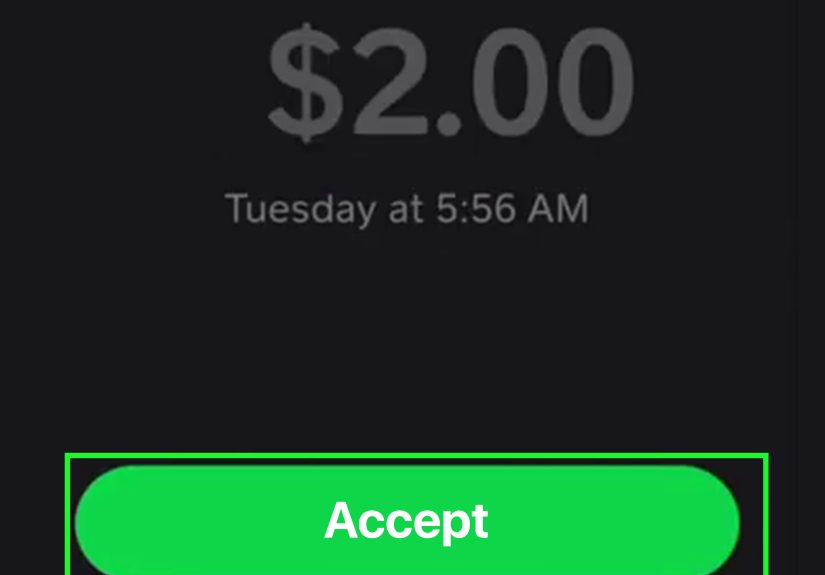
Sometimes the “pending” problem is simply that you haven’t accepted the money yet. Cash App provides a straightforward accept flow:
- Go to the Activity tab.
- Select the pending payment.
- Choose Accept to receive the funds.
If you don’t see an Accept option, refresh the Activity feed, update the app, and confirm you’re signed into the right account (yes, people accidentally juggle accountsno judgment).
Example: A friend says they sent you $60, but you don’t see it in your balance. You check Activity, tap the pending payment, hit Accept, and the money lands instantly.
How to clear a pending Cash Card transaction (merchant purchase)
A pending Cash Card purchase is often an authorization holda temporary “reservation” of funds while the merchant finalizes (or cancels) the charge. This is common with gas stations, hotels, restaurants (tips), and online orders that don’t fully process until shipping.
What you can do (and what you usually can’t)
- You can: contact the merchant to cancel/void the purchase, ask for a refund, or confirm if they’ve finalized it.
- You often can’t: force a pending card authorization to instantly disappear just because you’re annoyed (even if your annoyance is justified).
Typical timelines: when pending usually clears
Banks commonly explain that pending card transactions are authorized but not yet processed, and they often post within a few business days. Many everyday pending transactions clear in roughly 1–5 business days, depending on merchant and network processing.
If a merchant cancels a transaction properly, the hold should releasethough timing can vary. Visa notes that when reversal information doesn’t match correctly, funds can remain outstanding for 1 to 8 days depending on card and transaction type. (In plain English: sometimes the “hold” lingers because payment messages don’t line up perfectly.)
Use Cash App’s refund guidance to set expectations
If the charge is completed and you’re waiting on a refund, Cash App explains that merchant refunds can take up to 10 business days (and sometimes longer in calendar days) to be received and processedespecially when the original payment method involves card networks and bank processing.
For refunds to a card specifically, Cash App notes they often arrive within a handful of business days, but timing still depends on the bank and network.
If your Cash Card transaction is “declined pending review,” clear it in-app
Cash App also has a security flow where a transaction may be declined and shown as pending review. In that case, open Activity, find the transaction, and confirm whether you recognize it. That confirmation can help clear the status and protect you if you don’t recognize it.
If you don’t recognize the pending card transaction
Don’t “wait and see” with suspicious activity. Start with the in-app security confirmation step, then use Cash App’s dispute pathway for Cash App Card purchases if needed. Also consider contacting the merchant directlymerchants can sometimes void transactions faster than banks can “un-pend” them.
Example: You pay at the pump and see a pending $100 hold even though you only bought $32 in gas. The $100 is an authorization hold, and the final posted amount updates after processing. If the hold doesn’t drop after several business days, you call the merchant first (gas station/processor), then follow up with Cash App support if needed.
How to clear a pending Cash App Pay transaction (paying a business)
Cash App Pay transactions can show phases like Pending, Completed, or Canceled. Pending typically means the transaction is entered into the merchant’s system but still processing. If the merchant cancels the payment, the hold can be released and funds returned (or the pending charge removed), depending on how it was funded.
Fastest fix: ask the merchant to cancel/void if the purchase won’t happen
If you changed your mind, the item is out of stock, or the merchant made an error, asking the merchant to cancel or void is often the quickest way to stop the pending charge from turning into a posted charge.
If it completed and you need your money back: go refund route
Once a transaction is completed, “clearing” it usually means a refund. Cash App provides refund guidance and timelinesso you’ll know whether you should wait a few days, follow up with the merchant, or escalate through the appropriate dispute process.
Troubleshooting: common reasons Cash App stays pending
If you’re trying to fix a pending payment on Cash App, it helps to understand the usual suspects. Here are the top causes, plus what to do:
1) Action needed (verification or confirmation)
If Cash App needs you to confirm something, the Activity details usually say so. Complete the requested step and refresh.
2) Recipient hasn’t accepted (incoming payment pending)
If you’re receiving money, you may need to tap the pending payment and hit Accept in Activity.
3) Merchant hasn’t finalized the charge (card authorization hold)
Especially for gas, hotels, and online orders, the pending amount may be a temporary hold. It often clears within a few business days, but can vary by merchant and network.
4) Refund processing (completed → refund pending)
Refunds are not instant everywhere. Merchant refunds can take several business days to be received and processed. If it’s been longer than the expected window, follow up with the merchant first, then Cash App support.
5) Security review or suspicious activity checks
If a transaction is flagged, Cash App may cancel it for security reasons, returning funds. Or it may require you to confirm you recognize a transaction pending review.
6) System issues (app or platform status)
If Cash App is experiencing outages, pending statuses may update slowly. Check service status and try again later.
When to escalate: merchant, Cash App support, bank, or a dispute?
Here’s a simple escalation ladder that saves time (and stress-snacking).
Start with the merchant when it’s a card/merchant transaction
- Ask if they can void/cancel the authorization (best for pending holds).
- If it’s completed, ask for a refund and confirm the refund method (Cash App balance vs. card).
Use Cash App support paths for Cash App-specific issues
- If a P2P payment is stuck and you can’t cancel it, use in-app help/support options.
- If it’s a Cash App Card purchase you don’t recognize, use Cash App’s dispute flow for card transactions.
- If you sent money to the wrong account, report the issue from the payment details quickly.
Know your consumer protection basics (especially for unauthorized transfers)
If you believe an electronic fund transfer was unauthorized, U.S. consumer protection rules (often discussed under Regulation E) can apply depending on the circumstances and the accounts involved. The key move is speed: report suspected unauthorized activity as soon as possible through the appropriate channels.
Safety corner: avoid “pending payment” scams and fake support
Scammers love the word “pending” because it sounds official and urgent. A few rules that keep your money where it belongs (with you):
- Never pay money to “release” money. If someone says you must send a fee to clear a pending payment, that’s a red flag.
- Only use in-app support. Don’t trust random texts, DMs, or “support agents” asking for codes or remote access.
- Treat P2P payments like cash. Bank groups warn that once money is sent to the wrong person (or a scammer), recovery is hardso confirm the recipient first.
- Report scams. The FTC encourages reporting fraud involving payment apps, and reports help stop scam patterns.
Conclusion: your “pending” game plan
To clear a pending payment on Cash App, you don’t need a secret hackyou need the correct path:
- Pending P2P you sent: open Activity, follow any prompts, cancel if possible, refresh, and remember the 24-hour auto-fail window.
- Pending payment you’re receiving: open Activity and hit Accept.
- Pending Cash Card or merchant payment: it’s often an authorization holdcontact the merchant to void/cancel; otherwise wait for posting or hold release timelines.
- Refund delays: refunds can take multiple business days depending on the network and banktrack it, then escalate if it runs long.
If you match the fix to the pending type, you’ll usually get unstuck quicklyand keep your sanity (and your snack budget) intact.
Experiences: what usually works in real life (extra ~)
After helping friends and family troubleshoot Cash App “pending” situations, I’ve noticed a pattern: people assume “pending” means “Cash App ate my money.” In reality, “pending” usually means “the money is standing in line at the checkout, holding a basket, and pretending not to notice you staring.”
The most common “easy win” is the Accept button. I can’t count how many times someone said, “Cash App won’t let me receive the payment,” and the fix was: open Activity → tap the pending payment → Accept. Five seconds later, they’re sending victory emojis like they just hacked NASA. If you’re the receiver, always check for Accept before you do anything else.
The second most common “easy win” is the refresh + update combo. Cash App statuses sometimes lagespecially if your phone is clinging to one bar of Wi-Fi like it’s a life raft. Pulling down to refresh can flip “Waiting to Complete” into “Failed” or “Completed,” and updating the app can solve those weird moments when the transaction detail screen looks like it loaded through a potato.
For senders, the frustration usually comes from expecting every payment to behave like a text message: send → delivered → read. Money doesn’t always work that way. When a payment is truly pending, the first place I look is the transaction details. If Cash App needs action, it typically says so. If there’s a Cancel option, I take itbecause canceling a pending payment is cleaner than waiting, wondering, and doom-scrolling. If there’s no Cancel option, I shift my mindset from “I must fix this right now” to “This is either processing, or it will fail and return.” That mindset saves stress, and it prevents the worst move: sending another payment “just in case,” which can turn one problem into two.
Merchant-related pending charges are their own special genre. The classic story: someone buys gas, sees a huge pending amount, and assumes the station charged them twice. Most of the time, it’s an authorization hold. I’ve watched people spend an hour arguing with their balance when the real fix was patienceand occasionally a quick call to the merchant to confirm the final charge will post correctly. Another frequent example is restaurants: a pending amount may not match the final amount if the tip updates later. The best habit here is to treat pending like “reserved funds,” and budget accordingly until it posts or drops off.
The last experience-based tip is about scam resistance. The internet is full of “agents” who promise to clear your pending payment if you pay a fee, share a code, or “verify” your account through a link. Real support doesn’t ask you to pay to receive money, and real solutions don’t require you to hand over your login details. When in doubt, I stick to in-app support and official stepsbecause the only thing worse than a pending payment is a missing balance.