Table of Contents >> Show >> Hide
- What Does It Mean to Calibrate a Digital Pocket Scale?
- When Should You Calibrate a Pocket Scale?
- What You Need Before You Start
- Quick Step-by-Step: How to Calibrate a Digital Pocket Scale
- A More Detailed Walkthrough for First-Time Users
- Common Calibration Mistakes That Cause Bad Readings
- Why Pocket Scales Go Out of Calibration
- How to Check Accuracy After Calibration
- Troubleshooting a Pocket Scale That Still Reads Wrong
- Best Practices for Keeping Your Pocket Scale Accurate Longer
- Quick FAQ
- Real-World Experiences With Pocket Scale Calibration
- Conclusion
If your digital pocket scale has started acting a little dramatic—showing one number, then another, then pretending a paper clip weighs as much as your lunch—it probably needs calibration. The good news? Calibrating a digital pocket scale is usually fast, simple, and far less intimidating than the word calibration makes it sound.
Whether you use a pocket scale for jewelry, coins, coffee, crafts, or other small items, accurate readings matter. Even tiny errors can add up, especially on scales that measure in 0.1-gram or 0.01-gram increments. This guide walks you through how to calibrate a digital pocket scale the easy way, what you need before you start, what mistakes to avoid, and how to troubleshoot a stubborn scale that refuses to cooperate.
What Does It Mean to Calibrate a Digital Pocket Scale?
Calibration is the process of teaching your scale what “correct” looks like. In plain English, you place a known weight on the platform and let the scale compare that real weight to what its sensor thinks it sees. If the two don’t match, the scale adjusts itself.
Think of it like correcting a friend who insists every medium coffee is “basically a gallon.” A pocket scale can drift over time because of movement, temperature changes, battery issues, rough handling, or simply regular use. Calibration brings it back to reality.
That said, calibration is not the same as magic. If your scale has a damaged sensor, severe overload issues, or internal electronic problems, calibration may not fix it. But for ordinary accuracy problems, it is usually the first and best step.
When Should You Calibrate a Pocket Scale?
You do not need to calibrate your scale every five minutes like an overachieving lab technician. But you should calibrate it when accuracy matters and any of the following has happened:
- You just bought the scale and are using it for the first time.
- The scale was shipped, bumped around, or moved a long distance.
- You changed batteries or noticed low-battery warnings.
- The scale was stored in a hot, cold, or humid place.
- You moved to a different location and readings suddenly seem off.
- The display gives inconsistent numbers for the same item.
- The scale shows an error code, won’t return to zero, or fails a simple accuracy check.
A smart habit is to verify accuracy before calibrating. Place a known calibration weight on the platform and compare the reading to the actual value. If it’s off beyond the scale’s normal tolerance, calibration is worth doing.
What You Need Before You Start
1. The correct calibration weight
This is the big one. Your scale usually expects a specific calibration weight, such as 100g, 200g, or 500g. The required weight depends on the model. Some scales even use multi-step calibration and ask for more than one value.
Do not assume every pocket scale uses 100 grams just because your neighbor’s does. Check your manual or the startup prompt on the display. If your scale asks for 100g and you place 50g on it, the scale will not suddenly appreciate your creativity.
2. A flat, stable, level surface
Use a hard tabletop or counter, not a soft mat, couch cushion, or anything with a bounce factor. Uneven or unstable surfaces are one of the fastest ways to get bad readings.
3. A clean, empty platform
Make sure nothing is on the weighing surface, including the cover, tray, dust, crumbs, or that one mystery speck that somehow appears only when you need precision.
4. Good batteries or a full charge
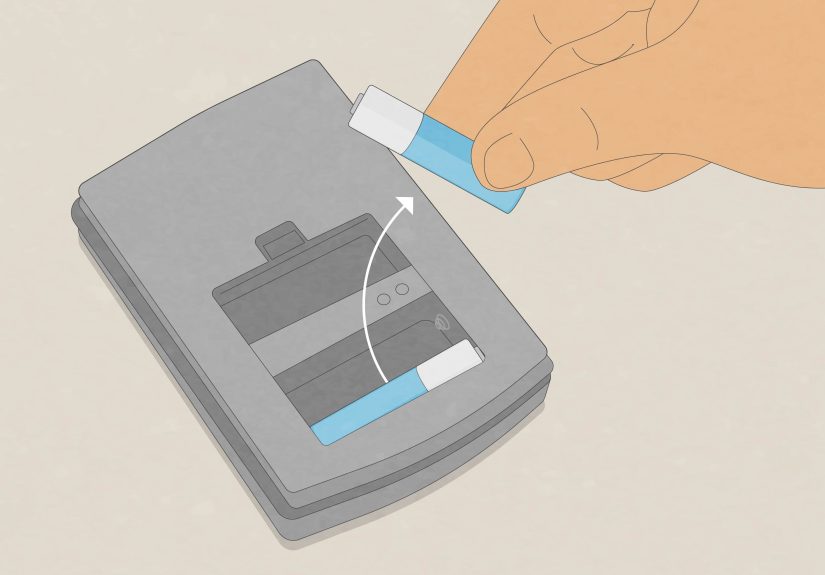
Low batteries are a surprisingly common reason for slow, unstable, or inaccurate readings. If your scale is acting odd, replace the batteries before assuming it needs a heroic rescue.
5. A calm environment
Airflow, vibration, moisture, temperature swings, and nearby electronics can all affect sensitive digital scales. That means calibration goes better away from fans, open windows, speakers, washing machines, and the world’s noisiest desk.
Quick Step-by-Step: How to Calibrate a Digital Pocket Scale
Here is the quick and easy method that works for many digital pocket scales. Since button names and prompts vary by brand, always follow your model’s instructions if they differ.
- Place the scale on a level, stable surface. Avoid vibration and drafts.
- Let the scale reach room temperature. If it was stored in a car, garage, or cold room, give it time to acclimate.
- Turn the scale on and let it warm up. Many manufacturers recommend waiting at least 30 to 60 seconds before calibrating or weighing.
- Make sure the platform is empty. No tray, no lid, no item, no surprises.
- Enter calibration mode. On many models, this means pressing and holding a button such as MODE, CAL, PCS, or a combination of keys until the display shows “CAL.”
- Confirm the zero point if prompted. Some scales ask you to confirm that the empty platform is at zero before moving on.
- Wait for the required calibration weight to appear. The display may flash a value such as 100g or 500g.
- Place the correct calibration weight in the center of the platform. Set it down gently. Do not drop it.
- Wait for the scale to finish. Many models show “PASS,” return to normal weighing mode, or display the calibrated weight.
- Remove the weight and verify accuracy. Recheck with the same weight or a second known weight if you have one.
That’s the whole process on many pocket scales. In other words, calibration is less “advanced engineering ritual” and more “follow the prompts without panicking.”
A More Detailed Walkthrough for First-Time Users
If you have never calibrated a digital pocket scale before, take it slowly. First, wipe the platform with a soft dry cloth and make sure the area is clean. Tiny debris can interfere with zeroing, especially on small scales with fine readability.
Next, check whether your scale needs a lid or tray removed before calibration. Some pocket scales have covers that double as trays, which is convenient right up until someone calibrates with the tray still on and wonders why everything is suddenly nonsense.
Then, look at your display carefully. Some models immediately show the required weight after entering calibration mode. Others want you to press the mode key again to confirm zero first. A few display numbers that look cryptic but are simply prompts. This is why the user manual remains the unsung hero of the whole operation.
When you place the weight, center it. Off-center loads can cause inaccurate readings on some scales. Set the weight down gently, keep your hands away, and wait for the reading to stabilize. Once the scale accepts the weight, you should see a success message, or the scale will return to weighing mode.
After that, do not assume perfection just because the scale acted confident. Test it. Put the calibration weight back on. Then try another known weight if available. A quick check now saves frustration later.
Common Calibration Mistakes That Cause Bad Readings
Using the wrong weight
This is the classic mistake. If your scale wants 100g, give it 100g—not 98g, not two random objects that “feel close,” and definitely not a handful of coins unless your manufacturer specifically says that is acceptable. A proper calibration weight is the safest choice.
Skipping warm-up time
Many digital scales need a short warm-up period so internal components can stabilize. If you rush straight into calibration the second the display lights up, you may calibrate a still-settling sensor.
Calibrating on an uneven surface
A crooked or soft surface can distort the downward force the load cell is trying to measure. Translation: your scale cannot do precision work while balancing on the moral equivalent of a beanbag chair.
Ignoring airflow and vibration
Open windows, fans, desk vibrations, and shaky tables can all make readings wander. Pocket scales are small, but they are still precision tools. Treat them like one.
Forgetting the zero point
If your scale asks you to confirm zero before adding the calibration weight, do not skip that step. A bad zero means a bad calibration.
Calibrating with low batteries
If your display is dim, slow, or flashing a low-battery warning, swap the batteries first. Calibration should happen with stable power.
Why Pocket Scales Go Out of Calibration
Digital pocket scales are portable, which is wonderful for convenience and slightly less wonderful for staying perfectly pampered. Because they travel easily, they often experience bumps, temperature changes, dust, pressure on the platform, and storage in places that are not exactly luxury spas for electronics.
Another reason is location. Gravity is not identical everywhere, and even smaller changes in environment can matter to sensitive scales. That is why some manufacturers recommend calibrating after moving the scale from one place to another, especially if you care about fine readings.
Overload is another culprit. If you exceed the maximum capacity, you can damage the sensor or shift performance. Some scales recover after recalibration. Others do not. So when a scale says its capacity is 100g, treat that number like a firm boundary, not a polite suggestion.
How to Check Accuracy After Calibration
Once calibration is complete, do a quick quality check:
- Place the calibration weight back on the scale and confirm it reads correctly.
- Try a second known weight if you own one.
- Repeat the same test three times and see whether the readings stay consistent.
- Check that the display returns to zero when the platform is empty.
If the weight is correct once but not consistently, the issue may be environmental rather than calibration-related. Look again at the surface, airflow, battery level, and nearby movement.
Troubleshooting a Pocket Scale That Still Reads Wrong
The reading keeps fluctuating
Move the scale to a sturdier surface. Turn off fans. Close windows. Keep phones, speakers, and other electronics a little farther away. Also make sure the load is centered.
The scale will not enter calibration mode
Check the manual for the exact button sequence. On some models you hold MODE, on others CAL, PCS, or a two-button combination. If the batteries are weak, replace them and try again.
The display shows PASS, but measurements are still off
Double-check that you used the exact required calibration weight. Then repeat the process more slowly. If the scale was cold or hot, let it sit at room temperature longer and try again.
The scale shows an error code
Look up the code in the manual. Common issues include overload, unstable surface, zeroing problems, or calibration failure. If repeated calibration attempts fail, the sensor may be damaged.
The scale is accurate in one unit but odd in another
Reset to grams and retest. Grams are usually the easiest base unit for checking accuracy on pocket scales.
Best Practices for Keeping Your Pocket Scale Accurate Longer
- Store it in a clean, dry place.
- Use the protective cover when not in use.
- Do not leave weight on the platform for long periods.
- Never overload the scale.
- Replace weak batteries promptly.
- Calibrate after travel, shipping, or major temperature changes.
- Use it on the same stable surface whenever possible.
Small habits make a big difference. A pocket scale that is treated gently will usually stay accurate much longer than one tossed in a drawer with batteries, keys, and the chaos of everyday life.
Quick FAQ
Can I calibrate a digital pocket scale without calibration weights?
You can try, but it is not ideal. If accuracy matters, use a proper calibration weight that matches your model’s requirement. Guesswork and “close enough” objects usually lead to not-close-enough results.
How often should I calibrate my pocket scale?
There is no universal schedule. Calibrate when readings seem off, after moving the scale, after battery changes, after shipping, or before any task where precision matters.
Why does my scale say 0.01g readability but still seem slightly off?
Readability is the smallest increment the display shows, not a promise that every reading is perfect to that last decimal place under every condition. Environment, handling, and tolerance still matter.
Should I calibrate every time I turn it on?
No. That is usually unnecessary. A quick zero check is smart. Full calibration is for when the scale has drifted, moved, or needs verification.
Real-World Experiences With Pocket Scale Calibration
In real life, most people do not start by saying, “Today I shall study the noble art of scale calibration.” They start when something seems weird. A coffee enthusiast notices their beans suddenly weigh differently from one morning to the next. A jewelry seller sees that a ring weighs 3.98 grams one minute and 4.06 grams the next. A hobbyist checks the same small item three times and gets three different answers. That is usually the moment calibration enters the chat.
One common experience is discovering that the scale itself is fine—the setup is the problem. Many first-time users place a pocket scale on whatever surface is nearby: a soft placemat, a slightly uneven desk, or a table right next to a fan. Then they are shocked when the numbers drift. After moving the scale to a solid countertop and shutting off the airflow, the readings often settle down immediately. It feels dramatic, but it is really just physics doing what physics does.
Another frequent experience is underestimating warm-up time. People turn the scale on, press buttons at lightning speed, and expect perfect results instantly. Then they recalibrate more slowly, wait 30 to 60 seconds, and suddenly the scale behaves like a completely different device. The same thing happens when a scale comes in from a cold car or hot garage. Letting it reach room temperature sounds boring, but boring is often exactly what accurate measuring needs.
Battery issues are another classic. Plenty of users assume inaccurate readings mean the scale is broken, when really the batteries are weak. Fresh batteries fix more problems than most people expect. It is not the most exciting repair story in the world, but it is extremely satisfying when a “dead” scale comes back to life after a simple battery swap and recalibration.
Then there is the calibration weight lesson. People often want to improvise with random household items because they are already standing there and do not feel like ordering a proper weight. Sometimes that works badly. Really badly. Once users switch to the exact calibration weight their model asks for, the process gets much easier. That is why experienced scale owners often keep one or two calibration weights tucked into the same case or drawer as the scale. Future-you will be grateful, and future-you deserves nice things.
Many users also learn that consistency matters almost as much as calibration itself. Using the same stable spot, centering the load the same way, and checking zero before weighing can make the scale feel much more reliable day to day. In other words, good results rarely come from a single magic button press. They come from a handful of repeatable habits that keep the tool performing the way it should.
The biggest real-world takeaway is simple: most pocket scale problems are not mysterious. They come down to environment, power, handling, or skipped steps. Once people understand that, calibration stops feeling technical and starts feeling practical. It becomes one of those tiny life skills that saves time, reduces frustration, and keeps your measurements honest. Not glamorous, maybe—but extremely useful.
Conclusion
If you want accurate readings, calibrating a digital pocket scale is one of the simplest maintenance steps you can learn. Use the right calibration weight, work on a flat stable surface, give the scale time to warm up, and follow your model’s button sequence carefully. That alone solves most accuracy issues.
The main thing to remember is that pocket scales are precise, but they are also sensitive. Treat them gently, calibrate when needed, and verify with a known weight once in a while. Do that, and your little scale should stay dependable instead of becoming a tiny chrome-plated chaos machine.