Table of Contents >> Show >> Hide
- What Blocking Someone on Instagram Actually Does
- How to Block Someone on Instagram
- How to Unblock Someone on Instagram
- What Happens After You Unblock Someone?
- What a Blocked Person Can Still See
- Block vs. Restrict vs. Mute vs. Private Account
- Common Problems When Blocking or Unblocking Users on Instagram
- When You Should Block Someone on Instagram
- When You Should Unblock Someone
- Real Experiences: What Blocking and Unblocking Feel Like in Real Life
- Final Thoughts
Built from current Instagram Help Center and About Instagram materials, cross-checked against major U.S. tech and privacy publishers. Core facts reflected below include that Instagram does not notify people when you block them, blocking can cover related accounts they already have or may create,
WIRED
+5
Instagram About
+5
Instagram Help Center
+5
ike Restrict, Limits, Mute, and private accounts may fit better in some situations.
Norton
+15
Instagram About
+15
Instagram Help Center
+15
Instagram is fun until it becomes a surprise reunion with your ex, a spam bot named “CryptoQueen_447,” or that one cousin who comments “Call me” under every single Reel. That is where Instagram’s blocking and unblocking tools come in. They are simple on the surface, but the details matter: What happens to messages? Can the person tell? Will they still see your profile? And is blocking always the best move, or is there a less dramatic option?
This full guide walks through exactly how to block or unblock users on Instagram, what changes after you do it, and when you should use other privacy tools instead. If you want a cleaner, calmer Instagram experience without turning your account into a digital soap opera, you are in the right place.
What Blocking Someone on Instagram Actually Does
Before you tap that button with the confidence of a movie hero walking away from an explosion, it helps to know what blocking actually means on Instagram.
When you block someone, Instagram is designed to stop that account from finding your profile, seeing your posts or Stories, messaging you, tagging you, or mentioning your username. In many cases, Instagram also lets you block other accounts that person already has, plus new ones they may create later. That makes blocking more useful than it used to be, especially when dealing with repeat harassment, spam, or people who collect backup accounts like they are trading cards.
Blocking also changes how interaction works behind the scenes. A previous DM thread may still exist in your inbox, but new messaging between the two of you is effectively shut down. The blocked person is not directly notified, which is nice because Instagram does not need to turn every privacy setting into a formal breakup announcement.
One more important point: blocking is different from simply unfollowing someone. Unfollowing changes your feed. Blocking changes access.
How to Block Someone on Instagram
Method 1: Block from Their Profile
This is the fastest and most common method.
- Open Instagram and go to the person’s profile.
- Tap the three-dot menu in the top-right corner.
- Tap Block.
- If Instagram shows multiple blocking options, choose the one that fits your situation.
- Confirm your choice.
That is it. Instagram does not send them a cheerful little alert saying, “Congratulations, you’ve been blocked.” They may figure it out later, but the app does not formally announce it.
Method 2: Block from Your Blocked Accounts List
If you already know who you want to block, you can do it from your settings.
- Go to your profile.
- Tap the menu icon in the top-right corner.
- Open Settings and privacy.
- Go to the section for who can see your content or related privacy controls.
- Tap Blocked.
- Use Add or search for the account.
- Tap Block next to the username.
This method is handy when you want to clean house in one sitting, like a digital spring cleaning session with less dust and more emotional closure.
Method 3: Block on Desktop
If you are on a browser instead of the app, you can still block someone.
- Log in to Instagram on your computer.
- Search for the user and open their profile.
- Click the menu options on their profile.
- Select Block and confirm.
Desktop options may look a little different depending on Instagram updates, but the overall process is similar.
How to Unblock Someone on Instagram
People change. Situations cool off. Sometimes you blocked a bot; sometimes you blocked your best friend after a heated debate about who makes the best fries. Either way, unblocking is easy.
Unblock from the Person’s Profile
- Search for the blocked account.
- Open the profile.
- Tap Unblock.
- Confirm.
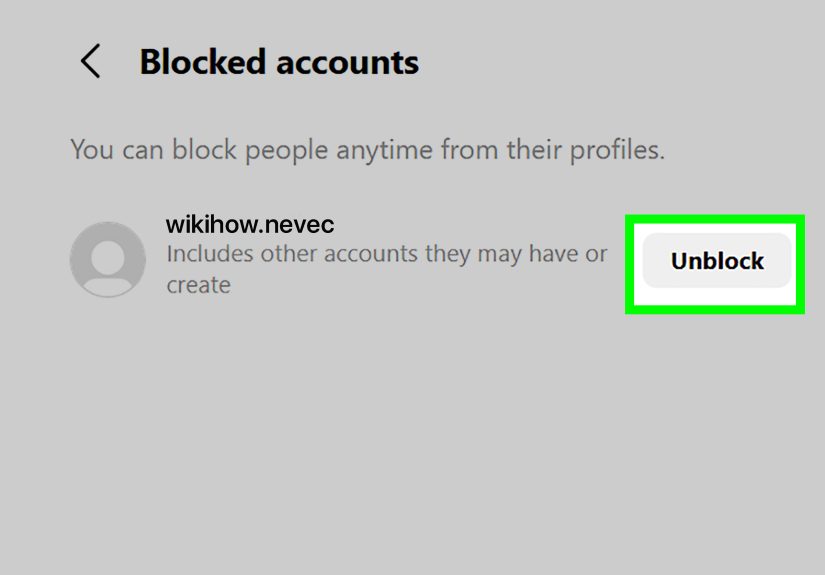
Unblock from Your Blocked List
- Go to your profile.
- Tap the menu icon.
- Open Settings and privacy.
- Find Blocked.
- Tap Unblock next to the username.
- Confirm again.
Instagram usually makes you confirm because it knows some taps are accidental and some are the result of late-night curiosity, which is not always the same thing as wisdom.
What Happens After You Unblock Someone?
Unblocking is not a magic reset button. It simply restores access going forward. That means a few things:
- You may need to follow each other again if you want to reconnect.
- Past interaction does not necessarily return to normal automatically.
- Old likes and comments generally do not just pop back into place after unblocking.
- The person still is not notified that you unblocked them.
In other words, unblocking reopens the door, but it does not redecorate the room. If you want the relationship restored, you usually have to take extra steps.
What a Blocked Person Can Still See
This is where many users get confused. Blocking cuts off direct access to your account, but it does not erase your existence from the internet like you are entering a witness protection program.
For example, if you have liked or commented on posts shared by public accounts or accounts they follow, some of that activity may still be visible in those spaces. Blocking protects your profile and direct interaction, but it does not necessarily rewrite every trace of prior public engagement across Instagram.
That is why blocking is a strong privacy tool, but not a time machine.
Block vs. Restrict vs. Mute vs. Private Account
Blocking is not always the best option. Sometimes you want peace without fireworks. Here is how the alternatives compare.
Block
Use this when you want a full stop. The person should not be able to view your profile, tag you, mention you, or message you. Best for harassment, repeated boundary issues, spam, impersonation concerns, or anyone who treats your DMs like a public utility.
Restrict
Restrict is quieter. A restricted user cannot see when you are online or whether you have read their messages. Their new comments on your posts are limited and can require your approval before others see them. This is ideal when you want distance without escalating things.
Mute
Mute is for when someone is not dangerous, just exhausting. You can mute their posts, Stories, or both. They stay connected to you, but your feed gets a break.
Private Account
If your account is public, switching to private can dramatically cut down on unwanted attention. Only approved followers can see your posts, Reels, and Stories. That said, private accounts can still receive message requests, so this is helpful but not bulletproof.
Limits
Instagram’s Limits feature is helpful during pile-ons, stress spikes, or unwanted attention from strangers and recent followers. It temporarily hides or limits certain comments and messages. Think of it as a “the store is closed, please come back never” sign for random chaos.
Common Problems When Blocking or Unblocking Users on Instagram
You Cannot Find the Account to Unblock
If the account does not appear, the user may have changed their username, deactivated their account, or deleted it. You can also check your blocked list from settings to confirm whether they are still on it.
You Unblocked Someone but Still Cannot See Their Content
They may have a private account and need to accept your follow request again. Unblocking does not automatically restore mutual following.
You Still See the Old Chat Thread
That is normal. Blocking does not necessarily erase the existing conversation from your inbox. It mainly cuts off future interaction.
You Blocked One Account but Another One Appeared
If Instagram offered the option to block related or future accounts, use it. If not, block the new account too and consider reporting repeated harassment or impersonation.
When You Should Block Someone on Instagram
Here are a few cases where blocking is usually the right move:
- They are harassing, threatening, or stalking you.
- They keep creating new accounts to contact you.
- They spam your comments, tags, or DMs.
- You are trying to protect your mental health and need a clean break.
- The account looks fake, suspicious, or impersonates someone.
If the behavior crosses into abuse, impersonation, or ongoing harassment, do not just block. Report the account too. Instagram gives users tools for both, and using both can be smarter than relying on one button alone.
When You Should Unblock Someone
Unblocking makes sense when the problem has genuinely passed and you are comfortable reopening access. Maybe the issue was temporary. Maybe you overreacted. Maybe they overreacted. Maybe everyone needed snacks and a nap.
Still, unblocking is a personal choice, not a moral obligation. You do not owe anyone access to your space just because time has passed. If your feed felt calmer after the block, that is useful information.
Real Experiences: What Blocking and Unblocking Feel Like in Real Life
In real life, people rarely block someone because they woke up and thought, “What a beautiful day to create drama.” Most blocking happens after a pattern. It might start with annoying replies, then slide into constant lurking, weird DMs, or comments that somehow manage to be both passive-aggressive and full-time employment. By the time someone uses Instagram’s block feature, they usually are not being petty. They are tired.
A common experience is the “soft discomfort” phase. Someone is not exactly threatening, but every interaction feels off. Maybe it is an old friend who keeps turning your posts into a guilt trip. Maybe it is a former partner who watches every Story within seconds and somehow always appears in the comments when you finally look happy. In those cases, users often try muting or restricting first. But when the account keeps finding ways to push through boundaries, blocking becomes less about punishment and more about peace.
Another very real experience is blocking spam or scam accounts. That version is much less emotional and far more annoying. One minute you are posting a vacation photo; the next, five fake accounts want to “collab” or offer suspicious investment opportunities with the enthusiasm of a late-night infomercial. Blocking those accounts becomes routine maintenance, like taking out the trash or deleting blurry screenshots you swore you needed.
Unblocking has its own emotional weirdness. Sometimes it happens months later, after a friendship recovers or a conflict cools down. The actual tap is easy, but the thought process is not. People often wonder whether the other person will notice, whether they should refollow, or whether reopening access will bring back the same old mess. That hesitation is normal. Unblocking can feel less like pressing a button and more like reopening a door you worked hard to close.
There is also the accidental block-and-unblock cycle, which is almost a rite of passage on social media. Someone gets blocked in anger, unblocked out of curiosity, blocked again after one terrible comment, and then muted because apparently chaos has layers. If that sounds familiar, congratulations: you are having a very human internet experience.
The biggest lesson from real-world blocking and unblocking is simple. These tools are not just technical settings. They are boundary tools. They help you decide who gets access to your attention, your content, and your peace of mind. Used well, they make Instagram feel more like your space and less like a hallway where anyone can walk in and start talking.
Final Thoughts
If you want total separation, block. If you want quiet distance, restrict. If you just need fewer Stories from someone who posts 47 times before breakfast, mute. And if your account is attracting too much random attention, private settings and Limits can help take the temperature down fast.
The best Instagram privacy strategy is not the harshest one. It is the one that matches your actual situation. Social media should feel social, not stressful. So protect your space, use the right tool, and remember: your block button is not rude. It is just excellent housekeeping.
“` :