Table of Contents >> Show >> Hide
- What the 2019 Mac Pro Is (and Who It's For)
- Design: The Tower Is Back (With Serious Cooling)
- Core Hardware: CPU, Memory, Storage, and Bandwidth
- MPX Modules: Apple's Workstation Graphics Approach
- Afterburner: A Card for ProRes People
- PCIe Expansion: The Mac Pro's Superpower
- Upgrades: What's Easy, What's Possible, and What's a Headache
- Performance: Where It Feels Worth It
- Pricing: From $5,999 to "Please Don't Tell My Accountant"
- Buying a 2019 Mac Pro in 2026
- Real-World Experiences With the Apple Mac Pro 2019 (About )
- Bottom Line
The Apple Mac Pro 2019 is what happens when Apple builds a computer for people who measure time in render queues, track counts, and terabytes. It’s the return of the expandable “cheese grater” tower-reborn as a stainless-steel frame inside a precision-perforated aluminum shell that’s equal parts sculpture and wind tunnel. And yes, it can get wildly expensive, but so can any tool that earns its keep in a studio.
This guide breaks down the 2019 Mac Pro’s hardware, the MPX graphics system, the Afterburner accelerator card, what’s upgradeable (and what’s oddly not), and whether it still makes sense to buy in 2026-especially now that Apple’s newest Macs run Apple silicon.
What the 2019 Mac Pro Is (and Who It’s For)
The 2019 Mac Pro (often listed as MacPro7,1) is a modular workstation built around Intel Xeon W processors, ECC memory, and lots of PCI Express expansion. It’s made for people who genuinely benefit from:
- Many CPU cores for sustained workloads (rendering, compiling, simulation)
- Large memory pools (hundreds of gigabytes or more)
- Workstation GPUs and heavy I/O
- Internal PCIe cards (capture, audio DSP, high-speed networking, storage controllers)
If your daily life is email and a few browser tabs, the Mac Pro is the wrong kind of “future-proofing.” It’s like buying a commercial espresso machine because you once made instant coffee and felt betrayed.
Design: The Tower Is Back (With Serious Cooling)
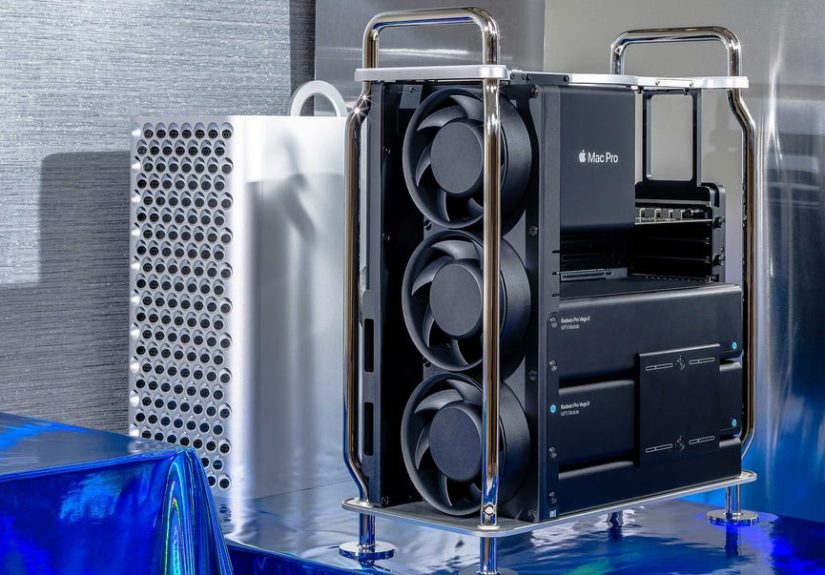
Apple sold the Mac Pro 2019 in two physical formats: a tower and a rack version. The tower has the iconic look and top handles; the rack model slides into standard racks for machine rooms and post houses. The famous circular perforations aren’t decorative-they help pull cool air through the system and push heat out efficiently, keeping performance stable during long exports and renders.
Unlike many modern desktops, the Mac Pro is built for serviceability. The outer housing lifts off, and the inside is laid out so you can access memory slots, MPX bays, and PCIe slots without feeling like you’re defusing a bomb.
Core Hardware: CPU, Memory, Storage, and Bandwidth
CPU: Intel Xeon W from 8 to 28 cores
Apple offered Xeon W configurations ranging from 8 cores up through 12, 16, 24, and 28 cores. The “best” CPU isn’t automatically the biggest number. It depends on how your apps scale:
- Great scaling: CPU rendering, code compilation, some scientific workloads.
- Mixed scaling: video editing and motion work (often also limited by GPU and storage).
- Latency sensitive: audio production, where balance and stability matter as much as raw parallelism.
Example: If you render overnight, more cores can be money. If you mainly edit H.264 footage and export occasionally, storage speed and GPU acceleration may matter more than jumping from 16 to 28 cores.
Memory: ECC RAM with 12 DIMM slots, up to 1.5TB
The 2019 Mac Pro supports DDR4 ECC memory in 12 user-accessible DIMM slots. With supported CPUs, it uses a six-channel architecture, and certain configurations can reach a massive 1.5TB of RAM. That’s not a flex for casual use; it’s practical for giant timelines, huge sample libraries, large caches, or datasets that simply don’t fit in “normal” memory.
Practical win: More RAM often means fewer pauses. When your system swaps to disk, creative flow turns into staring-at-a-spinner flow.
Storage: fast internal SSD, but the T2 chip makes it different
Mac Pro 2019 uses internal SSD modules linked to Apple’s T2 Security Chip, which supports secure boot and encrypts storage. The upside is security and tight integration. The tradeoff is that internal storage isn’t a typical off-the-shelf NVMe swap. Many owners treat the internal SSD as “macOS + apps” and rely on Thunderbolt or PCIe storage for large media, scratch disks, and caches.
Connectivity: pro-friendly I/O
The Mac Pro includes built-in 10Gb Ethernet for fast networking-great if your projects live on shared storage. It also provides Thunderbolt 3/USB-C and USB-A connectivity, with a dedicated Apple I/O card providing convenient extra ports (including a headphone jack) for quick hookups.
MPX Modules: Apple’s Workstation Graphics Approach
One of the most “Mac Pro” parts of the Mac Pro is MPX-the Mac Pro Expansion Module format. MPX modules are Apple-designed graphics modules that combine PCIe connectivity, high power delivery, and system integration in a cleaner, more serviceable package than a typical multi-GPU PC build.
Why MPX matters
- Power headroom: MPX bays can supply large power budgets without a tangle of cables.
- Airflow and layout: big workstation GPUs fit the thermal design.
- Integration: certain MPX configurations route connections in ways that standard cards don’t.
On macOS, the Mac Pro’s supported high-end GPU world is largely AMD Radeon Pro. That’s great for Metal-optimized apps. If your pipeline depends on Nvidia CUDA, the Mac Pro 2019 is usually the wrong tool, because modern CUDA-centric workflows are much better supported on Windows workstations.
Afterburner: A Card for ProRes People
The Mac Pro 2019 can be configured with Apple Afterburner, a PCIe accelerator card designed to speed up decoding and playback of ProRes and ProRes RAW in supported applications. Apple’s own specifications describe multi-stream ProRes RAW playback capability with Afterburner installed-useful for editors who want smoother timelines without building elaborate proxy workflows.
Important nuance: Afterburner is targeted. It won’t accelerate every format or every effect. If your bottleneck is GPU-heavy compositing, 3D rendering, or storage throughput, you’ll see bigger gains from the right GPU configuration and faster media storage.
PCIe Expansion: The Mac Pro’s Superpower
For many buyers, the Mac Pro 2019 is about one thing: internal expansion. The system is commonly described as having eight PCIe expansion slots total (including MPX bays and additional PCIe slots). That enables serious workflow customization:
- Video capture/monitoring: SDI capture cards and broadcast I/O.
- Audio: PCIe DSP cards and certain pro interface ecosystems.
- Storage: high-performance PCIe SSD controllers for scratch arrays.
- Networking: add-on networking for specialized environments.
It’s a workstation you can build around your workflow instead of forcing your workflow to fit a sealed box.
Upgrades: What’s Easy, What’s Possible, and What’s a Headache
Easy upgrades
- RAM: straightforward, as long as you buy compatible ECC DIMMs and follow slot population guidance.
- PCIe cards: the Mac Pro was built for this-capture, audio, networking, storage.
- Some GPUs: MPX is the cleanest route; certain AMD PCIe cards can work depending on macOS support.
Possible, but not “beginner friendly”
- Internal SSD modules: upgradable via Apple’s approach, but not a simple commodity NVMe swap because of T2 pairing/encryption.
- CPU: socketed Xeon upgrades have been done by advanced users, but compatibility and risk make it a project, not a casual weekend swap.
Performance: Where It Feels Worth It
Performance isn’t only about being “fast.” It’s about removing friction. The Mac Pro 2019 tends to feel worth it when it reduces waiting and workarounds in a professional pipeline:
- ProRes-focused post: strong CPU/GPU plus optional Afterburner for smooth playback in supported apps.
- Large audio sessions: stability, headroom, and lots of RAM for samples.
- CPU-heavy rendering/compute: high core counts plus big memory capacity.
But if your apps don’t scale with cores, don’t use AMD GPUs well, or don’t need PCIe cards, other Macs (and many PCs) can deliver better value.
Pricing: From $5,999 to “Please Don’t Tell My Accountant”
The Mac Pro 2019 launched at a $5,999 U.S. base price. Configurations could climb dramatically with higher-core Xeons, more RAM, bigger SSDs, stronger GPUs, and add-ons like Afterburner. Even the optional wheel kit became famous-partly because it was pricey and partly because it made the Mac Pro look like it was about to roll into a runway show.
In the workstation world, this pricing isn’t unheard of. The real question is ROI: if it saves a studio hours every week, the math can work surprisingly well.
Buying a 2019 Mac Pro in 2026
In 2026, the Mac Pro 2019 is an Intel-era machine in a world where Apple’s newest Macs run Apple silicon. That doesn’t make it obsolete-but it does mean you should buy it for specific reasons.
Reasons it can still be a smart buy
- You need PCIe expansion for capture, audio DSP, or specialized cards.
- You need macOS for your pro app stack and your workflow is stable on Intel.
- You want a serviceable tower you can keep productive with RAM and PCIe upgrades.
Reasons to pass
- You don’t need internal cards: if your setup is mostly external Thunderbolt devices, other Macs may be a better fit.
- Your apps are optimized for Apple silicon: you may get more performance per dollar elsewhere.
- Your workflow depends on CUDA: you’ll likely be happier on a Windows workstation.
Real-World Experiences With the Apple Mac Pro 2019 (About )
The best way to understand the Mac Pro is to picture how it behaves in a working environment. The scenarios below are composite experiences based on common themes from professional reviews and owner discussions-meant to reflect what many users notice rather than one person’s exact configuration.
Experience 1: The “Timeline Confidence” Upgrade
Editors often describe the Mac Pro 2019’s biggest benefit as confidence, not just speed. With a balanced configuration-fast media storage, a capable AMD GPU, and enough RAM-the system can keep a high-resolution timeline responsive while you experiment. That matters because creative work is iterative: you try a cut, tweak pacing, test a grade, add a title, then try something else. When a client says, “Can we see that version with the tighter intro?” the friction isn’t the request; it’s the fear that every change triggers a new round of waiting. In ProRes-heavy workflows (especially in apps optimized for macOS), editors often report fewer “make proxies first” moments and smoother scrubbing when caches and media live on fast storage. The day feels less like babysitting progress bars and more like actual editing-where the computer stays out of the way.
Experience 2: Big Audio Sessions Feel Less Fragile
Music production can be deceptively demanding. A modern session might include dozens of virtual instruments, multiple reverbs, heavy mastering chains, and huge sample libraries. Producers often report that a Mac Pro with ample RAM feels steadier: samples stay accessible, the system swaps less, and there’s more headroom before buffer tweaks become necessary. PCIe expansion can also be a quiet hero in studios that use internal DSP cards or pro audio ecosystems that prefer consistent bandwidth and low latency. The funniest compliment you’ll hear in a control room is silence-because if nobody is talking about the computer, it’s probably doing its job.
Experience 3: Expansion Relief After the Dongle Era
Some Mac Pro owners talk less about raw performance and more about relief. Instead of chaining adapters and hubs, they can install what they need: an SDI capture card for ingest, a dedicated PCIe SSD controller for scratch, and networking that matches the facility’s shared-storage setup. With built-in 10Gb Ethernet, large projects move around the studio faster, and the machine feels like part of the workflow rather than a bottleneck. The Mac Pro becomes a purpose-built tool: if the job changes, you swap a card, add storage, or reconfigure the I/O. That flexibility is why expandable towers still matter in professional environments-they let the computer evolve with the work instead of forcing the work to evolve around the computer.
Experience 4: The Honest Reality Check
Even fans of the Mac Pro 2019 usually share the same warning: it’s only worth it if you use it. If your workload is light, a smaller Mac can feel just as fast (or faster) for far less money, and you can spend the difference on displays, storage, plugins, or camera gear. But if the Mac Pro replaces other hardware, reduces time lost to workarounds, or enables specialized PCIe tools your pipeline depends on, it becomes a business decision rather than a luxury purchase. In that context, the price stops being “wow” and starts being “does it pay back?”-which is a much healthier way to buy any workstation.
Bottom Line
The Apple Mac Pro 2019 is one of the most modular Macs Apple has made in the modern era: Intel Xeon W CPUs, huge ECC memory capacity, MPX graphics, optional Afterburner for ProRes workflows, and real PCIe expansion for professional hardware. In 2026 it isn’t automatically the best Mac for every creator, but for studios that need internal cards and a serviceable tower on macOS, it can still be the right tool-and a surprisingly long-lived one if you spec it thoughtfully.