Table of Contents >> Show >> Hide
- Why Finding a YouTube Video Feels Weirdly Hard
- 1. Check Your YouTube Watch History First
- 2. Search Smarter on YouTube and Google
- 3. Search by Transcript, Captions, or a Memorable Quote
- 4. Follow Your Activity Breadcrumbs: Comments, Searches, and Other Clues
- Common Mistakes That Make the Search Harder
- Quick Example: How This Works in Real Life
- The Best Strategy, in One Sentence
- Experience-Based Tips: What Usually Happens When People Try to Find a Lost YouTube Video
- Final Thoughts
Note: HTML body only, ready to copy and publish.
We have all done it. You watched a YouTube video three days ago, loved it, laughed at it, maybe even sent it to a friend with the very confident message, “This is amazing, I’ll find it again later.” Then later arrives, your confidence leaves the building, and the title is gone from your brain like socks in a dryer.
The good news is that finding a YouTube video without knowing the name is usually much easier than people think. You do not need a photographic memory, a conspiracy wall, or a private investigator named Carl. You just need a smarter search strategy.
In this guide, I’ll walk through four simple ways to find a YouTube video without knowing the name, using tools you already have: your watch history, better search terms, transcripts, and your own activity breadcrumbs. Along the way, I’ll show you how to search faster, narrow results more effectively, and avoid the classic mistakes that turn one missing video into a full-blown digital scavenger hunt.
Why Finding a YouTube Video Feels Weirdly Hard
YouTube is enormous. That is the first problem. The second problem is your memory is usually not wrong, just incomplete. You may remember one quote, a visual detail, the channel vibe, the length, or the topic, but not the actual title.
That means typing random phrases like “funny guy explains taxes with markers” into the search bar can work, but only if you know how to refine the search. The trick is to stop hunting for the exact title and start looking for evidence: what you watched, what you searched, what you commented on, and what the video actually said.
1. Check Your YouTube Watch History First
If you watched the video while signed in, this is your easiest win. Before you start inventing detective theories, go straight to your YouTube watch history. It is the digital equivalent of checking where you left your keys before accusing the universe of betrayal.
Why this works
Your watch history is often much more useful than the main YouTube search bar because it is based on what you actually watched, not what millions of other people are watching. If your history is turned on, you can browse it, search it, and often rediscover the video in a minute or two.
What to look for
Do not search your history with the title you forgot. Search with the scraps you remember instead:
- a topic, like budget travel Japan
- a phrase from the video, like don’t buy this at the airport
- the creator’s niche, like woodworking shorts
- a visual cue, like guy in yellow kitchen
If you also remember when you watched it, even better. Scroll by date and narrow your search that way. A lot of “lost” videos are not really lost. They are just hiding two Tuesdays ago.
When this method fails
This method will not help much if your history was paused, auto-deleted, or never saved in the first place. It can also come up empty if you watched while signed out. Still, it is the fastest place to start, and it should always be your first move.
2. Search Smarter on YouTube and Google
When people say, “I searched and couldn’t find it,” what they usually mean is, “I typed three vague words and hoped YouTube would read my soul.” Admirable, but not effective.
The better approach is to build a search query from fragments. You do not need the exact title. You just need enough memorable pieces to corner the right result.
Start with what you remember, not what you wish you remembered
Try combining:
- the topic
- a quote or unusual phrase
- the channel type
- the approximate length
- the upload window if you know it
For example, instead of searching:
best finance video
Search something like:
youtube credit card points mistake airport lounge
Or, if you remember a line that felt specific, put that part in quotation marks on Google. Exact phrase searching can be surprisingly powerful when a video contains a memorable sentence.
Use Google like a backup sniper
Sometimes YouTube search is broad and a little too enthusiastic. That is when Google can be your cleanup crew. Search the phrase you remember and add site:youtube.com. This tells Google to look specifically for YouTube pages.
Examples:
- “I was broke at 25” site:youtube.com
- minimal desk setup lamps site:youtube.com
- pasta science crispy edges site:youtube.com
You can also remove distracting results with a minus sign. If you keep getting Shorts, reaction videos, or the wrong creator, trim the noise:
- small apartment workout -shorts site:youtube.com
- desk cable management -gaming site:youtube.com
Use filters before you rage-quit
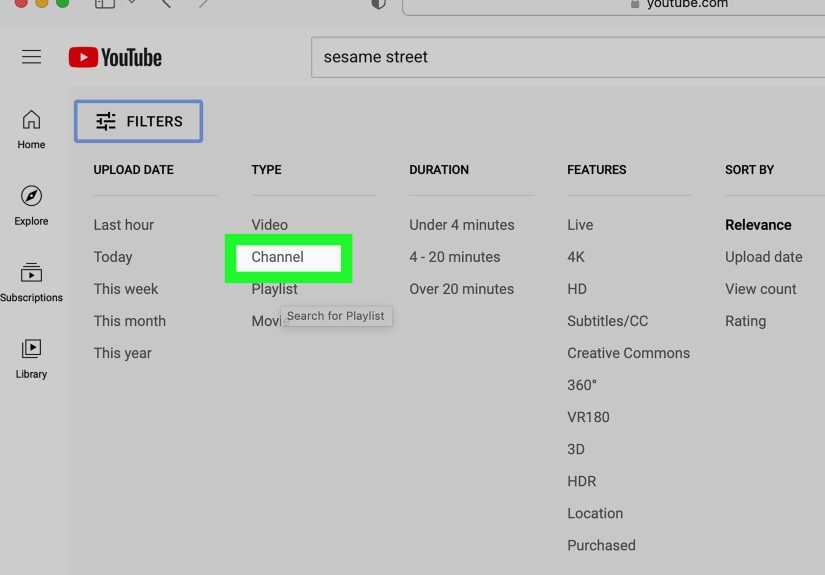
YouTube’s filters can narrow results by things like upload date, type, duration, and subtitles. That matters a lot when your memory includes clues like “it was under four minutes” or “it definitely had captions.”
If you remember the video was recent, long, live, or from a specific format, filters can turn a haystack into a much smaller haystack. Still annoying, yes. But now it is a haystack with boundaries.
3. Search by Transcript, Captions, or a Memorable Quote
This is the underrated move. If you remember something the person said but not the title, the YouTube transcript can help you work backward.
Why transcripts are gold
For videos with captions, YouTube can show a transcript. That means spoken words become searchable clues. If the title was generic but the dialogue was distinctive, the transcript may be the fastest route back to the video.
Let’s say you remember the creator saying, “Your first apartment does not need to look finished.” That line might not appear in the title, but it could still lead you to the right video when searched as a quoted phrase.
How to use this method well
Think in terms of spoken language. Search for:
- a joke you remember
- an unusual statistic
- a repeated phrase
- a dramatic sentence from the intro
Then try one of these approaches:
- Search the quote directly on Google with site:youtube.com.
- Open likely YouTube results and view the transcript.
- Use your browser’s find command to search for the phrase inside the page or transcript text.
This works especially well for tutorials, interviews, commentary videos, documentaries, and podcasts, where creators say enough unique words to leave a trail.
One important catch
Not every video has a visible transcript. Some videos do not have captions, and some transcripts are imperfect. Auto-generated captions are helpful, but they are not magic. If the speaker mumbles, the mic crackles, or the transcript thinks “budget” is “but judge it,” things can get strange quickly.
Still, even an imperfect transcript can be enough to confirm you found the right video.
4. Follow Your Activity Breadcrumbs: Comments, Searches, and Other Clues
If you interacted with the video, you may not need to remember the title at all. You just need to find your own footprint.
Check your comment history
If you ever left a comment, congratulations: past-you may have done present-you a huge favor. YouTube lets you view your comment history, and from there you can jump back to the original video.
This is one of the best methods because comments are tied to actual content you interacted with. Even a tiny comment like “Great tip” can lead you right back to the video you forgot.
Review your search history
You may not remember the video title, but you might remember how you found it. That means your YouTube search history can be just as useful as your watch history.
Maybe you found the video after searching:
- best carry on backpack Europe
- how to make crunchy potatoes no fryer
- study with me rainy cafe 2 hours
If that old search is still in your history, rerunning it with filters can get you back to the same result much faster than starting from scratch.
Do not forget language clues
Here is one more useful detail people miss: some videos have translated titles and descriptions. So if you saw the video in one language, the title you remember may not match the original upload title exactly. Searching in another language version of the title or using translated keywords can sometimes surface the right result.
That is especially useful for international channels, travel videos, multilingual tutorials, and news content.
Common Mistakes That Make the Search Harder
- Searching too broadly. “Funny podcast clip” is a lifestyle, not a query.
- Ignoring history. People jump to Google before checking the one place designed to remember what they watched.
- Using only title words. The title is what you do not know. Search for quotes, topics, or visuals instead.
- Skipping filters. Duration, date, and captions can eliminate a shocking amount of junk.
- Forgetting your own actions. If you commented, searched, or interacted, you already left clues behind.
Quick Example: How This Works in Real Life
Let’s say you are trying to find a video about apartment organization. You do not know the channel name. You do not know the title. You only remember that the creator said something like, “Stop buying bins before you measure,” and the video was probably around ten minutes long.
Here is the smart approach:
- Check your watch history for apartment, organization, or bins.
- Search YouTube for apartment organization bins measure.
- Apply duration and recent upload filters if needed.
- Search Google for “stop buying bins before you measure” site:youtube.com.
- Open promising results and scan the transcript.
- If you commented on it, check comment history and jump straight back.
That is the difference between random guessing and actually finding the video.
The Best Strategy, in One Sentence
If you want the shortest version possible, here it is: start with your history, search with fragments, use quotes and filters, and check transcripts or comments when memory gets fuzzy.
That is how to find a YouTube video without knowing the name without turning the process into a full afternoon project.
Experience-Based Tips: What Usually Happens When People Try to Find a Lost YouTube Video
In real life, most people do not remember the title because titles are often the least memorable part of the video. What sticks is the feeling of the video, the line that made them laugh, the one tip they wanted to try, or the fact that the creator was standing in a kitchen with suspiciously good lighting. That is why the best searches start with human memory, not robotic keywords.
A very common experience goes like this: someone remembers one oddly specific sentence, ignores it because it feels too random, and instead searches a broad topic. They type something like productivity video, get 50,000 results, and immediately feel doomed. Then they remember the creator said, “Your to-do list is not a storage unit,” search that phrase instead, and the video appears like it was waiting to be dramatic. The lesson is simple: weird details are often your strongest clues.
Another common pattern is that people underestimate watch history. They assume it will be too cluttered to be useful, but in practice it is often the fastest route back. Once they search their history by a topic or time frame, the video suddenly shows up between things they forgot they watched, like a recipe at midnight and a documentary about abandoned malls. Not glamorous, but effective.
Comment history is the sleeper hit. People forget that leaving even a tiny comment creates a breadcrumb trail. Someone might not remember the video title, the channel, or the upload date, but they do remember writing, “This actually helped, thanks.” That is enough. A quick visit to comment history can turn a frustrating search into a two-click reunion.
Transcript searching also tends to feel like a superpower the first time you use it well. It is especially useful for interviews, lectures, tutorials, and long-form videos where the title is vague. A title like My Honest Thoughts tells you almost nothing. A line from the video like “I spent six months testing this setup” tells you much more. Once people realize spoken words can help them identify a video, their search habits get much sharper.
There is also the emotional reality of the search itself. Usually, the more frustrated someone gets, the worse their search terms become. They stop being precise and start typing things like that one guy youtube video minimalism shelves maybe desk. That is the moment to pause, breathe, and go back to structured clues: topic, quote, channel type, length, date, interaction. Calm beats chaos every time.
Over time, people who get good at this develop a tiny routine. They check history first. They search with fragments second. They use Google with quotation marks when they remember exact wording. They inspect transcripts when the title is too generic. And if they ever leave a comment, they quietly thank past-themselves for being unexpectedly helpful.
So yes, finding a forgotten YouTube video can feel absurdly difficult for something you know you watched. But in practice, it is less about luck and more about method. Once you start thinking like a clue collector instead of a title guesser, the search gets much easier.
Final Thoughts
You do not need the exact name of a video to find it again. In most cases, you only need a few reliable clues and the patience to use the right tool in the right order. Start with history, move to better search, use transcripts when words matter, and follow your own activity when you interacted with the video.
That is the practical, low-stress way to find a forgotten YouTube video without going full detective noir over a clip about desk lamps or pasta science.