Table of Contents >> Show >> Hide
- What Makes Acer’s New 3D Monitors Different?
- A Bigger Canvas for Glasses-Free 3D
- How Acer SpatialLabs 3D Technology Works
- Acer SpatialLabs View Pro 27: Built for Creators and Developers
- Predator SpatialLabs View 27: 3D Gaming Gets Serious
- Who Are Acer’s 3D Monitors Really For?
- The Strengths of Acer’s New 3D Monitors
- The Limitations You Should Know Before Buying
- Why Acer’s 3D Monitors Matter for the Future of Displays
- Real-World Experience: What Using Acer’s 3D Monitors Feels Like
- Should You Buy an Acer 3D Monitor?
- Conclusion
The humble monitor has spent decades doing one job very well: sitting on a desk and pretending the world is a flat rectangle. Acer, apparently tired of that arrangement, has been pushing a different idea with its SpatialLabs lineup: what if your screen could show depth without asking you to wear 3D glasses, strap on a headset, or look like you lost a bet at a tech convention?
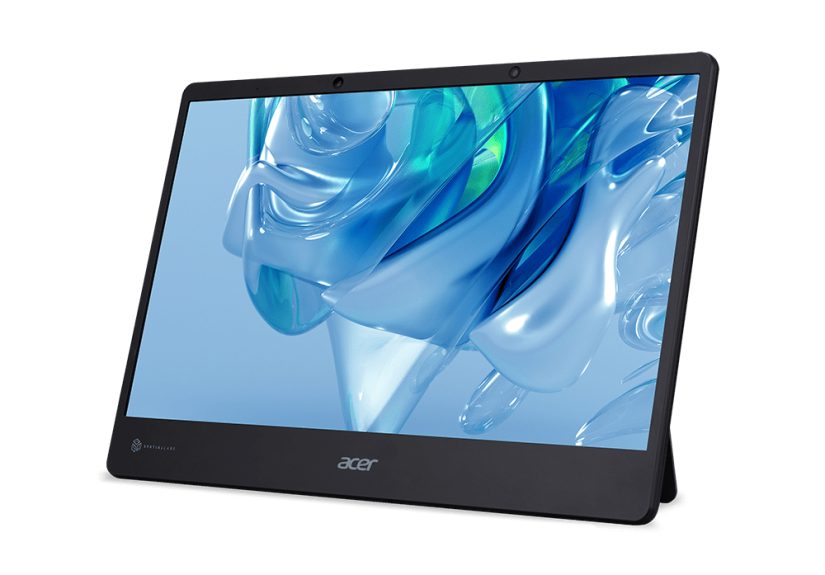
That is the promise behind Acer’s new 3D monitors, especially the Acer SpatialLabs View Pro 27 and Predator SpatialLabs View 27. These displays are designed to make digital worlds feel less like postcards and more like miniature stage sets. Models, games, product designs, medical visuals, animated scenes, and architectural concepts can appear with real visual depth, using glasses-free stereoscopic 3D technology powered by eye tracking, real-time rendering, optical display engineering, and software support.
For creators, developers, designers, and gamers, this is more than a party trick. It is a new way to look at content. For everyone else, it is at least a very convincing reminder that “flat screen” no longer has to mean “flat experience.”
What Makes Acer’s New 3D Monitors Different?
Acer’s latest 3D monitors are built around its SpatialLabs technology, a system that combines a stereoscopic 3D display, eye tracking, real-time rendering, AI-assisted processing, and software tools that help compatible content appear with depth. Instead of using traditional red-and-blue glasses or active shutter eyewear, the monitor tracks the viewer’s eyes and adjusts the image so each eye receives a slightly different perspective.
That difference is what creates the illusion of depth. Your brain does the final bit of magic, blending the two perspectives into a single 3D scene. In simpler terms: Acer is letting your eyes do what they already do in real life, only this time the “real life” object might be a dragon, a concept car, a 3D sneaker render, or a suspiciously over-designed spaceship.
The Acer SpatialLabs View Pro 27 is aimed mainly at professionals and creators. It offers a 27-inch 4K display, a 160Hz refresh rate, stereoscopic 3D support, eye tracking, and tools for viewing 3D models. The Predator SpatialLabs View 27 brings a similar 27-inch 4K glasses-free 3D idea into gaming, with features such as high refresh performance, adaptive sync support, and game-focused SpatialLabs TrueGame compatibility.
A Bigger Canvas for Glasses-Free 3D
One of the biggest upgrades in Acer’s newer 3D monitor push is size. Earlier SpatialLabs displays included portable 15.6-inch models, which were impressive but naturally limited by their smaller screen area. A 27-inch 3D monitor changes the experience. It gives designers more room to inspect a model, gamers more space to feel pulled into a world, and presenters a more convincing way to show 3D content without asking everyone in the room to share one tiny screen.
A 27-inch 4K panel also matters because 3D display quality depends heavily on clarity. When a screen is splitting visual information between two eyes, sharpness becomes especially important. Acer’s 4K resolution helps preserve detail in both 2D and 3D viewing modes. That makes the monitors useful even when you are not using the 3D effect. They are not one-trick ponies; they are more like very ambitious horses with engineering degrees.
How Acer SpatialLabs 3D Technology Works
Eye Tracking Keeps the Image Aligned
The most important part of glasses-free 3D is knowing where the viewer is looking from. Acer’s SpatialLabs monitors use eye-tracking technology to follow the user’s eye position. The system then adjusts the displayed image so the right perspective reaches each eye. This is what allows the 3D effect to work without glasses.
Good eye tracking is crucial because the illusion can weaken if the viewer moves too far out of the ideal position. Acer has improved its system for larger displays and low-light conditions, which matters for real-world use. Gamers often play in darker rooms. Designers may work in dim studios. Developers may demo projects in conference spaces where lighting is less than perfect. A 3D monitor that only works under laboratory conditions would be about as useful as a chocolate keyboard.
A Lenticular Lens Creates Separate Views
The display uses a switchable lenticular lens system to help direct different images to each eye. In 2D mode, the monitor behaves like a regular high-resolution display. In 3D mode, the optical layer helps create the stereoscopic effect. This 2D-to-3D flexibility is important because not every task benefits from depth. Writing an email in 3D would be unnecessary, unless your inbox is so terrifying that it deserves horror-movie treatment.
Real-Time Rendering Adds Depth
SpatialLabs also depends on real-time rendering. For 3D content, the system needs to generate perspectives that match the viewer’s position. This is especially useful for 3D modeling, visualization, game rendering, and interactive applications where the user changes the view constantly. Instead of watching a fixed 3D video, users can rotate objects, explore scenes, and examine depth relationships in a more natural way.
Acer SpatialLabs View Pro 27: Built for Creators and Developers
The Acer SpatialLabs View Pro 27 is the professional star of the lineup. It is designed for people who work with 3D content before anyone else gets to admire it. That includes game developers, industrial designers, architects, animators, medical visualization teams, product designers, education teams, and creative studios.
The monitor’s 27-inch 4K panel, 160Hz refresh rate, color accuracy focus, and glasses-free 3D support make it a strong fit for reviewing 3D assets. A designer can inspect the curves of a product prototype. An architect can walk a client through a room layout. A developer can preview a 3D environment without switching into a VR headset. A teacher can make anatomy, engineering, or physics visuals feel more dimensional and less like something trapped in a textbook.
Acer’s software ecosystem also plays a major role. SpatialLabs Model Viewer Pro is designed to make it easier to import, view, and present 3D models. Support for common 3D workflows helps the monitor feel less like a novelty accessory and more like a practical creative tool. The key benefit is speed: when a team can preview depth directly on a monitor, they may catch design issues earlier and explain ideas more clearly.
Predator SpatialLabs View 27: 3D Gaming Gets Serious
The Predator SpatialLabs View 27 is Acer’s gaming-focused 3D monitor. It takes the same basic concept of glasses-free stereoscopic depth and aims it directly at players who want more immersion than a standard 2D screen can offer. With a 27-inch Ultra HD display, 160Hz refresh rate, stereo 3D visuals, and adaptive sync support, it is designed to remain useful as a high-performance gaming monitor even when 3D mode is turned off.
The most exciting part is Acer SpatialLabs TrueGame, which applies 3D profiles to supported games. Instead of forcing users to become part-time graphics engineers, TrueGame is meant to simplify the process. Launch a compatible game through the software, and the system applies a stereo 3D profile. That convenience matters because 3D gaming has historically suffered from the “great when it works, annoying when it doesn’t” problem.
When it works well, the effect can be striking. Strategy games, role-playing games, simulation titles, racing games, and third-person adventures can benefit from a diorama-like sense of depth. Instead of everything sitting on the screen surface, environments appear layered inward. Mountains feel farther away. Characters occupy space. Roads stretch into the distance. A fantasy town can look like a tiny living model behind the glass.
Who Are Acer’s 3D Monitors Really For?
For 3D Artists and Animators
Artists working with character models, environments, visual effects, and animation can use 3D depth to evaluate form more naturally. A monster’s jawline, a vehicle’s silhouette, or a scene’s lighting can look different when viewed stereoscopically. That extra depth can help artists catch awkward proportions or improve presentation quality.
For Product Designers
Product designers often spend hours rotating models on flat screens. A glasses-free 3D monitor can make prototypes easier to understand visually. Whether the product is a smartwatch, chair, medical device, or sneaker, depth helps teams see curves, edges, and volume with less mental translation.
For Architects and Interior Designers
Architectural visualization is one of the most natural uses for Acer SpatialLabs monitors. Floor plans and 3D renders already try to communicate space. A stereoscopic display gives viewers a stronger sense of room depth, furniture placement, ceiling height, and spatial flow. Clients who struggle to read technical drawings may understand a 3D scene much faster.
For Game Developers
Game developers can preview 3D assets, environments, and camera behavior without jumping into VR. That can be valuable for testing level design, object scale, scene composition, and player perspective. A glasses-free monitor will not replace full VR testing for VR games, but it can speed up everyday visual review.
For Gamers
Gamers are the audience most likely to ask the obvious question: “Does it make games more fun?” The answer depends on the game, the setup, and the player. Some games benefit more than others. A cinematic RPG, racing game, or simulation title may feel deeper and more immersive. A competitive esports shooter may not be the best match because players usually prioritize response time, consistency, and zero distractions over visual magic.
The Strengths of Acer’s New 3D Monitors
The first strength is convenience. Glasses-free 3D removes the biggest barrier that killed many older 3D display experiments: accessories. No glasses means fewer things to charge, lose, clean, or explain to confused relatives.
The second strength is flexibility. These monitors can switch between 2D and 3D modes, which means users can work normally and activate 3D only when it adds value. This is essential because 3D is not always better. Sometimes a spreadsheet should remain flat, calm, and emotionally unavailable.
The third strength is professional usefulness. Acer is not only selling a cool visual effect; it is building an ecosystem for model viewing, game profiles, creative workflows, and interactive visualization. That software layer is what separates a serious 3D monitor from a flashy demo screen.
The fourth strength is display quality. A 27-inch 4K panel with a high refresh rate gives these monitors a strong foundation. Even if users spend part of the day in regular 2D mode, the monitor still needs to perform well. Acer’s approach makes the 3D feature feel like an upgrade rather than a compromise.
The Limitations You Should Know Before Buying
Acer’s 3D monitors are exciting, but they are not magic portals. The first limitation is viewing position. Glasses-free 3D works best when the user sits in the correct zone and the eye-tracking system can clearly detect eye position. Move too far off-center, and the effect may weaken.
The second limitation is content compatibility. Not every game, app, video, or 3D file will automatically look amazing in stereo 3D. Acer’s software ecosystem helps, but users still need compatible content and the right workflow. For professional use, that may mean checking supported file types and software tools. For gaming, it means checking TrueGame support.
The third limitation is cost. Advanced 3D monitors are premium products. They are best suited for users who will actually benefit from the technology, not someone who only wants to watch cat videos in depthalthough, admittedly, a cat paw reaching out of a 3D screen sounds dangerously delightful.
The fourth limitation is comfort. Some users may need time to adjust to stereoscopic depth. Long sessions in 3D mode can feel different from normal monitor use, so it is wise to take breaks, adjust depth settings, and switch back to 2D when needed.
Why Acer’s 3D Monitors Matter for the Future of Displays
For years, consumer 3D technology has had a strange reputation. It has been hyped, dismissed, revived, and dismissed again. The difference now is that Acer is not trying to sell 3D as a replacement for every screen. Instead, SpatialLabs positions 3D as a specialized tool that becomes powerful in the right context.
That is a smarter path. The future of monitors may not be “everything in 3D all the time.” It may be adaptive displays that move between normal 2D work, immersive 3D previews, spatial presentations, and interactive visual experiences. Acer’s SpatialLabs monitors fit that future nicely because they let users decide when depth is useful.
This also matters because spatial computing is growing. VR headsets, mixed reality devices, 3D design tools, digital twins, simulation platforms, and game engines are becoming more common. A glasses-free 3D monitor can act as a bridge between traditional desktop computing and fully immersive headsets. It gives users depth without isolating them from the room, their keyboard, their coworkers, or their coffee.
Real-World Experience: What Using Acer’s 3D Monitors Feels Like
Using a glasses-free 3D monitor is not like watching an object fly out of the screen every five seconds. In fact, the best effect is usually more subtle and more useful. Think of it less as “shark jumping through the display” and more as “a small world exists behind the glass.” That distinction is important because Acer’s SpatialLabs experience often creates depth inward, making scenes look layered and dimensional.
For a designer, the experience can feel like replacing a flat sketch with a physical prototype. A chair render suddenly has thickness. A product casing shows its curves more clearly. A car model feels less like an image and more like an object sitting in a display case. The advantage is not just visual drama; it is comprehension. Depth helps the brain understand shape faster.
For an architect or interior designer, the experience can be even more practical. A room render on a normal monitor can look beautiful, but clients still have to imagine scale. On a 3D display, the distance between a sofa and a wall, the height of shelving, or the openness of a kitchen layout can feel more obvious. This can make presentations more persuasive and reduce the number of “Wait, how big is that?” moments.
For gamers, the experience depends heavily on the game. A first-person shooter may look interesting, but fast competitive play may not be the ideal showcase. A role-playing game, city builder, racing title, or adventure game can be more rewarding because the player has time to appreciate depth. Landscapes stretch backward. Characters stand apart from backgrounds. A town square can look like a tiny stage. It is not always a competitive advantage, but it can be a serious immersion boost.
There is also a learning curve. Users may need to adjust posture, lighting, viewing distance, and software settings. The best results usually come from sitting centered, keeping the display at a comfortable height, and letting the eye-tracking system do its job. Once the setup feels right, the technology can fade into the background, and the content becomes the star.
One underrated experience is switching back to 2D. After spending time with a good stereoscopic scene, a flat image can suddenly feel a little plain. Not bad, just less alive. It is similar to hearing a song through quality speakers and then returning to a phone speaker. The old way still works, but now you know what is missing.
That is where Acer’s new 3D monitors are most compelling. They do not need to replace every display. They simply need to show that some work, some games, and some presentations become better when depth is part of the conversation. The world may not literally be inside the monitor, but Acer is making a surprisingly good argument that it can look that way.
Should You Buy an Acer 3D Monitor?
If you are a casual user who mostly browses the web, streams shows, edits documents, and occasionally shops for things you definitely do not need, Acer’s 3D monitors may be more technology than your desk requires. A standard 4K monitor will likely serve you well.
However, if you work with 3D content, create visual presentations, develop games, teach spatial subjects, or want a premium gaming display with a unique immersion feature, Acer’s SpatialLabs monitors are much more interesting. They offer something traditional monitors cannot: a convincing sense of depth without the friction of glasses or a headset.
The Acer SpatialLabs View Pro 27 is best for professional visualization, design, and development. The Predator SpatialLabs View 27 is better suited for gamers who want 3D experiences and strong 2D performance in one display. The smaller Nitro SpatialLabs View remains relevant for portable 3D viewing, but the 27-inch models make the technology feel more mature and desk-ready.
Conclusion
Acer’s new 3D monitors show that the future of desktop displays does not have to be flat, boring, or limited to ordinary pixels arranged in ordinary ways. With SpatialLabs technology, Acer combines eye tracking, stereoscopic 3D, real-time rendering, and high-resolution panels to create a viewing experience that feels more dimensional and more interactive.
These monitors are not for everyone, and they are not meant to turn every task into a 3D spectacle. Their real value appears when depth improves understanding, creativity, presentation, or immersion. For designers, developers, educators, and adventurous gamers, Acer’s SpatialLabs lineup offers a genuine glimpse of where monitors may be heading next.
The world is no longer flatnot on Acer’s newest 3D monitors, anyway. And honestly, after decades of staring at rectangles, a little depth feels like a pretty exciting plot twist.
Note: This article is written in original wording and is based on real product information about Acer SpatialLabs 3D monitor technology, including Acer SpatialLabs View Pro 27, Predator SpatialLabs View 27, Nitro SpatialLabs View, SpatialLabs TrueGame, and related professional 3D display features.