Table of Contents >> Show >> Hide
- What Is PS5 Game Help, Exactly?
- What’s New: Community Game Help (Help from Real Players)
- How to Get In-Game Help from Other PS5 Players
- Which Games Support Game Help and Community Game Help?
- Why Use In-Game Help Instead of YouTube or Wikis?
- Tips for Being a Great Community Helper
- Limitations and Things to Know
- Real-World Experiences: What It’s Like to Use Community Game Help
- The Bottom Line: PS5 Players Helping Players, Built-In
Every gamer knows that moment: you’ve been stuck on the same boss for an hour, your snacks are gone, your controller battery is low, and you’re seriously considering switching to an easier game “for just five minutes.”
On PS5, that crisis point now has a surprisingly wholesome solution: you can get in-game help from other PS5 players without leaving your game, alt-tabbing to YouTube, or doom-scrolling forum threads from 2013.
Thanks to Sony’s Game Help and the newer Community Game Help features, your PS5 can surface spoiler-light tips and short gameplay clips directly from fellow players and from developers, tailored to the exact spot where you’re stuck.
It’s like having a tiny strategy guide built into your console, powered by the community.
What Is PS5 Game Help, Exactly?
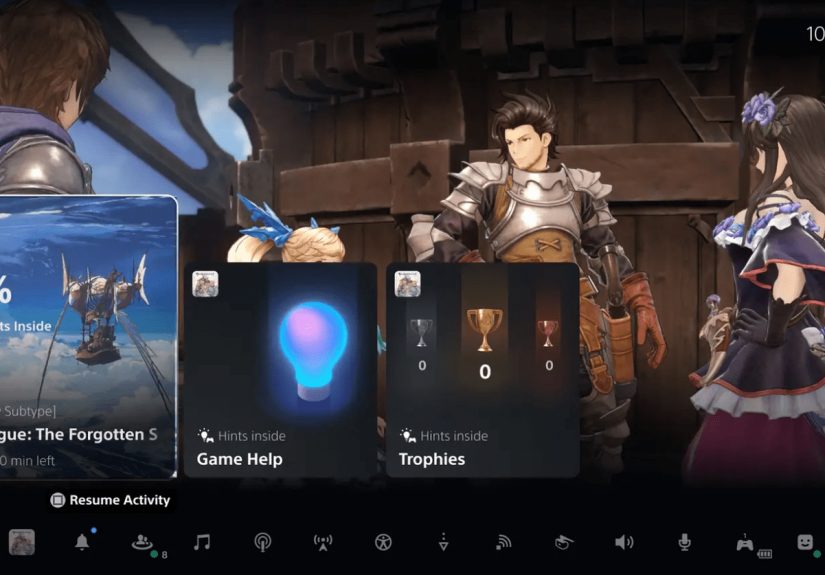
Game Help launched with the PS5 as part of the console’s Activity Cards system. When you’re playing a supported game and hit a roadblock, you can open the Control Center and see cards for specific objectives, levels, or challenges. Some of these cards have a “Hints inside” or Game Help icon.
Tap into those cards and you’ll see:
- Text hints that nudge you in the right direction.
- Short video clips showing exactly how to clear that puzzle, find that hidden collectible, or avoid that one ridiculous one-shot attack.
- Multiple hint levels, so the first hint might be subtle, and later ones are more explicit if you really need the answer.
Originally, Game Help was a perk tied to PlayStation Plus for certain games like Astro’s Playroom and Ratchet & Clank: Rift Apart.
Over time, Sony has expanded and refined it, turning Game Help into a more central part of the PS5 experience rather than just a bonus for a few titles.
What’s New: Community Game Help (Help from Real Players)
The real game-changer is Community Game Help, which takes that original Game Help concept and adds user-generated content right on your console.
Sony announced Community Game Help as an enhancement to the existing system: in supported PS5 games, you can now see hints that come from actual player gameplay clips alongside developer-made hints.
These clips are automatically captured when players who opt in successfully complete specific in-game activities, trophies, or objectives.
In practice, that means:
- When you open Game Help, some hints are labeled “Community Game Help”, indicating they’re sourced from other players’ footage rather than studio-produced guides.
- You can rate how useful those hints are, which helps Sony surface the best clips and filter out the “I just rolled around and got lucky” attempts.
- Because the clips are captured at specific points, they’re highly contextualno 20-minute videos where the one useful part is at 14:37.
Importantly, Sony says all of this runs through moderation and review, so random uploads don’t just go straight into your Game Help feed.
The goal is a curated library of useful, spoiler-controlled help that feels more like a polished tips channel than a chaotic social feed.
Is Community Game Help Live Yet?
Community Game Help was announced in March 2024 as a feature arriving “later this year” in select games.
Since then, Sony’s regional PlayStation accounts have confirmed that Community Game Help has rolled out, letting players both receive and contribute in-game guidance.
Support is still expanding, but the direction is clear: Game Help is moving from a developer-only tool to a community-driven assistance system.
How to Get In-Game Help from Other PS5 Players
Ready to get unstuck without rage-quitting? Here’s how to use Game Help and Community Game Help on your PS5.
Step 1: Open the Control Center
While you’re in a game:
- Press the PS button on your DualSense controller.
- The Control Center appears along the bottom of the screen with cards related to your current game and system features.
Step 2: Look for the Game Help / “Hints Inside” Card
In supported titles, you’ll see an Activity Card with a small icon or label indicating there are hints availablethis might say something like “Hints inside” or show a Game Help light-bulb-style symbol.
Select that card and you’ll see a list of objectives. For each objective that supports Game Help, you can open a dedicated help card.
Step 3: View Hints and Player Clips
When you open a Game Help card, you might see:
- Text hints describing what to do next.
- Short videos you can play right within the card.
- Multiple hints you can flip through if you want more detail.
Some of those videos will be labeled as Community Game Help, meaning they’re sourced from other players’ gameplay.
You can:
- Rate how useful a community hint was, helping bubble up the best ones.
- Use the pin-to-side mode so the hint appears alongside your game while you keep playing, instead of covering the whole screen.
- Press the PS button to jump right back into the action when you’ve seen enough.
Step 4: Turn On Community Game Help (If You Want to Contribute)
Want to be the hero who saves strangers on the internet from a brutal mini-boss? You can opt in to having your gameplay clips used as hints:
- Go to Settings on your PS5.
- Navigate to Captures & Broadcasts > Auto Captures > Community Game Help.
- Select Participate to opt in.
Once enabled, your PS5 can automatically record short clips when you complete certain in-game tasks in supported titles. Those clips are then reviewed, and the best ones may appear as Community Game Help hints for other players.
You can:
- Opt out at any time.
- Set a monthly capture limit so the feature doesn’t eat your entire SSD or bandwidth.
Which Games Support Game Help and Community Game Help?
Not every PS5 game supports Game Help, but a growing list of first-party and select third-party titles do. Early examples included Astro’s Playroom, Oddworld: Soulstorm, Maquette, and Ratchet & Clank: Rift Apart.
Sony is continuing to push Game Help and Community Game Help as part of the PS5 feature set, and its PS5 features page now explicitly highlights Community Game Help as a way to access tips and hints across supported titles.
While there’s no exhaustive public list of supported games, you’ll typically find Game Help in:
- Sony first-party games and big exclusives with strong PS5 integration.
- Some PS Plus titles where Sony has invested in deeper platform features.
- Newer games that emphasize accessibility and guided progression.
The easiest way to tell if a game supports it: press the PS button in-game and look for the Game Help or “Hints inside” card. If you don’t see it, that game probably doesn’t support Game Help yet.
Why Use In-Game Help Instead of YouTube or Wikis?
YouTube guides and wikis aren’t going anywhere, but PS5’s built-in help has some real advantages:
- Context-aware help: Game Help knows exactly which objective or mission you’re on, so hints and clips are tailored to your current spot instead of a generic “Chapter 7 walkthrough.”
- Fewer spoilers: Hints can be layered, giving you a gentle nudge first and the full solution only if you ask for more. No accidental endgame spoilers in the suggested videos sidebar.
- No second screen required: Everything appears on your console, and pin-to-side mode lets you play while watching the clip.
- No ads or algorithm rabbit holes: You get straight to the tip you need instead of watching an unskippable ad, then accidentally spending 40 minutes watching unrelated content.
- Accessibility friendly: For players who struggle with multitasking between devices, or who benefit from visual, real-time examples, in-console help can be much smoother than switching to a phone or laptop.
Community Game Help adds a more human touchthese aren’t perfectly polished dev demos but real runs from players who had to solve the same problem you’re facing.
Tips for Being a Great Community Helper
If you opt in to Community Game Help, you’re not just playingyou’re quietly co-authoring a built-in guide for other PS5 owners. A few ways to make your clips genuinely helpful:
- Play clearly: When you’re tackling a tricky puzzle or boss, try not to flail wildly. Move the camera smoothly, show key landmarks, and make your path obvious.
- Don’t cheese everything: Speedrunner-style glitches might be hilarious, but they’re not always reproducible. Standard, repeatable strategies are more useful for most players.
- Show the “setup” moment: For collectibles or platforming sections, it helps if your clip shows where you start from, not just the final jump or pickup.
- Respect spoilers: Even though Sony moderates clips, being mindful about major story moments makes the feature better for everyone.
The rating system should gradually highlight the most useful play styles, but thinking like a guide creator while you play is a good habit if you want your clips to help others.
Limitations and Things to Know
As slick as Game Help and Community Game Help are, they’re not magic (yet). Keep in mind:
- Only supported games: If a developer hasn’t integrated Game Help, you simply won’t see the option. That’s up to each studio, not Sony alone.
- Internet required: Videos and clips stream over the internet, so you’ll want a reasonably stable connection.
- Privacy and captures: Community Game Help uses automatically recorded gameplay clips. Sony gives you controls over whether you participate and how many clips can be captured monthly.
- Coverage will grow over time: Early on, some games will have sparse community clips. As more players opt in and as more titles ship with support, the library should feel richer.
Still, even with these caveats, the feature fits neatly into the PS5’s broader push toward convenience, accessibility, and more approachable game design.
Real-World Experiences: What It’s Like to Use Community Game Help
So what does this actually feel like when you’re in the middle of a tough game night? Think of a few real-world scenarios.
You’re playing a dense open-world game loaded with side quests and collectibles. You’ve cleared most of a region, but one last collectible refuses to show up. You’ve run circles around the map, climbed every ledge, and interrogated your poor photo mode like it’s hiding secrets. Instead of pulling out your phone and typing “game name last collectible region X,” you hit the PS button, open the Activity Card for that area, and tap the Game Help hint. A clip from another player pops up, clearly showing the exact rock you need to climb and the angle of the jump. You pin it to the side of the screen, mimic the movement, and grab the collectible in 20 seconds. Stress gone.
Or picture this: you’re in a boss fight where one attack keeps deleting half your health bar. You know there has to be a trickroll timing, a parry window, somethingbut the pattern just won’t click. You open Game Help and see both a developer-made clip and a community clip. The community video shows a player using an unexpected but valid strategy: hugging a certain pillar, baiting the attack, then countering with a specific ability. Suddenly the fight feels less unfair and more like a puzzle you can actually solve. You go back in, try the same approach, and win on the next attempt. That rush of “Ohhh, that’s how you’re supposed to do it” hits just as hard as doing it “blind,” but with a lot less frustration.
Community Game Help can also be surprisingly helpful for new or returning gamers. Imagine someone’s first PS5 being their first console in years. Difficulty spikes, complex control schemes, and layered systems can all feel overwhelming. Having gentle, embedded guidance that doesn’t require leaving the game or navigating external apps makes it easier for them to stay engaged. Instead of feeling like games “aren’t for them” anymore, they get small, targeted assists that keep momentum going.
On the flip side, contributing to Community Game Help can be quietly satisfying. Maybe you’ve mastered a tricky platforming section, or you’ve found a smart route through a crowded combat arena. When you know your successful run might end up as a reference clip, you start noticing how you play: you line up the camera more cleanly, you show the starting position before you execute the move, and you avoid chaotic “panic rolling” in case another player has to follow your footsteps. Your ordinary gameplay suddenly becomes part of a shared knowledge base.
Over time, this can change how communities form around games. Instead of help existing only on external sites, some of that knowledge now lives directly on the console, curated and moderated. External guides and deep-dive videos still have their placeespecially for min-maxing, speedrunning, or lore breakdownsbut the “I’m stuck right now on this one thing” problem is increasingly solvable without leaving your couch or your game session.
In that sense, “getting in-game help from other PS5 players” isn’t just a headline featureit’s a subtle shift in how we think about difficulty and community. You’re not alone in your living room trying to brute-force a puzzle anymore; you’re part of a network of players quietly helping each other get through the same tricky moments, one short clip at a time.
The Bottom Line: PS5 Players Helping Players, Built-In
The PS5’s Game Help and Community Game Help features transform your console into more than just a machine that runs gamesthey turn it into a platform where players and developers collaborate to reduce friction and keep you in the flow of play. Whether you’re stuck on a brutal boss, hunting that last collectible, or just trying to figure out what the game wants you to do, you can now get in-game help from other PS5 players without ever leaving your screen.
If you haven’t tried it yet, dip into the Control Center the next time you hit a wall. And if you’re already a pro at your favorite game, consider opting into Community Game Helpyou might be the reason someone else doesn’t give up right before the good part.