Table of Contents >> Show >> Hide
- M4 Mac Mini at a Glance
- M4 Mac Mini Release Date and Product Cycle
- M4 Mac Mini Price and Configurations
- M4 Mac Mini Design and Ports
- M4 Mac Mini Specs and Performance
- M4 Mac Mini vs. Other Macs
- Who Is the M4 Mac Mini Best For?
- Buying Tips: Getting the Best Value
- Real-World Experiences with the M4 Mac Mini
- Conclusion: Is the M4 Mac Mini Worth It?
If you’ve been waiting for a tiny desktop that hits way above its weight class, the M4 Mac mini is basically Apple saying, “Here, have a shrink-wrapped powerhouse.” With a new design, a more capable M-series chip, and serious Apple Intelligence features, the M4 Mac mini has gone from “cute little Mac” to “do-almost-everything machine” for creators, coders, and everyday users alike.
This guide walks you through the latest M4 Mac mini news, price, release date, specs, and real-world buying adviceplus some hands-on experiences and lessons from early adoptersso you can decide if this is the right desktop for your setup.
M4 Mac Mini at a Glance
- Announcement date: October 29, 2024
- Release date: Begins shipping November 8, 2024
- Starting price (M4): $599 (U.S.), $499 for education
- Starting price (M4 Pro): $1,399 (U.S.)
- Chip options: Apple M4 or M4 Pro
- Base memory: 16GB (M4), 24GB (M4 Pro)
- Max memory: Up to 32GB (M4), up to 64GB (M4 Pro)
- Storage: 256GB–2TB (M4), up to 8TB (M4 Pro), with modular SSD design
- Key features: Smaller 5×5-inch chassis, more ports, Apple Intelligence (on-device AI features)
M4 Mac Mini Release Date and Product Cycle
Apple introduced the redesigned M4 Mac mini in late 2024 as part of a broader Mac refresh centered around the M4 generation of chips and Apple Intelligence. The new model officially went up for preorder on October 29, 2024, and started landing on desks and studio setups on November 8, 2024, in the U.S. and other major markets.
As of late 2025, the M4 Mac mini is in the middle of its life cycle. Rumors and buyer’s guides suggest that Apple’s next revision, likely powered by an M5 or M5 Pro chip, is expected sometime in 2025–2026, with some reports pointing at a 2026 timeframe and others hinting Apple could move earlier. The important takeaway: if you buy an M4 Mac mini now, you’re still getting Apple’s current-generation desktop silicon with several years of macOS updates and Apple Intelligence support ahead of it.
Should You Wait for M5 or Buy M4 Now?
If you need a Mac today, the M4 Mac mini is not a “stopgap” machineit’s a major redesign with a strong performance uplift and new AI features. Waiting for the next chip cycle only makes sense if:
- Your current computer is limping along but still usable.
- You specifically want bleeding-edge Apple Silicon with the next-gen AI cores.
- You’re willing to live in “rumor land” for another year or more.
For most people, the M4 Mac mini is a safe, modern, and very fast choice right now.
M4 Mac Mini Price and Configurations
One of the M4 Mac mini’s biggest selling points is that it’s the most affordable way to get into Apple’s current desktop lineup, while still giving you real workstation-class performance.
Official Pricing
- Mac mini (M4) base model: $599 (U.S.) with 16GB unified memory and 256GB SSD.
- Mac mini (M4 Pro) base model: $1,399 (U.S.) with 24GB unified memory and 512GB SSD.
- Education pricing: M4 Mac mini starts at $499 for eligible students and institutions.
Apple, of course, charges a premium for upgrades. Every step up in storage or unified memory typically adds a few hundred dollars to the price. Fully loaded M4 Pro models with 64GB of memory and multi-terabyte storage can climb into “small-car-payment” territory.
Real-World Street Pricing
By 2025, the M4 Mac mini has shown up in frequent sales. Retailers like Best Buy and major online stores have dropped the base M4 model below the official $599 price tag, occasionally hitting sub-$500 deals. Those promos make the M4 Mac mini one of the best performance-per-dollar Macs you can buy, especially if you’re fine with adding external storage instead of paying Apple’s upgrade rates.
Which Configuration Is Right for You?
Because the M4 Mac mini uses unified memory that’s not user-upgradeable, it’s smart to think ahead:
- 16GB RAM (M4 base): Great for web, office work, light photo editing, music listening, and casual coding. It’s also surprisingly capable for 4K video editing if you’re not pushing heavy effects.
- 24GB–32GB RAM (M4 / M4 Pro): Better for running multiple pro apps, large photo libraries, heavier coding projects, and more serious video work.
- 64GB RAM (M4 Pro maxed): Overkill for most users, but a nice option for large 3D projects, advanced audio production, or developers and researchers running local AI models.
Storage is where you can save money. The internal SSD is very fast, but pricey. Many owners deliberately choose 256GB or 512GB internal storage and rely on high-quality external NVMe drives via USB-C or Thunderbolt for big media libraries and projects. It’s a very common and much more affordable setup.
M4 Mac Mini Design and Ports
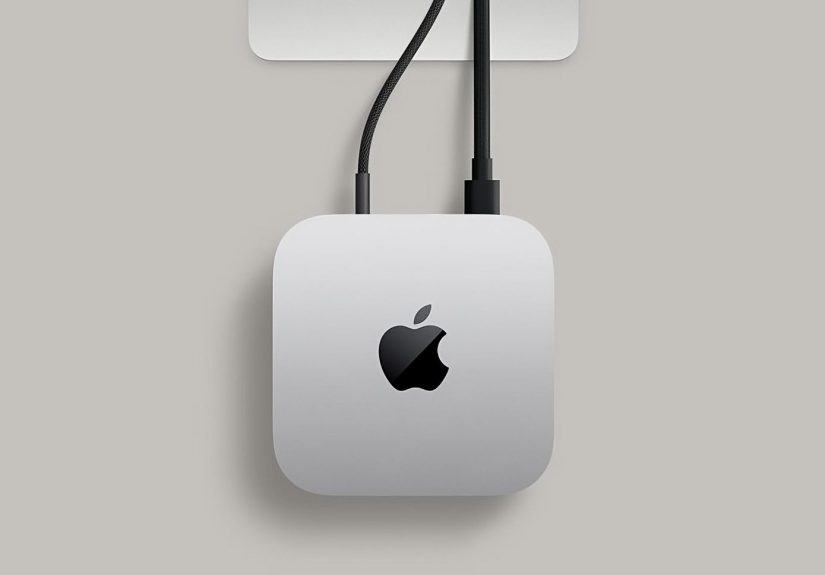
On the outside, the M4 Mac mini went from “cute aluminum lunchbox” to “super-compact slab of power.” Apple shrunk the chassis to roughly 5×5 inches, making it noticeably smaller than the old Intel and M1/M2 designs. The new footprint makes it easier to tuck the machine under a monitor, mount it behind a display, or slide it into tight home-office setups.
Port Layout
Apple finally leaned into the “mini desktop hub” role. On the rear, the M4 Mac mini offers:
- Three Thunderbolt 4 ports on M4 models, or three Thunderbolt 5 ports on M4 Pro models
- An HDMI port for displays or TVs
- Gigabit (or optional 10-Gigabit) Ethernet
On the front, you get:
- Two USB-C ports for quick access
- A 3.5mm headphone jack, which audio nerds are still grateful Apple didn’t kill
Between the front ports and the rear Thunderbolt connections, the M4 Mac mini can comfortably run multiple monitors, big external drives, audio interfaces, and a pile of accessories. If you need even more convenience, third-party “Mac mini hubs” are available that stack under the mini and add SD card slots, extra USB-A, and internal bays for additional SSDs.
M4 Mac Mini Specs and Performance
The headline feature is, of course, the M4 chip. It’s the next evolution of Apple Silicon, with a strong focus on performance-per-watt and AI workloads.
M4 vs. M4 Pro
Exact core counts vary by configuration, but broadly:
- M4 Mac mini: A 10-core CPU and 10-core GPU configuration is common, with up to 32GB of unified memory and 2TB of storage. It already offers more than enough speed for most tasks, including 4K video editing, coding, and light 3D work.
- M4 Pro Mac mini: Adds more performance cores, a beefier GPU, higher memory bandwidth, and support for up to 64GB of unified memory and up to 8TB of storage. It’s aimed at heavier pro workloadsthink complex timelines in Final Cut, multiple virtual instruments, or demanding dev environments.
In real tests, reviewers have found that the base M4 Mac mini often nips at the heels of its M4 Pro sibling for everyday jobs. Unless your workflows are genuinely demanding, you may see only small day-to-day performance differencesthough the M4 Pro does pull away in GPU-heavy and multi-core workloads.
Apple Intelligence and On-Device AI
One of the quieter but more important changes with the M4 generation is improved neural engine performance and AI-optimized design. The M4 Mac mini is designed to run Apple Intelligence features locally whenever possible, speeding up things like:
- Summarizing and rewriting text in apps
- Generating images and illustrations
- Smarter search and context-aware suggestions across macOS
For professionals working with AI workflowslike local LLMs, custom image generation models, or data-science notebooksthis combination of CPU, GPU, and neural engine power in a small box is particularly appealing.
Everyday Experience: Noise, Heat, and Power Use
One of the biggest quality-of-life upgrades from older Intel minis is how quiet and cool the M-series models are, and the M4 continues that trend. Under normal office or creative workloads, the M4 Mac mini is either whisper-quiet or effectively silent. The system sips power compared to traditional desktops, which is great if your Mac stays on all day for remote work, servers, or always-on home-office setups.
M4 Mac Mini vs. Other Macs
“Should I buy the M4 Mac mini or something else?” is the question that haunts many shopping carts. Here’s a quick comparison.
M4 Mac Mini vs. MacBook Air / MacBook Pro
- Choose the M4 Mac mini if: You already have a monitor and accessories, mostly work at a desk, and want the most performance for the money.
- Choose an M4 MacBook Air or Pro if: Portability is essential. Laptops cost more for the same performance, but they double as desktop and travel machine.
In terms of raw speed, similarly specced M4 machines are very close. The Mac mini just lets you spend more of your budget on compute power instead of buying another screen and battery.
M4 Mac Mini vs. Mac Studio
The Mac Studio still wins for the most extreme workflows with Max and Ultra chips. But for many users, the M4 Pro Mac mini edges close enough that the Studio becomes a niche machine. Unless you’re pushing 8K video, large 3D scenes, or huge audio sessions daily, the M4 Mac mini is the better value.
M4 Mac Mini vs. Older Intel / M1 / M2 Minis
If you’re on an Intel Mac mini, the M4 will feel like a generational leap: faster, cooler, quieter, and much better with modern apps and AI features. Compared to M1 or M2 minis, the gains are more incremental but still meaningful if you work with large media files, multiple external displays, or newer AI-assisted tools.
Who Is the M4 Mac Mini Best For?
The M4 Mac mini is one of those rare Apple products that legitimately fits a huge range of users, because it scales from “web and email box” up to “compact creator’s workstation.” It’s especially good for:
- Home office workers who want a quiet, powerful desktop that doesn’t dominate the desk.
- Content creators editing photos and video, recording podcasts, or streaming.
- Coders and developers who need fast builds but don’t need a giant tower.
- Students who already own a display and want a long-lasting Mac with education pricing.
- Home theater and media server fans who want an ultra-capable box under the TV or in the media cabinet.
If you prefer picking your own keyboard, mouse, and monitor (or already own great ones), the M4 Mac mini is often a better buy than an all-in-one iMac, because you’re not locked into one display and one set of ports.
Buying Tips: Getting the Best Value
To get the most out of your M4 Mac mini purchase, keep these tips in mind:
- Prioritize memory over storage. You can always add more external storage later. You can’t add more unified memory.
- Don’t fear the base M4. For many workflows, the base chip is nearly as fast as the M4 Proand far cheaper.
- Watch for sales. Retail discounts can turn the M4 Mac mini into a shockingly affordable performance machine.
- Plan your monitor setup. Check that your displays support the resolutions and refresh rates you want via HDMI or Thunderbolt.
- Budget for accessories. A good mechanical keyboard, comfortable mouse or trackpad, and a color-accurate display can transform the experience.
Real-World Experiences with the M4 Mac Mini
Specs and charts are useful, but the real fun begins when the M4 Mac mini actually lands on people’s desks. While experiences vary, there are some clear patterns that show up across reviews, blogs, and user discussions.
From “Just a Mini” to Main Workhorse
Many early adopters originally bought the M4 Mac mini as a secondary machinea home office box, a backup editing rig, or a compact server. A surprising number of them ended up promoting it to “main computer” status. The typical story goes like this:
- They hook it up to their favorite 27-inch or ultrawide monitor.
- They start using it for a few “light tasks.”
- Within days, they realize this tiny box happily crunches through their real work: 4K timelines, code compiles, RAW photo edits, and dozens of browser tabs.
Once people see how smoothly the M4 Mac mini handles everyday and creative workflows, it’s hard to go back to louder, hotter PCs or older Macs.
A Quiet Beast for Creators
One of the most common comments from video editors, photographers, and streamers is how quietly the M4 Mac mini works under load. Even while exporting a long 4K video or batch-processing photos, the fan either stays unnoticeable or ramps gently. For anyone used to a roaring Intel iMac or Windows tower, the silence alone feels like a quality-of-life upgrade.
Creators also appreciate the flexibility of pairing the M4 Mac mini with whichever monitor they wanta color-accurate 4K display for editing, an ultrawide for timelines, or a dual-monitor setup for multitasking. Swapping displays or changing the layout is as simple as re-arranging cables.
Pro vs. Base: The “Am I Overbuying?” Question
A recurring theme among buyers is second-guessing whether they need the M4 Pro. Many users who opted for the base M4 later report that it’s more than capable of handling their work, from Xcode projects to Resolve or Final Cut Pro editing. The performance gap is very real for heavy 3D or multi-stream video workloads, but for more typical tasks, the M4 often feels just as snappy.
This is why you’ll see a lot of “I thought I needed the Pro, but the base M4 would have been fine” stories. On the flip side, those who routinely push large projects, multiple external displays, or serious GPU workloads are glad they chose the M4 Proespecially with 32GB or 64GB of unified memory.
Living with 256GB vs. 512GB (and Beyond)
Storage is the one area where base-model buyers sometimes regret going too small. A 256GB SSD fills quickly once you install pro apps, keep some local media, and cache large project files. That doesn’t mean 256GB is unusablemany people get by just fine with good external drivesbut it does require more discipline and planning.
Common patterns among happy owners include:
- Using a fast external NVMe SSD for current projects.
- Keeping a larger, cheaper HDD or SSD for long-term archives.
- Storing photos and videos in cloud services, with only active libraries local.
If you hate micromanaging storage, 512GB internal is often the sweet spot. It costs more upfront but feels more relaxed day-to-day.
Desk Setups and Everyday Comfort
The M4 Mac mini also scores high in ergonomics and aesthetics. Because the computer itself is so small, you can prioritize your desk around the monitor, keyboard, and chair. The mini can hide behind the display, sit on a shelf, or mount under the desk. Many people love that their “desktop computer” suddenly takes up less space than their coffee mug.
Combined with a good monitor arm and cable management, the M4 Mac mini helps create clean, minimalist workspaces. That might sound like a small thing, but it makes a big difference in how inviting your setup feels when you sit down to work.
Is the M4 Mac Mini Future-Proof?
No computer is truly future-proof, but the M4 Mac mini gets you close for the next several years. It’s running on one of Apple’s latest chips, supports Apple Intelligence features, and ships with modern macOS versions built with Apple Silicon in mind. Even as rumors swirl about M5-powered machines, the M4 Mac mini is likely to receive major macOS updates and security patches for a long time.
If you choose a configuration with enough memory (16GB+ for light users, 24–32GB+ for heavier workloads), the M4 Mac mini should stay responsive for years of everyday uselong after your desk plants have given up and been replaced.
Conclusion: Is the M4 Mac Mini Worth It?
The M4 Mac mini is, in many ways, the purest expression of what modern Macs are about: powerful, efficient, quiet, and compact. It’s the least expensive path into Apple’s latest desktop ecosystem, yet it has enough power to anchor serious creative and professional workflows.
If you already have a good monitor and accessories and you don’t need a portable machine, the M4 Mac mini is one of the best values in Apple’s lineup. Choose your memory wisely, pair it with sensible storage (internal plus external), and you’ll have a tiny desktop that feels anything but “mini” in everyday use.